

GFX Tool For PUBG Lite
GFX Tool For PUBG Lite is an Android utility that lets you tweak PUBG Lite graphics, resolution and FPS settings to match the performance of your device. It helps players on low and mid-range phones get a smoother and more responsive gameplay experience.
With this tool you can unlock extra graphic options, lower or raise visual quality and adjust frame rates beyond the default limits. The official APK file is available directly on our website so you can download and install it easily on your phone or tablet.
If PUBG Lite stutters, lags or drops frames on your current setup, GFX Tool For PUBG Lite gives you fine-grained control to balance visuals and performance according to your hardware and connection speed.
Rate this app
App details
- App name
- GFX Tool For PUBG Lite
- Category
- Tools
- Version
- v9.0
- Size
- 3.39 MB
- Requirements
- 6.0 and Above
- Package name
- com.righttickk.gfxtool_pubglite
- Publisher
- GFX Tool
- Price
- Free
- Mod
- No
- Downloads
- 6,916,242
- Rating
- 4.4 / 5
- Rating count
- 418,151
- Play Store
- No
- Requires root
- No
- Offline support
- Yes
- Contains ads
- Yes
- In-app purchases
- No
- Updated
- May 21, 2026
- Age rating
- Rated for 3+
Table of contents
What is GFX Tool For PUBG Lite?
GFX Tool For PUBG Lite is a configuration utility created specifically for PUBG Mobile Lite. It works as a patch of settings that unlocks hidden or device-restricted graphics options so you can customize how the game looks and performs.
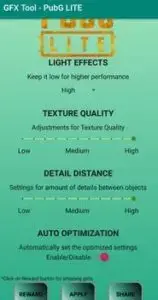
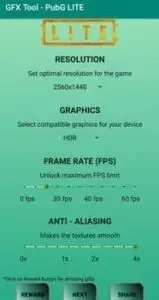
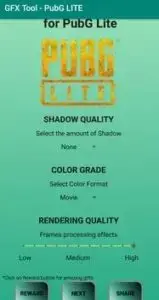
Instead of relying only on the in-game menu, this app lets you manually choose resolution, graphics quality, frame rate, anti-aliasing and shadows. By lowering heavy options or raising FPS where possible, you can reduce lag and make the game feel smoother, especially on low-end or older Android phones.
The interface is straightforward. You open the app, select the PUBG Lite version you play, pick your preferred graphics profile and apply the configuration. After that, you launch PUBG Lite and experience the game with the new settings applied.
If you want to improve the graphics of your phone with all types of games, then try JM Tools or GFX TOOL BGMI. These tools are free and can be used as alternatives.
Why download GFX Tool For PUBG Lite?
Many PUBG Lite players use devices that struggle with the default graphics configuration. High resolution, effects and frame caps can cause lag, overheating and rapid battery drain. GFX Tool For PUBG Lite gives you direct control so you can tune the game for your real hardware, not just the generic presets.
By downloading the APK from our website, you get a dedicated tool that can unlock higher FPS modes, adjust HDR options, turn off expensive effects like shadows and anti-aliasing, and tailor the whole experience to smooth gameplay rather than only visuals. This is particularly useful if you play on a slow internet connection or older chipset.
The app is free to use, lightweight and designed with a simple layout so even non-technical users can quickly set it up. You can experiment with different configurations until you find the balance of clarity and performance that feels best for your style of play.
How GFX Tool For PUBG Lite is useful?
GFX Tool For PUBG Lite is useful because it targets the core problem most PUBG Lite players face: lag and frame drops on modest hardware. Instead of forcing you to upgrade your phone, it lets you optimize game settings to get the most from what you already own.
Lowering resolution and disabling heavy effects can significantly reduce stutter and improve touch response, which matters in close combat and fast rotations. Unlocking higher FPS options, when your device supports them, can make aim tracking and movement feel more fluid.
Since all options are grouped in one place, you can tweak graphics before each session depending on your battery level, temperature or network condition. This flexibility turns the app into a practical companion for regular PUBG Lite players who want consistent performance without constantly digging through complex menus.
How to download and install GFX Tool For PUBG Lite?
You can download the official GFX Tool For PUBG Lite APK directly from our website. Follow the steps below to get the latest available version on your Android device.
Scroll to the download section on this page.
Tap the APK download button for GFX Tool For PUBG Lite.
Wait until the APK file finishes downloading to your device.
Open your phone settings and go to security or apps.
Allow installation from unknown sources if it is not already enabled.
Open your file manager and navigate to the Downloads folder.
Tap the GFX Tool For PUBG Lite APK file.
Choose Install and wait for the process to complete.
Launch the app, configure your preferred graphics settings and then open PUBG Lite.
After installation you can revisit the tool any time to adjust settings again if you change devices or notice new performance issues.
Features
Version selection for PUBG Lite builds
Choose the correct PUBG Lite variant so the tool applies compatible graphics settings to the right game client.
Custom resolution control
Manually lower or raise in-game resolution to reduce load on GPU and CPU or sharpen visuals on capable devices.
Graphics quality presets
Switch between modes such as smooth, balanced and higher profiles to match your device performance level.
FPS unlock and frame rate tweaks
Increase the frames per second limit where supported to make gameplay feel more responsive and fluid.
Anti-aliasing management
Enable or disable anti-aliasing to balance edge smoothness with performance and battery usage.
Shadow and effects toggles
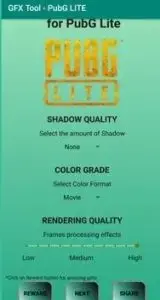
Turn off or tone down shadows and other heavy effects to cut lag and improve stability on low-end phones.
User-friendly layout
Simple, organized interface that makes it easy for beginners to change values and apply them safely.
Free Android optimization tool
The app is free to download and use, offering performance tuning options without subscription costs.
Screenshots
Best settings tips for low-end devices
If you use an entry-level or older Android phone, start with conservative settings. Choose the smooth graphics preset, select a lower resolution than your native screen and disable shadows and anti-aliasing. This combination usually gives a noticeable boost in stability and reduces overheating.
You can then slowly increase individual options, such as resolution or FPS, and test each change in a short match. If you see new stutters or temperature spikes, roll back the last adjustment to keep gameplay stable.
Compatibility and usage notes
GFX Tool For PUBG Lite relies on the way PUBG Lite exposes graphics parameters. When the game receives a major update, some options or values may change. If you notice issues after an update, reset your configuration to default in the tool and reapply settings gradually.
The app is built for PUBG Lite and should not be treated as a universal optimization tool for unrelated games. Always close the game before applying new graphics profiles, then reopen it so the changes can take effect properly.
FAQs
Pros
- Lets users fine-tune PUBG Lite graphics, resolution and FPS beyond default in-game options
- Can reduce lag and frame drops on low and mid-range Android devices
- Simple interface that is easy to understand even for non-technical players
- Free to download and use from our website
- Offers flexible control over effects like shadows and anti-aliasing to balance visuals and performance
Cons
- Improper settings may cause crashes or instability for some devices
- May not be compatible with every new game update or all regions of PUBG Lite
- Changes rely on game support, so some options might not work on certain hardware or versions
Conclusion
GFX Tool For PUBG Lite is a practical companion app for PUBG Lite players who want smoother performance on everyday Android devices. By offering granular control over resolution, graphics quality and FPS, it helps you tune the game to your hardware and network conditions. If you struggle with lag or inconsistent frame rates, downloading the APK from our website and experimenting with different profiles can significantly improve your overall gameplay experience.




Comments
No approved comments yet.