
Globilab
Globilab is a science education app from Globisens that connects with Labdisc data loggers and the sensors in your Android device to turn any space into a digital laboratory. It helps students collect, visualize, and analyze experiment data in real time.
With built-in support for multiple sensors, rich graphing tools, and subject-specific activities, the app makes physics, chemistry, biology, geography, and environmental science more engaging and hands-on.
This application offers tons of different tools, through which students can do different experiments. It doesn’t only offer science experiments, there are tons of more tools, through which students can explore other subjects very deeply. We have some similar apps for students, hope you will find them interesting including Mashim and Read Along, among many others.
You can download the official Globilab APK directly from our website and start using your phone or tablet as a powerful companion for school projects and home experiments.
Rate this app
App details
- App name
- Globilab
- Category
- Educational
- Version
- v1.7
- Size
- 238.14 MB
- Requirements
- 5.0 and Above
- Package name
- com.globisens.globilab
- Publisher
- Globisens Ltd.
- Price
- Free
- Mod
- No
- Downloads
- 113,940
- Rating
- 4.8 / 5
- Rating count
- 50,443
- Play Store
- Yes
- Requires root
- No
- Offline support
- Yes
- Contains ads
- No
- In-app purchases
- No
- Updated
- May 19, 2026
- Age rating
- Rated for 7+
Table of contents
What is Globilab Android app
Globilab is an educational Android application developed by Globisens Ltd. designed to work with Labdisc data loggers and the sensors available on your mobile device. The app focuses on inquiry-based learning, allowing students to run real experiments, collect measurements, and analyze results in a simple interface.
Although it is widely used with middle and high school students, Globilab is not limited to a single grade level. Learners, teachers, and parents can use it to explore science concepts at different depths, from simple observations to more advanced investigations.
The app supports a wide range of experiment types, including sound and motion in physics, temperature and humidity in chemistry and environmental science, GPS-based fieldwork in geography, and many other sensor-based activities. Data is captured in real time and stored on the device so students can review, compare, and share their results.
Globilab runs on Android devices with version 4.4 and above, and you can install the current APK directly from our website to start using all available features.
Why download Globilab APK from our website
Downloading the Globilab APK from our website gives you direct access to the current Android version without waiting for store updates. You can quickly install it on classroom tablets or personal phones and pair it with Labdisc devices where available.
The app provides more than just basic sensor readings. It combines data logging, graphing, annotations, and multimedia tools in one place, which makes it easier for students to design experiments and present findings. Whether you are a teacher planning hands-on lessons or a student preparing a project, this single app can cover many subject areas.
Our website offers the official installation file for Globilab, so you can keep a copy for offline deployment, reinstall it when needed, and use it across multiple Android devices in your lab or home.
How Globilab helps students and teachers
Globilab is useful because it turns abstract science concepts into visual, measurable experiences. Instead of only reading about motion, sound, or climate, students can record real data and immediately see it plotted on colorful graphs.
Teachers can use the app during demonstrations or let students work independently in small groups. The combination of built-in device sensors and wireless Labdisc hardware supports a variety of experiments, from short classroom activities to long-term environmental monitoring projects.
The app also supports saving and revisiting experiments, adding notes, and combining images with data. These features help students document their process, improve science reports, and build stronger data literacy skills.
How to download and install Globilab APK
You can get the official Globilab APK file directly from our website and install it on any compatible Android phone or tablet.
Scroll to the download section on this page.
Tap the Globilab APK download button to start downloading the file to your device.
When the download finishes, open the APK file from your notification bar or file manager.
If your device blocks the installation, enable app installs from unknown sources or allow your browser to install apps in the Android settings.
Return to the APK file and confirm the installation.
Once the installation completes, open Globilab, grant the requested permissions, and start setting up your experiments.
After installation, you can run Globilab either with your device sensors alone or connect it to compatible Labdisc data loggers when available.
Features
Multi-subject science platform
Supports experiments in physics, chemistry, biology, geography, environmental science, and math from one app.
Integration with Labdisc data loggers
Pairs wirelessly with Labdisc devices to log high-quality sensor data for classroom and field experiments.
Built-in science sensors
Uses more than 15 supported sensors, including sound level, temperature, light, humidity, acceleration, and more depending on connected hardware.
Real-time data logging
Captures measurements continuously and displays them instantly so students can see how changes affect their results.
Advanced graphing tools
Offers zoom, pan, and multi-touch features for closely examining graphs and data trends.
GPS-based activities
Uses GPS for location-aware experiments, mapping, and geography or environmental studies.
Colorful data visualization
Shows sensor readings using clear, colorful graphs and indicators that are easy for students to interpret.
Multimedia annotations
Allows combining sensor data with notes, images, and other multimedia elements to create richer experiment records.
Screenshots
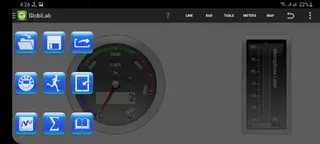
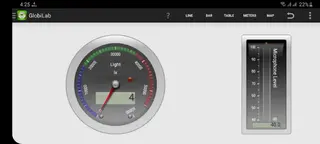
Supported devices and system requirements
Globilab is designed for Android phones and tablets running Android 4.4 or higher. For the best experience, it is recommended to use devices with sufficient RAM and storage, especially when logging data for long periods or running multiple sensors at once.
The app can operate using only your device sensors, but full functionality is available when paired with compatible Labdisc data loggers from Globisens. These hardware units add dedicated sensors and greater precision for school and field experiments.
Classroom and home learning scenarios
In the classroom, teachers can project Globilab on a screen to demonstrate live experiments, such as tracking temperature changes over time or measuring sound levels in different environments. Students can then repeat similar activities in small groups using their own devices.
At home, learners can explore everyday science by measuring light intensity near windows, tracking room temperature, or recording noise levels at different times of day. The ability to save and compare runs encourages curiosity and helps students design better investigations.
Tips for getting started with experiments
If you are new to Globilab, begin with simple experiments that use a single sensor, such as measuring ambient temperature or sound level. This helps students understand how readings change and how to interpret the graphs.
Once comfortable with the basics, move on to multi-sensor activities, like combining temperature and humidity in an environmental study or using acceleration and time to explore motion. Encourage students to add notes and images so their experiment records are clear when they write reports later.
FAQs
Pros
- Supports a wide range of science subjects in one app
- Integrates with Labdisc hardware for accurate data logging
- Provides clear, colorful graphs and interactive visualizations
- Works offline once installed and experiments are set up
- User-friendly interface suitable for students and teachers
Cons
- Requires compatible Labdisc devices to unlock all capabilities
- Interface may feel technical for very young learners
- Older Android devices may struggle with large data sets
Conclusion
Globilab offers a practical way to bring real data collection and analysis into everyday science learning. By combining Android sensors with Labdisc integration and strong visualization tools, it helps students run meaningful experiments and understand results more clearly. You can download the official Globilab APK from our website and start exploring hands-on science on your own device.




Comments
No approved comments yet.