
Headshot GFX Tool
Headshot GFX Tool is an Android utility that lets Free Fire players fine tune graphics, sensitivity and device performance in one place. It targets smoother gameplay and more responsive controls on a wide range of phones.
With this tool you can adjust resolution, FPS, graphics presets and custom sensitivity values beyond in-game limits. It also includes options like CPU and GPU boost, RAM cleaning and network tweaks to reduce lag during matches.
You can download the latest Headshot GFX Tool APK directly from our website, install it on your Android device and apply your preferred settings before launching the game.
Rate this app
App details
- App name
- Headshot GFX Tool
- Category
- Tools
- Version
- v3.0
- Size
- 20.81 MB
- Requirements
- 4.0 and Above
- Package name
- com.bgappsolution.gfxtool
- Publisher
- TechupLifts
- Price
- Free
- Mod
- No
- Downloads
- 79,282
- Rating
- 4.7 / 5
- Rating count
- 27,491
- Play Store
- No
- Requires root
- No
- Offline support
- Yes
- Contains ads
- Yes
- In-app purchases
- No
- Updated
- May 21, 2026
- Age rating
- Rated for 3+
Table of contents
What is Headshot GFX Tool
Headshot GFX Tool is a third party Android application created for players of Garena Free Fire and similar shooters who want more control over graphics and sensitivity settings. It works as a separate launcher-style utility where you configure your preferred visuals and touch response before starting the game.
In the market, there are hundreds of tools available like REGEDIT Macro and FFSensity, but using a modifying tool is always an unsafe option. A modifying tool is always a risk for a user’s account, and last month thousands of players lost their accounts after using hacks in FF. This is why we have developed a legal app for you to try.
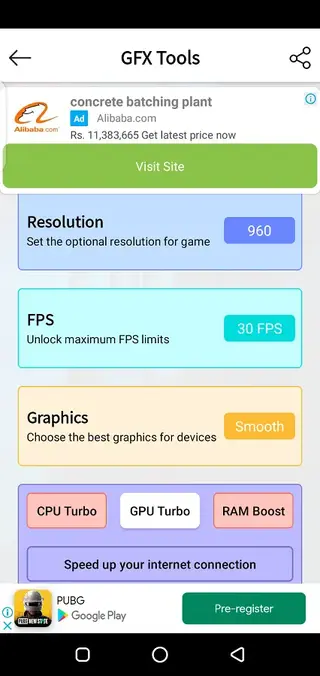
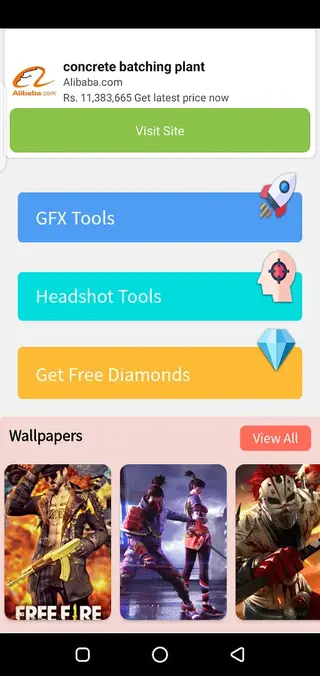
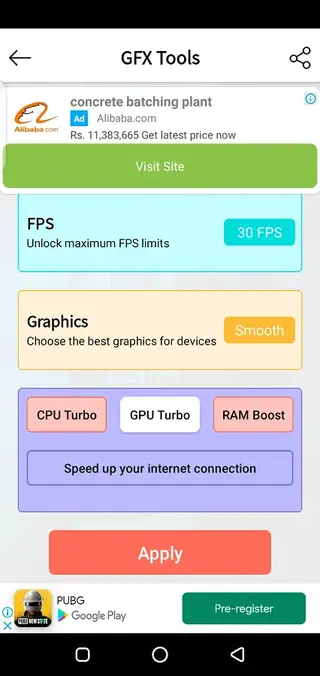
The app focuses on three areas. First, it offers extended graphics controls such as custom resolution, FPS targets and HDR-related options so you can balance quality and performance according to your device. Second, it provides a dedicated sensitivity panel designed to help with faster aim adjustment and more consistent headshots. Third, it adds device optimization tools like RAM cleaning and CPU or GPU boosting to reduce stutter.
Headshot GFX Tool is not an official Free Fire product and it may conflict with the game developer’s terms. It does not require root access, but you should use it carefully and understand that using external tweaking tools in online games can carry account risk.
Why download Headshot GFX Tool APK
Many budget and mid range Android phones struggle with consistent performance in online battle royale games. Default in-game settings often do not give enough flexibility to tune graphics and sensitivity for a specific device. Headshot GFX Tool tries to fill that gap by exposing extra configuration options in a simple interface.
By downloading the Headshot GFX Tool APK from our website, you get a single utility where you can experiment with different resolutions, FPS caps and sensitivity profiles without constantly changing in-game menus. For players who practice one tap or precise headshot aiming, this kind of fine control can make the gameplay feel more responsive.
At the same time, the app remains lightweight, runs without root and can be adjusted quickly before every match. That combination makes it attractive for users who regularly test new settings to find the right balance between smooth performance and clear visuals.
How Headshot GFX Tool can be useful
Headshot GFX Tool can be useful if you want more stable performance and consistent aim behavior in Free Fire or similar shooters. Custom sensitivity sliders allow you to tune horizontal and vertical movement so the crosshair travels the same distance every time you swipe, which supports muscle memory during intense fights.
The graphics and performance section helps you lower visual load on weaker devices by reducing resolution or enabling smoother FPS options. When the game runs more smoothly, it becomes easier to track opponents, react quickly and control recoil. The integrated RAM and CPU tools can also free up resources before you start a match.
The app includes additional options such as network tweaks and gaming wallpapers. While these extras are not essential for gameplay, they let you centralize some common gaming adjustments in a single tool. Always remember that using external tweaking apps for online games may violate the game’s policies, so consider testing changes on a secondary or guest account first.
How to download and install Headshot GFX Tool APK
You can get the official Headshot GFX Tool APK file directly from our website. Follow these steps to download and install it on your Android phone or tablet.
Scroll to the download section on this page and tap the APK download button.
Wait for the APK file to finish downloading to your device.
Open your phone settings and enable installation from unknown sources for your browser or file manager if it is not already allowed.
Locate the downloaded APK in your downloads folder and tap it to start installation.
Review the permissions on the install screen and tap Install to proceed.
Once installed, open Headshot GFX Tool, apply your preferred settings and then launch the game through the tool if required.
If you already use another GFX or sensitivity tool, uninstall or disable it first to avoid conflicting settings.
Features
Advanced sensitivity customization
Offers separate sensitivity adjustments tailored for faster aim response and more stable headshot control compared to default game sliders.
Graphics and resolution control
Lets you modify resolution, graphics presets and related options so you can balance visual quality with frame rate on your device.
FPS optimization
Includes FPS related settings that aim for smoother motion and reduced stutter during intense matches when configured correctly.
CPU and GPU boost tools
Provides CPU Turbo and GPU Turbo style toggles that attempt to prioritize game performance and keep resources focused on gameplay.
RAM booster
Adds a RAM cleaning function designed to close background processes before launching the game to free additional memory.
Network tweak options
Contains options aimed at speeding up or stabilizing the internet connection to help reduce lag spikes while playing online.
Headshot oriented controls
Combines sensitivity and stability tweaks that can support more accurate headshot attempts when used with proper practice.
HDR and graphics tuning
Gives you basic control over HDR related settings and overall graphics tuning for clearer visibility or lower load as needed.
Screenshots
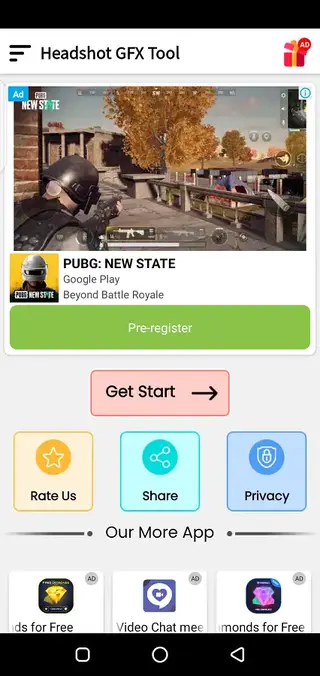
Safety and fair play considerations
Headshot GFX Tool sits in a grey area between simple optimization and gameplay modification. While its main purpose is to expose graphics and sensitivity options, using any external tool with competitive online games can fall outside official policies.
Garena and other publishers actively monitor unusual behavior and may apply penalties if they detect activity that conflicts with their rules. For that reason, it is wise to read the current terms of service for your game, avoid extreme or suspicious settings and consider testing the app on a non essential account.
You are responsible for how you use the tool. Avoid combining it with cheats or scripts and treat it strictly as a performance and configuration helper if you decide to keep it installed.
Tips for better results with Headshot GFX Tool
To get practical value from Headshot GFX Tool, change only a few settings at a time and test them in training mode or casual matches. Start by lowering resolution or graphics slightly if your device struggles with lag, then work on finding a comfortable sensitivity level that allows smooth 180 degree turns without overshooting.
Keep notes of combinations that feel good, such as a specific DPI, sensitivity and FPS target. This approach helps you revert quickly if a new configuration makes gameplay worse. Also remember that stable frame rate is usually more important than maximum visual quality in competitive shooters.
FAQs
Pros
- Provides extended sensitivity controls for more precise aiming
- Offers graphics and FPS tweaks tailored to a range of Android devices
- Includes RAM, CPU and GPU tools to help reduce lag and stutter
- Does not require root access to function
- APK is available for direct download from our website
Cons
- Contains frequent and sometimes intrusive advertisements
- May conflict with the terms of service of online games like Free Fire
- Using third party tools can create account risk if detected by anti cheat systems
- Some devices may not see noticeable improvements despite tweaking settings
Conclusion
Headshot GFX Tool is a specialized Android utility for players who want deeper control over sensitivity, graphics and performance in Free Fire style games. It can help you experiment with settings and potentially achieve smoother gameplay, but it is a third party tool, carries some account and compatibility risk and shows many ads. Use it carefully, ideally test on a secondary account and always adjust options in small steps to see how your device responds.




Comments
No approved comments yet.