

Honista
Honista is an Android mod of Instagram that focuses on extra privacy controls, media downloading, and visual customization. It keeps the familiar Instagram experience while adding tools power users often miss in the official app.
With Honista, you can hide activity status, view stories and live streams more privately, lock the app, and customize themes and chat backgrounds. You can also save photos, videos, reels, and stories directly to your device.
The official Honista APK file is available on our website, so you can download the latest version for your Android phone or tablet and start using these additional features in a few simple steps.
Rate this app
App details
- App name
- Honista
- Category
- Social
- Version
- v12
- Size
- 132.91 MB
- Requirements
- 5.0 and Above
- Package name
- cc.honista.app
- Publisher
- HONISTA
- Price
- Free
- Mod
- No
- Downloads
- 526,889
- Rating
- 4.2 / 5
- Rating count
- 58,557
- Play Store
- No
- Requires root
- No
- Offline support
- No
- Contains ads
- No
- In-app purchases
- No
- Updated
- May 11, 2026
- Age rating
- Rated for 3+
Table of contents
What is Honista APK
Honista is a modified Instagram client for Android that adds advanced privacy, downloading, and customization options on top of the standard Instagram features. You can log in with your Instagram account, browse your feed, watch reels, and chat as usual, but with more control over how your activity appears to others.
The app targets users who feel limited by the official Instagram app. It introduces ghost modes for stories, chats, and lives, lets you hide specific conversations, and includes a built-in app lock. On the visual side, you can switch themes, tweak the interface, and change chat backgrounds to match your style.
Honista APK is not available on Google Play. Instead, you can get the installation file directly from our website and install it manually on devices running Android 5.0 and above.
Why Download Honista for Android
Many Instagram users want more control over their privacy and content than the official app currently offers. Honista focuses exactly on that by adding detailed privacy switches, media downloading, and interface tweaks without changing the core Instagram experience you already know.
Downloading Honista APK from our website lets you:
Browse Instagram more privately with ghost features for stories, chats, and live streams.
Save photos, videos, reels, and stories directly to your phone in just a few taps.
Lock the app with a built-in locker and keep specific chats hidden from the main view.
Redesign the look of Instagram with themes and custom chat backgrounds.
If you want a more flexible Instagram client on Android and understand the risks of using unofficial mods, Honista offers one of the more feature-rich options in this space.
How Honista Can Be Useful
Honista can be useful for users who care about controlling their digital footprint on Instagram and managing content locally on their devices.
Privacy control: Ghost modes help you read messages, watch stories, and enter live streams without always announcing your presence to others.
Media backup: Built-in downloading tools allow you to save posts, reels, and stories to your storage, which can help with content curation or offline viewing.
Discreet conversations: Hide-chat and app lock features add an extra layer of privacy if you share your phone with others.
Personalized interface: Themes and chat backgrounds make the app feel more personal and easier on the eyes, especially with dark modes and color variations.
Because Honista is a third-party mod, you should use it carefully and avoid assuming the same level of security or account protection as the official Instagram app.
There are multiple similar apps available for the users, which you can also use and have fun with. So, if you are willing to explore more services, then try NS Plus and Whozi. Both of these are quite popular available applications.
How to Download and Install Honista APK
You can download the Honista APK file directly from our website and install it manually on your Android device. Follow these steps to get started:
Tap the download button for Honista APK on this page to save the file to your device.
When the download finishes, open your phone settings and enable installation from unknown sources for your browser or file manager.
Locate the downloaded Honista APK in your Downloads folder using a file manager.
Tap the APK file and confirm the installation prompt.
Wait for the installation to complete, then open Honista and sign in with your Instagram credentials.
After installation, you can explore the privacy options, media downloading tools, and UI customization features available in Honista.
Features
Advanced privacy modes
Use ghost options for stories, chats, and live videos so you can view content and messages more quietly.
Ghost chat reading
Read direct messages without instantly sending read receipts, giving you more control over when to reply.
Ghost mode for live streams
Join live broadcasts while limiting how visible your participation looks to others in the session.
Hide individual chats
Move sensitive conversations out of the main chat list so they are less visible to anyone using your phone.
Built in app lock
Protect access to Honista with a lock screen inside the app, adding another barrier on top of your device lock.
Customizable UI themes
Switch between different themes and colors, including dark styles, to change the overall look of Instagram.
Change chat background
Set your own images or designs as chat backgrounds for a more personalized messaging experience.
Media downloading
Download Instagram content such as photos, videos, reels, and stories directly to your device storage.
Screenshots

Privacy Controls and Ghost Mode
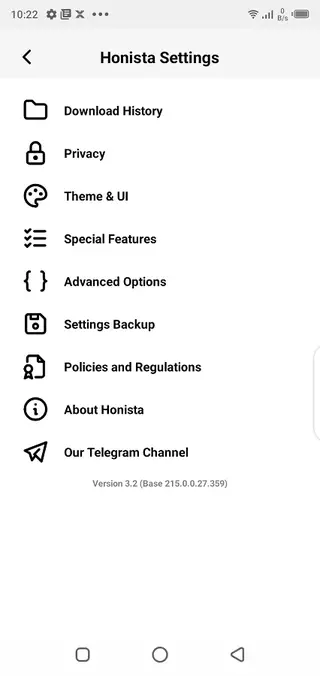
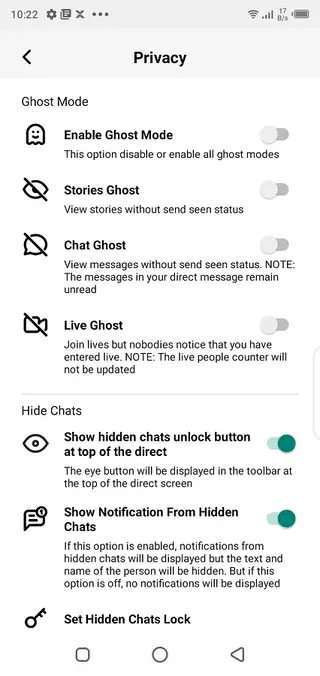
One of the main reasons people use Honista is for its privacy controls. The app offers options often called ghost modes, which aim to reduce how much activity information is shared with others.
You can adjust settings for story viewing, chat reading, and live stream participation. These switches help you browse content and catch up on conversations without always sending instant read receipts or view markers. While this does not change Instagram’s core servers, it changes how your client behaves and what it reports.
Because these tools depend on an unofficial implementation, they may not always behave exactly like the official app. It is wise to consider them as convenience features rather than guaranteed privacy shields.
Customization and User Interface Options
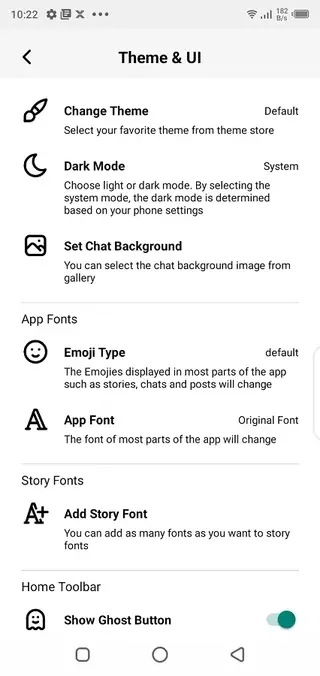
Honista keeps the familiar Instagram layout but adds more control over how it looks. You can change the global theme, apply dark or colored styles, and adjust elements like chat backgrounds. This is useful if you spend a lot of time in the app and want a layout that feels more comfortable or visually distinct.
These customization options are generally available from the app settings, where you can switch themes, pick colors, and choose background images. The result is a more personalized social experience compared to the fixed design of the official client.
Media Downloading and Content Management
Media downloading is another core focus of Honista. Instead of relying on separate tools or screenshots, you can save supported Instagram content straight from the app. This typically includes standard posts, carousels, stories, and reels.
Once saved, files are stored on your device, so you can watch or view them offline, add them to your personal archive, or use them as references later. You should still respect copyright, platform rules, and other users’ privacy when saving and using downloaded content.
Account Safety and Responsible Use
Honista is a third-party mod and is not affiliated with Instagram or Meta. Because it interacts with Instagram’s platform in an unofficial way, there is always some level of risk for your data and account compared to using the official app.
If you decide to use Honista, a careful approach is to test it first with a secondary account and review the available settings before moving any important activity to it. Avoid sharing more information than necessary, and keep the app updated by installing newer releases from our website when they become available.
FAQs
Pros
- Adds ghost modes and extra privacy settings to Instagram usage
- Allows direct download of photos, videos, reels, and stories
- Includes built in app lock and hidden chat options
- Offers themes and chat background customization for a fresh look
- Keeps core Instagram layout familiar and easy to navigate
Cons
- Unofficial Instagram mod and not available on Google Play
- May carry account or security risks compared to the official app
- Requires manual APK installation and enabling unknown sources
- Features and stability can change as Instagram updates its platform
Conclusion
Honista gives Android users a more flexible Instagram experience with extra privacy, downloading, and customization tools. If you understand the limitations of third-party mods and install it carefully, it can be a powerful alternative client for managing how you interact with Instagram on your phone.




Comments
No approved comments yet.