
Kaizerus GFX
Improve your mobile gaming experience with Kaizerus GFX Android. The application is specially developed for Android gamers who want smoother gameplay and better device optimization. Get a powerful combination of gaming tools to improve overall gaming performance.
Optimize your gaming experience through pointer speed, DPI, touch settings, and other performance adjustments. The application also provides gaming-related optimization tools for ping, network stability, and gaming settings, helping players enjoy a smoother gaming experience.
Rate this app
App details
- App name
- Kaizerus GFX
- Category
- Tools
- Version
- v1.0.0
- Size
- 20.08 MB
- Requirements
- 7.0 and Above
- Package name
- com.uruservices.kaizerus
- Publisher
- URU SERVICES
- Price
- Free
- Mod
- No
- Downloads
- 91,958
- Rating
- 4.8 / 5
- Rating count
- 21,948
- Play Store
- Yes
- Requires root
- No
- Offline support
- No
- Contains ads
- No
- In-app purchases
- No
- Updated
- Jul 21, 2026
- Age rating
- Rated for 3+
Table of contents
What is Kaizerus GFX Apk?
Kaizerus GFX is an Android gaming optimization application developed to improve device performance through advanced-level gaming settings. The application uses AI optimization, performance profiles, and game-specific configuration. Experience smooth gameplay with compatible games and have fun.
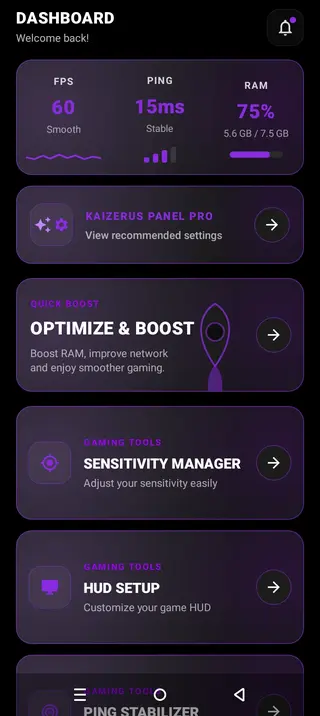
Apart from gaming optimizations, the app also provides real-time performance monitoring. Get information related to RAM, FPS, and Ping usage in real-time. These tools help users to analyze device performance and apply suitable optimization settings before starting any game.
Android users can get the best experience of gaming with all these services. However, if you want to try more similar tools, then try the Game Booster VIP GFX Lag Fix or Headshot GFX Tool. Both of these are quite popular alternative apps.
Why download Kaizerus GFX?
The application is ideal for Android gamers to improve their gaming performance. Android devices can be used for multiple services. Therefore, gaming on the device sometimes affected negatively. So, this tool improves device performance and allows gamers to enjoy gaming with the best performance.
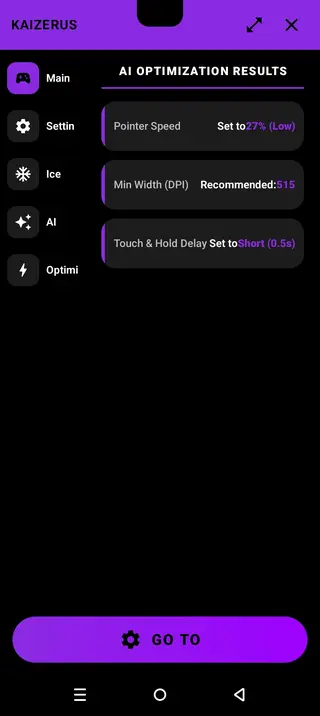
Although there are more similar apps offering similar optimization services. But this tool offers a unique combination of features. The most unique feature is the AI-optimization. With the AI-optimization, gamers can easily get the best recommendation for settings according to the device and game.
How is Kaizerus GFX useful?
The tool is useful for Android gamers who want a smooth and stable gaming experience. The application helps optimize device performance and game servers. This allows users to enjoy better responsiveness and fewer interruptions while playing compatible games.
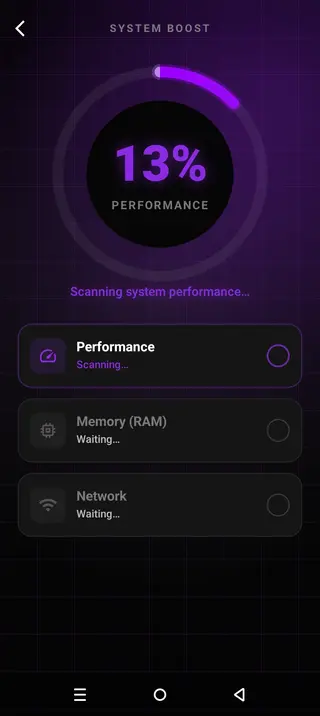
The built-in Quick Booster tool optimizes RAM and network performance. This will refresh the RAM and clean the space, which will provide more RAM to play. So, the gameplay will be smooth for the players to have more fun. Clear the background cache and enjoy gaming without any interruption.
How to download and install Kaizerus GFX App?
Downloading of this gaming tool is possible through this website. Here you can find the latest updated APK file, which allows advanced-level tools and fix all bugs. Therefore, gamers will have more control and a better gaming experience.
Follow these steps to download and install the APK file:
Find the download section on this page.
Tap on the Download Apk, wait for the process to complete.
Access the Android Settings and navigate the Security Panel.
Checkmark Install from Unknown Sources, if it is unchecked.
Open Android File Manager and access the Downloads folder.
Find the downloaded APK file and tap on it.
Select the install option and wait for the process to complete.
Once done, launch the application and improve your device performance, and get the best gaming experience on Android devices.
Features
AI Optimization
Automatically recommends gaming settings based on the Android device profile and game. It recommends the best settings levels for Pointer, DPI, Touch response, and many more.
Quick Boost
Optimize RAM and network performance with a single tap on quick boost. This will remove background apps and utilize resources on the game only.
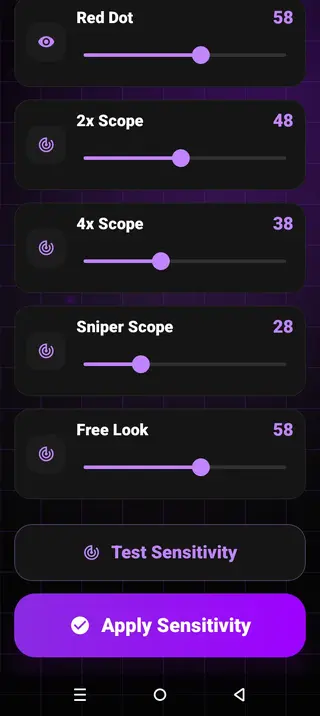
Sensitivity Manager
Get a complete set of sensitivity controls in this tool. Improve sensitivity of general movement, scopes, and free looks. Manual adjustment of these levels is also possible for users to get customized Sensi controls.
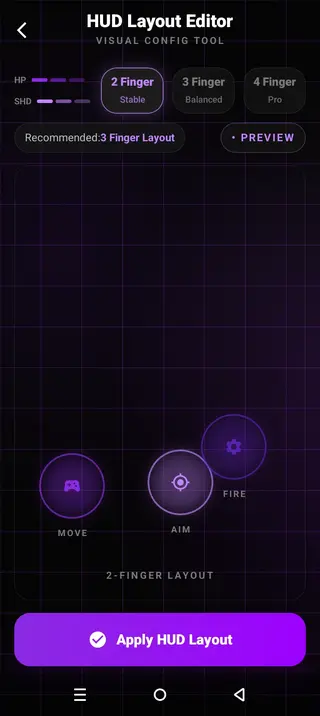
HUD Layout Editor
Choose between different HUD Layouts, including 2-finger, 3-finger, and 4-finger profiles. The editor helps players to customize on-screen controls more easily.
Ping Stabilizer
Monitor network quality and reduce background traffic for more stable connectivity. The tool helps minimize lag during online gameplay.
Game Profile
Load recommendation optimization settings from different game genres. The application search for games and get advanced-level suitable performance profiles.
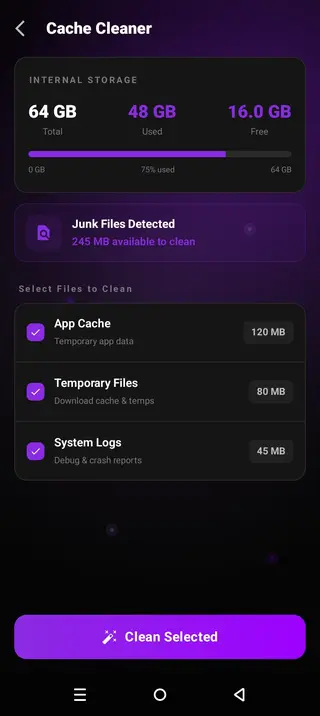
Cache Cleaner
Remove temporary files and unnecessary cache to free up storage space. With the instant clean up helps the device to process games faster and enjoy smooth gameplay.
Battery Cooler
Extensive gaming sessions can increase device temperature. So, the built-in Battery cooler helps maintain the temperature of the device without affecting the gameplay.
System Performance Scan
Analyze device performance, RAM usage, and network status with this tool. Identify apps using unnecessary RAM and network to remove them and free up space for a smoother experience.
Storage Analyzer
A complete storage analyzer with complete information about used storage, free space, and cleanable files. This makes it easier to manage storage for any gamer.
Screenshots
How to Reduce Lag in Mobile Games?
One of the most common problems while playing Android games is lagging. There are multiple reasons for any game to lag and crash. So, the best solution to fix the problem is to use the Kaizerus GFX Tool. This tool allows users to analyze the device performance completely, which is affecting the game on your device.
Get detailed information related to the Ping, System usage, RAM, Network, and everything. Additionally, to fix these problems or reduce the lag issue, this app also offers solutions. The app offers Quick Boost and Ping Stabilizer, through which users can easily clear cache, background running apps, and network usage, and allow users to have a low lag gaming experience.
How to Improve FPS on Android Games?
The FPS improvement on Android games requires full optimization. Therefore, this Kaizerus GFX offers built-in tools such as AI-optimizers, System performance scanner, and game profile. With these tools, gamers can optimize the device settings according to the best FPS settings for that specific game. Get smooth frame rates with the high-end optimizations.
FAQs
Pros
- Free gaming optimization tools.
- AI-powered performance optimization.
- One-tap Quick Boost.
- Custom sensitivity settings.
- Built-in HUD layout editor.
- Ping stabilization tools.
- Cache cleaner and storage management.
- Simple and user-friendly interface.
Cons
- Some optimizations vary by device.
- The Internet require for some functions.
- Advanced settings require game knowledge.
- Unnecessary Ads.
Conclusion
Kaizerus GFX Download to get access to advanced-level optimization tools for a smooth gameplay experience. This tool offers a diverse collection of high-end tools to enhance the performance of Android devices for gaming. Download this amazing application and improve the overall experience.




Comments
No approved comments yet.