

Konek2Card
Konek2Card is the official mobile banking app of CARD SME Bank / CARD MRI, designed to give clients secure access to their accounts directly from an Android phone.
With this app, you can check balances, review transactions, transfer funds, and pay bills without visiting a branch. It turns your smartphone into a convenient banking channel for everyday financial tasks.
You can download the latest Konek2Card APK version directly from our website and install it on compatible Android devices that meet the minimum system requirements.
Rate this app
App details
- App name
- Konek2Card
- Category
- Finance
- Version
- v4.0.31
- Size
- 52.26 MB
- Requirements
- 5.1 and Above
- Package name
- com.dwidasa.sme.mb.android
- Publisher
- CARD SME CBS
- Price
- Free
- Mod
- No
- Downloads
- 59,573
- Rating
- 4.7 / 5
- Rating count
- 20,184
- Play Store
- Yes
- Requires root
- No
- Offline support
- No
- Contains ads
- No
- In-app purchases
- No
- Updated
- May 13, 2026
- Age rating
- Rated for 3+
Table of contents
What is Konek2Card App?
Konek2Card is a finance and digital banking application created for CARD SME Bank / CARD MRI clients in the Philippines. It connects your mobile device to your CARD account so you can manage your money anytime through a secure platform.
The app focuses on practical mobile banking functions. Once registered and linked to your account, you can view real-time balances, check recent transactions, generate simple statements, and monitor your account activity from one place.
Konek2Card also supports QR-based transactions and electronic services that reduce the need to carry cash or visit a physical branch. It is built to work with the CARD MRI microfinance ecosystem, giving members better control of their savings and loan accounts.
The official Android package is available on our website as an APK file and is also listed on Google Play for supported devices. Users simply install the app, enroll or log in, and start using mobile banking features according to bank guidelines.
We have more similar banking applications, which offer quite the same services for the users. So, if you are willing to get access to more content, then try Livin By Mandiri and NeoBank. These applications also offer Online Banking services for the users. However, the listed Apps are restrictive to specific countries.
Why download Konek2Card APK from our website?
Downloading the Konek2Card APK from our website lets you get the stated version quickly and install it on compatible Android phones and tablets, even if the Play Store is slow or unavailable on your device.
Our download section provides the version information, package name, and other key details so you know exactly which build you are installing. After downloading, you can sign in with your registered CARD MRI credentials and access digital banking services instantly.
For CARD clients who prefer direct APK installation, this is a practical way to keep the app on their device while still using the official package name and public release information.
How Konek2Card is useful for CARD MRI clients
Konek2Card helps CARD MRI and CARD SME Bank customers handle many banking needs without lining up at a branch. It centralizes essential functions such as account inquiry, fund transfer, and payments into one easy-to-use app.
By giving you quick access to balances and transaction history, the app makes it easier to track loans, savings, and daily expenses. This is especially helpful for small business owners and borrowers who need to monitor cash flow closely.
The ability to send money between CARD accounts, use QR-powered withdrawal options where available, and pay bills online supports more efficient money management. Combined with customer support channels, Konek2Card becomes a practical companion for everyday banking.
How to download and install Konek2Card APK
You can get the Konek2Card APK directly from our website by following these steps on your Android device.
Scroll to the download area on this page and tap the Konek2Card APK download button.
Wait for the APK file to finish downloading to your phone or tablet.
Open your device settings and allow installation from unknown sources if prompted.
Locate the downloaded APK in your Downloads folder and tap it to start installation.
Follow the on-screen instructions to complete the setup process.
Open Konek2Card, enroll or log in with your CARD MRI details, and start using mobile banking services.
Always install the package that matches the version details listed on our page so you know which build you are using on your device.
Features
Account balance and inquiry
View real-time account balances, basic details, and status directly from your phone so you always know how much money is available.
Transaction history and statements
Access recent transactions and simple statement-style views to monitor deposits, withdrawals, loan payments, and other activities.
Fund transfer between accounts
Transfer money from your CARD account to other eligible accounts quickly, helping you send funds to family, business partners, or your own accounts.
QR-based withdrawal support
Use QR-powered digital withdrawal functions where supported so you can generate codes and cash out through designated channels without a physical card.
Online bill payments
Pay selected bills and obligations through the app, reducing the need to queue at payment centers or branches.
Customer support access
Reach support channels from within the app to report issues, clarify transactions, or ask about your account and mobile banking services.
Secure login and verification
Protect your account with authentication methods approved by CARD MRI, helping to keep your mobile banking sessions more secure.
User-friendly interface
Navigate a simple layout optimized for everyday use, making it easier for first-time smartphone users to learn mobile banking.
Screenshots
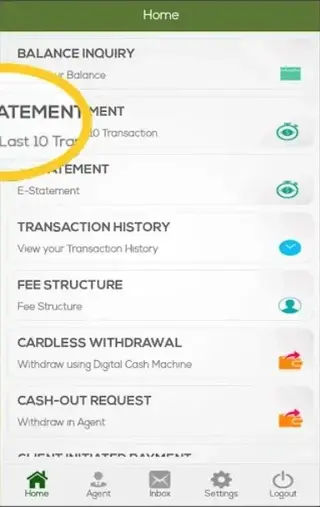
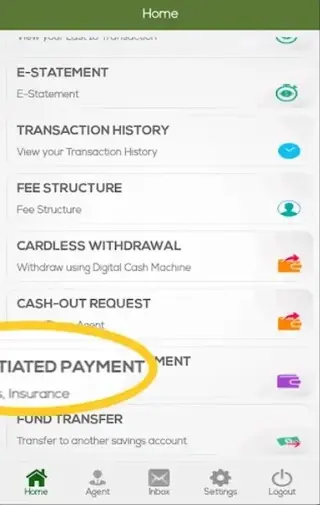
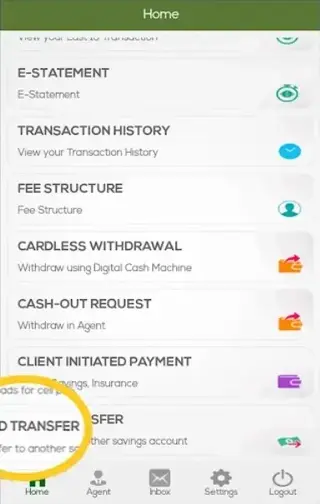
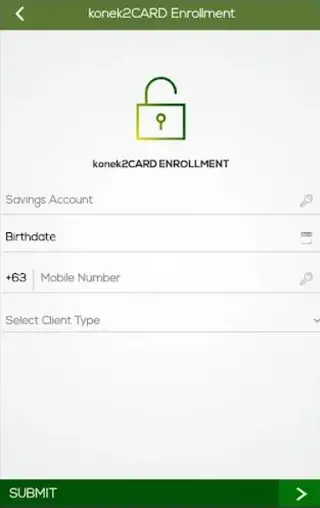
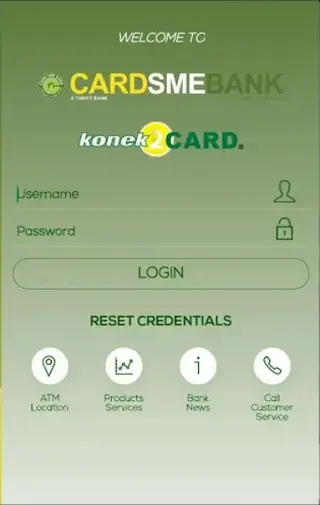
Registration and login overview
To use Konek2Card, you must be a registered CARD MRI or CARD SME Bank client and follow the bank’s enrollment process. In many cases, customers activate mobile banking through branch assistance, SMS-based registration, or other verification steps required by the bank.
After your account is linked to mobile banking, you can log in using your registered credentials. For your safety, keep your login details private, avoid sharing one-time codes, and follow CARD MRI security reminders at all times.
Security and responsible usage
Konek2Card deals with sensitive financial information, so responsible usage is important. Always secure your device with a PIN, pattern, or biometric lock, and log out from the app when you finish your session, especially on shared phones.
Use the official package name and version details shown on our page to confirm what you install. For lost phones, suspicious transactions, or login issues, contact CARD SME Bank or the CARD MRI support channels promptly for assistance.
Compatible devices and system requirements
The Konek2Card APK available on our website is built for Android devices that meet the stated minimum requirement of Android 5.1 and above for this version. Performance may vary depending on your device’s hardware and network quality.
Before installing, check your Android version in device settings. Keeping your system and app updated helps maintain stability, security, and compatibility with new banking features as they are introduced.
FAQs
Pros
- Official mobile banking app for CARD SME Bank and CARD MRI clients
- Supports balance inquiry, transaction history, and account monitoring
- Includes transfer, withdrawal-related, and bill payment features
- User interface is straightforward and suitable for everyday use
- APK is available directly from our website for manual installation
Cons
- Only useful for registered CARD MRI or CARD SME Bank customers
- Requires stable internet connectivity for most functions
- Feature set and supported services may be limited compared to larger commercial banks
- Availability and some functions can vary by region and account type
Conclusion
Konek2Card is a focused mobile banking tool for CARD MRI and CARD SME Bank customers who want to manage their accounts from an Android device. By offering balance checks, transfers, bill payments, and QR-based services in one app, it helps make everyday banking more convenient. You can download the stated APK version directly from our website and start using digital banking once your account is properly registered with the bank.




Comments
No approved comments yet.