

Livin By Mandiri
Livin By Mandiri is the official mobile banking app from Bank Mandiri that brings everyday banking, payments, and financial services to your Android phone. You can manage your Mandiri accounts, pay bills, and move money in just a few taps.
The app is designed for customers in Indonesia and supports both Bahasa Indonesia and English. With a simple interface and fast processing, it helps you handle routine transactions without visiting a branch or ATM.
You can download the official Livin By Mandiri APK directly from our website and install it on compatible Android devices to start using Mandiri’s digital banking services on the go.
Rate this app
App details
- App name
- Livin By Mandiri
- Category
- Finance
- Version
- v3.4.0
- Size
- 167.49 MB
- Requirements
- 5.0 and Above
- Package name
- com.bankmandiri.mandirionline
- Publisher
- PT Bank Mandiri (Persero) Tbk
- Price
- Free
- Mod
- No
- Downloads
- 1,925,422
- Rating
- 4.3 / 5
- Rating count
- 382,176
- Play Store
- Yes
- Requires root
- No
- Offline support
- No
- Contains ads
- No
- In-app purchases
- Yes
- Updated
- May 15, 2026
- Age rating
- Rated for 3+
Table of contents
What is Livin By Mandiri Android App?
Livin By Mandiri is a digital banking application developed by PT Bank Mandiri (Persero) Tbk for Android devices. It connects your Mandiri banking products with a secure mobile platform, so you can check balances, transfer funds, pay bills, and top up digital services from one place.
The app replaces many traditional branch and ATM activities with quick mobile actions. After registering and linking your Mandiri accounts, you can manage savings and current accounts, Mandiri credit cards, e-money, and selected investments directly from your phone.
Livin By Mandiri focuses on a clean, user-friendly layout, making it easier for both new and experienced users to perform transactions. The app is primarily designed for users who have Bank Mandiri products and a registered Indonesian mobile number.
We have some suggestions for non-Indonesian visitors, which you can access to get similar services. So, if you want to try some similar apps, then try NeoBank and Neo+. Both of these are quite popular available apps. However, these listed Apps are operational in other countries.
Why Download Livin By Mandiri APK?
Installing the Livin By Mandiri APK on your Android device gives you instant access to your Bank Mandiri accounts without depending on physical branches. You can review balances, see transaction history, and move money anytime during the day.
The app supports instant transfers to Mandiri and other Indonesian banks, QR-based payments at supported merchants, and fast bill payments for utilities, mobile operators, internet, and more. This saves time and reduces the need to queue at payment counters or ATMs.
When you download the APK from our website, you get the official Android installer that you can keep as a backup or use on devices that may not have access to Google Play. Once installed, simply register or log in with your Mandiri credentials to start using the service.
How Livin By Mandiri Is Useful for Everyday Banking?
Livin By Mandiri turns your Android phone into an all-in-one banking and payment tool. You can quickly check how much money you have across accounts before making a purchase, pay routine bills in a few taps, and transfer funds to family or business partners without visiting a branch.
The app keeps a detailed transaction history, so you can track where your money goes and download or review past activity when needed. Top-up options for mobile credit, data packages, and digital wallets also make it easier to manage daily digital spending.
For active Bank Mandiri customers in Indonesia, this combination of account access, payment features, and spending insights makes Livin By Mandiri a practical companion for managing personal finances.
How to Download and Install Livin By Mandiri APK?
You can get the official Livin By Mandiri APK file directly from our website and install it on any compatible Android device that meets the app requirements.
Scroll to the download section on this page and tap the APK download button.
Wait for the APK file to finish downloading to your device.
Open your phone settings and allow installation from unknown sources if prompted.
Locate the downloaded APK file in your downloads folder and tap it to start installation.
Follow the on-screen steps to complete installation, then open the app.
Register or log in with your Bank Mandiri credentials to start using Livin By Mandiri.
If Google Play is available on your device, you can also install or update Livin By Mandiri from the official Play Store page using the provided link.
Features
Official mobile banking from Bank Mandiri
Access and manage Bank Mandiri accounts directly from your Android phone through the official banking app.
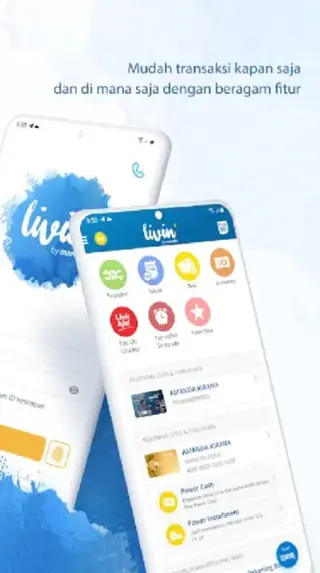
Account overview and balance check
View balances for your linked Mandiri products and see recent transactions in one dashboard.
Fast money transfers
Send money to Mandiri accounts or other Indonesian banks with real-time or near real-time processing.
Bill and utility payments
Pay electricity, water, mobile, internet, TV, and other supported bills without visiting a payment counter.
Top up mobile and digital services
Buy prepaid mobile credit, data packages, and top up supported digital wallets from within the app.
Transaction history tracking
Review detailed transaction history so you can monitor spending and confirm completed payments.
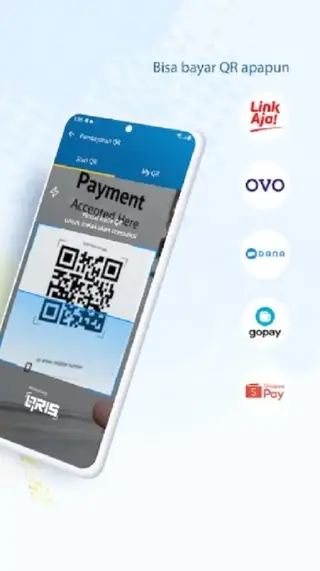
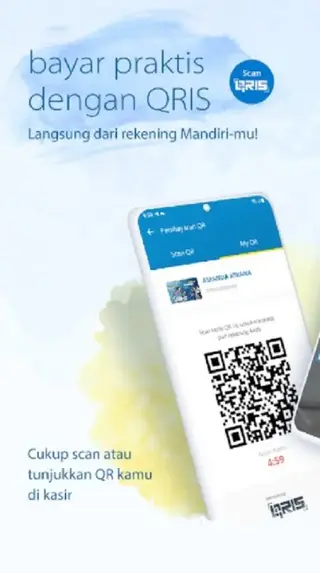
QR payment support
Pay at supported merchants by scanning QR codes using funds from your Mandiri account or selected sources.
Card and account management
Manage selected Mandiri debit and credit cards, including viewing statements and basic control options where available.
Screenshots


Eligibility and Regional Availability
Livin By Mandiri is designed for customers who hold Bank Mandiri products and are registered with an Indonesian mobile number. Most services, including transfers, bill payments, and QR payments, are tailored to the Indonesian banking system and local regulations.
Non-residents may be able to use the app only if they have valid Bank Mandiri accounts and meet the bank’s eligibility requirements. Features and service availability can vary based on your account type and local rules.
Security and Login Methods
The app uses modern security practices such as secure sessions, PIN or password login, and support for biometric authentication on compatible devices. One-time passwords and verification codes may be required for sensitive actions like adding payees or confirming transactions.
For best security, keep your device updated, protect your PIN or password, and log out after using shared devices. If you suspect any unusual activity, contact Bank Mandiri through official support channels.
Tips for New Users
If you are new to digital banking, start by linking one primary Mandiri account and exploring basic functions such as balance checks and mini statements. Once you feel comfortable, you can set up favorite billers, save frequent transfer destinations, and configure alerts where available.
Keep your contact details up to date with Bank Mandiri so that you receive important notifications, verification codes, and service updates related to Livin By Mandiri.
FAQs
Pros
- Official mobile banking app from PT Bank Mandiri (Persero) Tbk
- Supports transfers, bill payments, and top ups in one place
- User-friendly interface with support for Bahasa Indonesia and English
- Transaction history and balance overview help track spending
- Convenient QR and digital payments for everyday use
Cons
- Only useful for users with access to Bank Mandiri services in Indonesia
- Requires a stable internet connection for most functions
- Registration and verification may feel complex for first-time users
Conclusion
Livin By Mandiri is a practical, official mobile banking app for Bank Mandiri customers in Indonesia. With transfers, bill payments, and top ups in one place, it offers a convenient way to manage daily finances from an Android device. You can download the official APK directly from our website and start using Mandiri’s digital services after a quick registration process.




Comments
No approved comments yet.