

LTScores
LTScores is an IPTV player and sports info app that lets you stream online TV channels on Android using your own playlist links. It focuses on live sports and match details while keeping the interface simple.
Instead of offering built-in channels, LTScores works as a client for M3U lists and IPTV URLs. You add the links, and the app plays the streams, so you stay in control of what you watch.
The app targets Spanish-speaking users but can handle IPTV content in any language, depending on the streams you add. You can download the official LTScores APK directly from our website and start watching in a few steps.
Rate this app
App details
- App name
- LTScores
- Category
- Tools
- Version
- v2.0
- Size
- 5.14 MB
- Requirements
- 5.0 and Above
- Package name
- com.app.lt.scores2
- Publisher
- ITSCORES2
- Price
- Free
- Mod
- No
- Downloads
- 86,196
- Rating
- 4.6 / 5
- Rating count
- 34,103
- Play Store
- No
- Requires root
- No
- Offline support
- No
- Contains ads
- Yes
- In-app purchases
- No
- Updated
- May 13, 2026
- Age rating
- Rated for 7+
Table of contents
What is LTScores App?
LTScores is an Android IPTV player combined with a sports information hub. It allows you to load IPTV channel URLs or M3U playlists and watch live TV, with a strong focus on sports channels and match coverage.
The app does not host or include any channels by default. Instead, it provides a clean IPTV playback interface where you add your own links. Once a list is added, you can browse and stream channels directly on your phone or tablet.
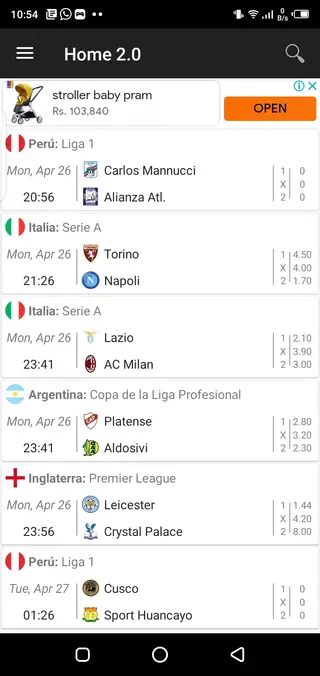
Alongside live streams, LTScores gives access to sports-related information such as fixtures, results, and team performance data across popular sports like football, basketball, tennis, and hockey. This makes it useful both as a viewer and as a quick reference for current and past sports events.
The interface is mainly in Spanish, but navigation is straightforward. Even if Spanish is not your first language, you can still configure playlists and open channels with a bit of exploration.
If you are still not satisfied with the app and have a problem with the language, then try Clouddy and NEOTV Pro 2. It also provides IPTV services but in the English language. There are tons of apps and hacks available on the Website here, which you can explore in it.
Why download LTScores APK from our website
Downloading the LTScores APK from our website gives you direct access to the latest available version of the app without searching around. You can install it on any compatible Android device and start using it as your IPTV player in minutes.
Because LTScores does not include built-in channels, it is a flexible choice for users who already have IPTV sources, M3U lists, or Telegram groups that share updated URLs. You decide what to watch, and the app simply handles the playback.
Sports fans get extra value from the integrated match information and records. Instead of jumping between different apps or sites for scores and streams, you can keep both in one place and quickly check what is happening in your favorite leagues.
How LTScores is useful for sports and IPTV fans
LTScores is useful if you want a lightweight IPTV player that does not lock you into a specific content provider. You only need working IPTV URLs or M3U playlists, and the app turns them into a custom live TV lineup.
Sports enthusiasts benefit from its focus on events and results. You can follow ongoing competitions, explore previous performance records for teams, and keep up with different sports categories, all while using the same app to watch live matches when you have compatible streams.
Because it supports channel lists, you can group your favorite sports, news, and entertainment channels in one place. This keeps your streaming organized and avoids the clutter that some full-scale IPTV bundles create.
How to download and install LTScores APK
You can download the official LTScores APK file for Android directly from our website. Follow these steps to get the app up and running on your device:
Scroll to the download section on this page and tap the LTScores APK download button.
Wait for the APK file to finish downloading to your device.
On Android, open Settings and enable installation from unknown sources for your browser or file manager if needed.
Open your file manager, locate the downloaded LTScores APK, and tap it to start installation.
Confirm the prompts on screen and wait until the installation completes.
Launch LTScores, add your IPTV URLs or M3U list, and start streaming channels and checking sports info.
Features
IPTV player for custom URLs
Load IPTV channel URLs or M3U playlists and stream live TV directly within the app.
Sports information hub
View information on fixtures, results, and team performance across multiple sports.
Focus on live sports content
Designed with sports fans in mind, making it easy to follow matches and leagues.
Create personal IPTV lists
Build and manage your own channel lists based on the URLs you collect.
Telegram group integration
Join a Telegram group from inside the app to find and share IPTV links when available.
Spanish language interface
User interface is primarily in Spanish, suitable for Spanish-speaking users.
Simple and user friendly UI
Clean layout that keeps channel lists and sports data easy to access.
Lightweight Android app
Small-sized application that runs on older Android versions from 4.4 and above.
Screenshots
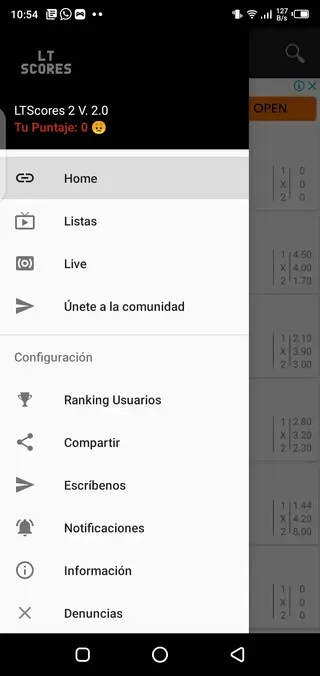
Supported devices and Android requirements
LTScores is built for Android smartphones and tablets running Android 4.4 or higher. Because the app is lightweight, it can run on many older or budget models, as long as they have a stable internet connection for streaming.
For the best experience, use a device with a reliable Wi-Fi or mobile data connection, and consider connecting it to a larger screen or TV via casting if you plan to watch long sports events.
Tips for finding and managing IPTV lists
LTScores depends on the quality of your IPTV sources. Good links mean smoother playback and fewer interruptions. Many users maintain their own M3U lists and update them regularly when channels stop working.
To keep things organized, group channels by category, such as sports, news, movies, and kids. Regularly review your list and remove dead links. This keeps navigation inside LTScores fast and prevents clutter.
Sports tracking and match information
Beyond streaming, LTScores helps you stay informed about sports events. You can check fixtures, match results, and performance data for different teams and competitions.
This combined setup is handy when you follow several leagues at once. Instead of jumping between separate score apps and IPTV players, you can keep both information and live coverage in one place whenever you have compatible streams.
FAQs
Pros
- Lightweight IPTV player that works with custom URLs and M3U lists
- Sports scores and information integrated into the same app
- Works on older Android devices starting from version 4.4
- Lets users create and manage their own IPTV channel lists
- No built-in content, so users have full control over what they watch
Cons
- No preloaded IPTV channels, users must find their own URLs
- Interface is mainly in Spanish, which can be hard for non-Spanish speakers
- Requires constant internet connection for streaming and live data
- May contain in-app advertising that some users find distracting
Conclusion
LTScores is a compact IPTV and sports information app for Android users who prefer managing their own playlists. If you already have IPTV links or M3U lists and want a straightforward player with extra sports stats, you can download the LTScores APK from our website and set it up in just a few minutes.




Comments
No approved comments yet.