

Magic Call
Magic Call is a real-time voice changer app that lets you sound different during live calls. You can switch voices on the fly and turn ordinary conversations into playful pranks.
With a simple dialer-style interface and one-tap voice presets, the app is easy to use even on your first call. You only need your Android phone and a stable connection to start experimenting with different characters.
You can download the official Magic Call APK directly from our website and install the latest available version on compatible Android phones and tablets.
Rate this app
App details
- App name
- Magic Call
- Category
- Entertainment
- Version
- v2.1.1
- Size
- 35.42 MB
- Requirements
- 5.0 and Above
- Package name
- com.bng.magiccall
- Publisher
- BNG MOBILE
- Price
- Free
- Mod
- No
- Downloads
- 64,833
- Rating
- 4.7 / 5
- Rating count
- 23,284
- Play Store
- Yes
- Requires root
- No
- Offline support
- No
- Contains ads
- Yes
- In-app purchases
- Yes
- Updated
- May 15, 2026
- Age rating
- Rated for 3+
Table of contents
What is Magic Call App
Magic Call is an Android entertainment and communication app that changes how you sound while you speak on calls. Instead of recording audio and editing it later, the app modifies your voice in real time so the person on the other side of the call hears the changed voice instantly.
The app offers several preset voice styles such as male, female, kid, cartoon, and robot. You select a style before or during a call, and Magic Call applies the effect live. This makes it suitable for light pranks, playful chats with friends, or adding some fun to regular voice conversations.
Magic Call is published by BNG MOBILE and works on most modern Android devices running Android 5.0 or higher. You can get the official APK file from our website and install it just like any other side-loaded app on your device.
If you are not satisfied with the available services, then we have more similar applications. You guys can try Morphvox Pro and Game Space Voice Changer, both of these are quite popular available applications. So, you can download and have fun spending your free time.
Why Download Magic Call APK for Android
Installing the Magic Call APK on your device gives you access to all the core voice-changing tools in a single app. You do not need to combine multiple utilities for voice effects, call handling, and audio tweaks.
By downloading directly from our website, you get the specific version listed on this page with the features and voice presets described here. This is helpful if you want to match a version that works well on your device or that you have used before.
The app focuses on fast setup and simple controls, so you can quickly place a call, pick a voice, and start talking. For users who enjoy prank calls, roleplay chats, or just adding humor to conversations, Magic Call is a compact and focused option.
How Magic Call Is Useful
Magic Call is useful whenever you want to change how you sound without complicated audio editing. It runs in the background during calls and applies the selected effect automatically, so you can stay focused on the conversation.
For casual entertainment, you can switch between different characters mid-call to keep friends guessing. Streamers, content creators, or gamers who chat over voice can also experiment with the live effects when the app is compatible with their calling setup.
The app’s straightforward interface, preset voices, and live switching make it approachable even for people who have never used audio tools before. You control everything with a few taps, from starting a call to adjusting the voice style.
How to Download and Install Magic Call APK
You can get the official Magic Call APK file directly from our website and install it on your Android device. Follow these basic steps to complete the process smoothly.
Scroll to the download area on this page and tap the download button for Magic Call.
Confirm the download in your browser and wait until the APK file finishes downloading.
Open your phone’s settings and enable installation from unknown sources for your browser or file manager, if it is not already allowed.
Locate the downloaded Magic Call APK in your Downloads folder using a file manager app.
Tap the APK file, review the permissions shown on screen, and then tap Install.
When the installation completes, open Magic Call, grant the required call and microphone permissions, and start testing the voice presets.
After setup, you can launch the app directly from your app drawer whenever you want to place a fun voice-changed call.
Features
Real-time voice changing
Modify your voice live while you are on a call so the listener hears the changed output instantly.
Multiple voice presets
Choose from several characters such as male, female, boy, girl, kid, cartoon, robot and more.
Live switching during calls
Switch between voice types in the middle of an active call without disconnecting.
Simple call interface
Use an intuitive dialer-style screen to place calls and select effects with minimal steps.
Entertainment focused design
The app is built primarily for pranks and light-hearted conversations with friends and family.
Works on Android 5.0 and above
Supports a wide range of modern Android smartphones and tablets running Android 5.0 or later.
Integrated sound effects
Add background sounds and extra effects in supported versions to enhance the prank experience.
Account and credit system
Use in-app plans or credits for certain call types in regions and versions where this is supported.
Screenshots

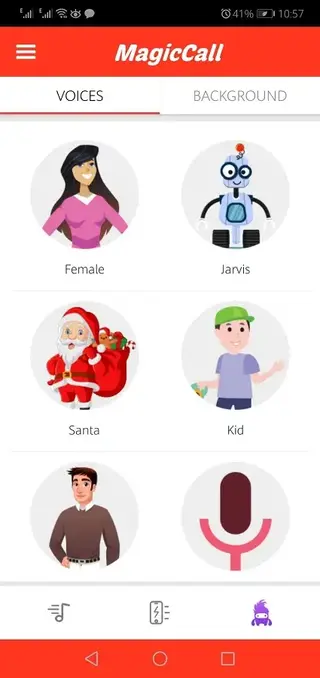



Voice Presets and Effects Explained
Magic Call groups its voice effects into easy-to-recognize presets so you do not have to tune technical audio parameters yourself. Options such as male, female, boy, girl, kid, cartoon, and robot apply ready-made filters to your voice.
These presets usually change pitch, tone, and timbre in combination, which makes the output sound like a different character. You can test each style using short sample calls before using it in a longer conversation. This helps you find the effect that sounds clearest on your particular device and connection.
Permissions and Compatibility
To function correctly, Magic Call needs several system permissions. The app typically requests access to your microphone, calling functions, and sometimes contacts. These are required so it can modify your audio in real time and place or manage calls from within the app.
The app targets Android 5.0 and above, which covers most modern devices. However, actual performance can vary based on your phone model, network quality, and carrier support for app-based calling. If you experience issues, checking permissions, restarting the app, and testing on a different network can help.
Tips for Better Call Quality
Voice-changing effects are more convincing when the underlying call quality is stable. Whenever possible, use Magic Call in a quiet environment and with a strong mobile or Wi-Fi signal. Background noise and weak connections can reduce clarity and make the effect sound distorted.
It is also a good idea to test the app with a willing friend before using more complex voice combinations. Short test calls allow you to refine which presets sound most natural and which ones you prefer for playful pranks or character-based chats.
FAQs
Pros
- Real-time voice changing during live calls
- Multiple preset voices for quick character switching
- User-friendly interface that is easy to understand
- Designed specifically for entertainment and pranks
- Available as an APK download for Android 5.0 and above
Cons
- Requires a stable network connection for calls
- May not work with every carrier or region in the same way
- Contains ads in the free version
- Some advanced options may require in-app purchases
Conclusion
Magic Call is a focused voice changer app for Android that brings real-time audio effects to your calls. If you enjoy playful conversations and pranks with friends, you can download the official Magic Call APK from our website, install it on a compatible device, and start experimenting with different voices in a few minutes.




Comments
No approved comments yet.