
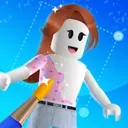
Makerblox
Makerblox is a Roblox skin creator for Android that lets you design unique outfits and avatars directly from your phone or tablet. You can mix clothes, colors, and stickers to build a look that matches your style.
The app focuses on simple tools and ready-made elements, so even beginners can create skins quickly. When you finish a design, you can export it and later upload it to Roblox through the official website on a computer.
You can download the official Makerblox APK latest version directly from our website and start creating Roblox character skins without complex editors or paid design software.
If you are playing Roblox on your device, then you know it is one of the most popular platforms to play multiple games. You can play multiple games here, which are created by other players. So, if you want to know about the tool, then stay with us. If you have already explored Customuse, then here we are with an equally amazing option for you.
Rate this app
App details
- App name
- Makerblox
- Category
- Entertainment
- Version
- v54.9
- Size
- 9.94 MB
- Requirements
- 8.0 and Above
- Package name
- com.skin.editor.avatar.maker
- Publisher
- White Platform Studio
- Price
- Free
- Mod
- No
- Downloads
- 1,596,546
- Rating
- 4.1 / 5
- Rating count
- 105,636
- Play Store
- Yes
- Requires root
- No
- Offline support
- Yes
- Contains ads
- Yes
- In-app purchases
- Yes
- Updated
- May 9, 2026
- Age rating
- Rated for 3+
Table of contents
What is Makerblox App
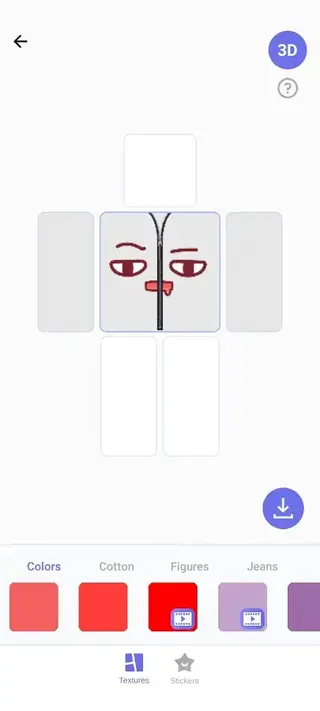
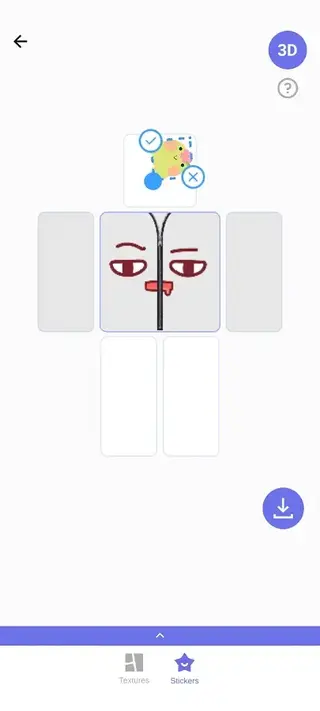
Makerblox is an Android application for creating custom skins and outfits for Roblox characters. It works as a visual skin editor where you combine shirts, pants, and T-shirts, adjust colors, and add decorative elements to build a complete avatar style.
The app is aimed at Roblox fans who want a more personalized look without relying only on built-in options or pre-made outfits. Makerblox does not unlock paid Roblox items. Instead, it helps you design your own textures that you can later upload to your Roblox account.
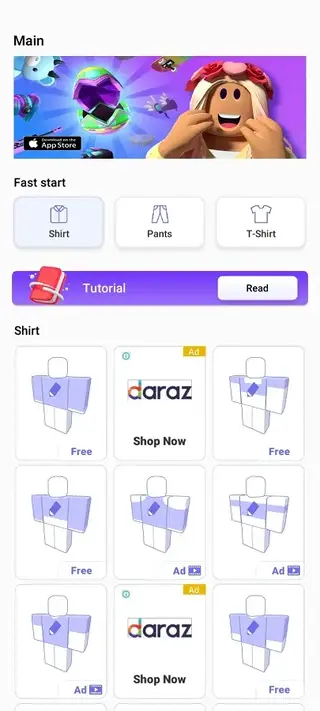
The editor is based on simple tap and drag controls. You choose a clothing type, pick a template or start from scratch, customize the design, and export the skin file. Inside the app you also find short guidelines that explain how to upload your creations to Roblox using the desktop site.
Why Download Makerblox APK from Our Website
Downloading Makerblox APK directly from our website gives you fast access to the official installation file without needing to search multiple pages. You get the latest available version listed with clear details such as version name, package name, and Android requirements.
With the app installed, you can design Roblox skins whenever you like, even without a PC. You prepare the outfits on your Android device, save them, and then upload them to Roblox later using the official website on a computer.
Our download page focuses only on this app, so you can read about its features, requirements, and usage before installing. This helps you decide whether Makerblox fits your style of Roblox customization.
How Makerblox is Useful for Roblox Players
Makerblox is useful for Roblox players who want more control over their avatar appearance. Instead of buying every new skin, you can experiment with your own designs and create outfits that stand out in different games and worlds.
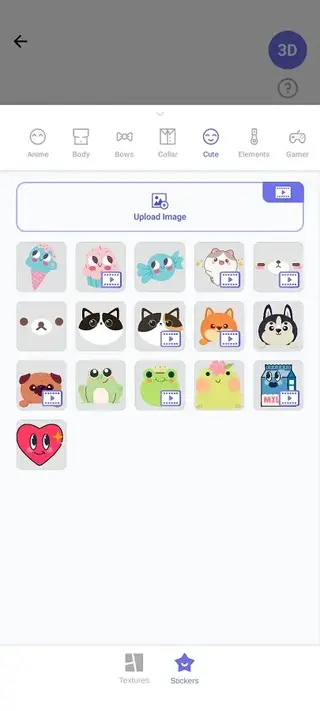
The editor offers quick visual tools, so you do not need advanced graphic design skills. You can change colors, try patterns, place stickers, and adjust your shirt, pants, and T-shirt until they match the look you imagine.
This makes Makerblox a handy companion app: you design on mobile, test multiple ideas, and keep only the skins you really like. Over time, you can build a small library of personal outfits ready for use in Roblox.
How to Download and Install Makerblox APK
You can download the official Makerblox APK file directly from our website. Follow these steps to get it on your Android device:
Scroll to the download section on this page.
Tap the download button for the latest Makerblox APK version.
Wait until the APK file finishes downloading to your device.
Open your phone settings and enable installation from unknown sources for your browser or file manager if needed.
Locate the downloaded APK in your downloads folder.
Tap the file and confirm the installation prompt.
After installation completes, open Makerblox from your app drawer and start creating skins.
The app requires at least Android 8.0 or above, so check your device version before installing to avoid compatibility issues.
Features
Roblox-focused skin editor
Create custom skins and outfits specifically designed for Roblox characters using a simple mobile interface.
Three-part clothing system
Design shirts, pants, and T-shirts separately so you can combine them into different avatar looks.
Ready templates and elements
Use preset clothes, patterns, and stickers as a starting point to speed up your design process.
Color and style customization
Adjust colors, mix styles, and layer visual details to create unique outfits for your character.
Simple export options
Save or export your finished skin files so they can be uploaded to Roblox through the official website.
In-app upload guidance
Follow basic instructions inside the app that explain how to upload custom skins to Roblox on desktop.
Beginner-friendly interface
Navigate clear menus and large buttons designed for quick editing even on small screens.
Free to use core tools
Access the main skin creation features for free, with optional paid items and ads inside the app.
Screenshots
How Makerblox Works With Roblox
Makerblox does not connect directly to your Roblox account. Instead, it focuses on generating skin image files that follow the basic structure Roblox uses for clothing textures. After designing in the app, you export or save the files and later upload them through the official Roblox website on a desktop or laptop.
This separation keeps the app simple and avoids changing anything inside Roblox itself. You keep full control over which designs you finally upload and use on your avatar.
Tips for Creating Better Roblox Skins
If you want your skins to look better in different Roblox games, try a few simple habits while using Makerblox:
Test moderate colors so details remain visible in bright and dark maps.
Avoid placing tiny text that becomes unreadable on small screens.
Save multiple versions of a design before making big changes.
Match the shirt and pants styles so the outfit feels consistent.
Check how designs look from the back and sides, not only the front.
With a bit of trial and improvement, you can quickly build a collection of skins that fit many different Roblox experiences.
FAQs
Pros
- Dedicated Roblox skin creator for mobile
- Very simple and beginner-friendly interface
- Allows quick customization of shirts, pants, and T-shirts
- Includes templates, colors, and stickers for faster design
- Works largely offline once installed
- Provides basic guidance for uploading skins to Roblox
Cons
- Skins must still be uploaded via Roblox desktop site
- Contains ads inside the app
- Some design packs or items may require in-app purchases
- Does not unlock or bypass paid Roblox content
Conclusion
Makerblox gives Roblox players a straightforward way to design their own character skins on Android. If you enjoy customizing your avatar and want more control over outfits, downloading the official Makerblox APK from our website is a simple way to start creating and experimenting with new looks.




Comments
No approved comments yet.