
Media Lounge
Media Lounge is an IPTV and streaming app for Android that brings live TV channels, movies, TV shows and sports into a single dashboard. It is designed for users who want a simple way to watch multiple types of content on phones, tablets and Android TV devices.
There are tons of other apps offering the same services, but there is a big difference between this and others. Similar to the RBTV77 and Krira TV this app also provides tons of TV channels, Lots of Movies, television series, television shows, and many more.
You can browse channels by category, stream recent and older movies, follow series, and enjoy music and sports coverage from one app. The official APK file for Media Lounge is available to download directly from our website.
The app focuses on quick access to entertainment with a straightforward layout, search options and basic parental controls for adult content. It targets users who prefer a lightweight streaming experience instead of switching between different apps.
Rate this app
App details
- App name
- Media Lounge
- Category
- Entertainment
- Version
- v4.0.7
- Size
- 13.15 MB
- Requirements
- 5.0 and Up
- Package name
- com.app.strix
- Publisher
- WARDY
- Price
- Free
- Mod
- No
- Downloads
- 58,105
- Rating
- 4.7 / 5
- Rating count
- 26,000
- Play Store
- No
- Requires root
- No
- Offline support
- No
- Contains ads
- Yes
- In-app purchases
- No
- Updated
- May 13, 2026
- Age rating
- Rated for 3+
Table of contents
What is Media Lounge APK
Media Lounge is a free Android IPTV and VOD streaming application that aggregates live TV channels, movies, series, sports and music in one place. Once installed, it lets you browse through categories or search directly for titles and channels, then stream them over your internet connection.
The app supports a wide range of entertainment sections such as Movies, TV Shows, Live TV, Sports TV, Music and an optional adults-only area protected by a password. It is built mainly for Android phones and tablets running Android 5.0 and above, and many users also install it on Android TV boxes and Fire TV devices via APK sideloading.
Media Lounge does not require root access. You simply install the APK, open the app and start exploring the available channels and content libraries using your Wi-Fi or mobile data connection.
Why Download Media Lounge for Android
Media Lounge appeals to users who want a single app that covers most of their day-to-day streaming needs. Instead of juggling different tools for IPTV, movies, TV series and music, you can access everything from one interface.
The app offers organized sections with genre filters for movies and series, country and category-based lists for live channels, and dedicated areas for sports and music. This structure makes it easier to discover something to watch quickly, even if you do not have a specific title in mind.
You can download the latest Media Lounge APK version directly from our website, install it manually and keep it as an alternative or companion to your existing streaming solutions.
How Media Lounge Can Be Useful
Media Lounge can be useful if you enjoy streaming live TV and on-demand content on Android but prefer a simple layout over complex menus. Its main sections cover popular use cases like movie nights, following TV series, watching live sports or listening to music channels.
The built-in search and categorized lists help you navigate a large catalog without needing advanced knowledge of IPTV or playlists. Basic parental controls for the grown-up section add an extra layer of privacy if you share your device with others.
Because the app is lightweight, it can work reasonably well on many mid-range Android devices. It is particularly handy if you often use your phone or an Android TV box as your main entertainment hub.
How to Download and Install Media Lounge APK
You can download the official Media Lounge APK file directly from our website. We provide the current available version so you can save it on your Android device and install it manually.
Follow these steps to download and install Media Lounge:
Tap the download button for Media Lounge on this page to save the APK file to your device.
On your Android phone or tablet, open Settings and go to the security or privacy section.
Enable the option that allows installation from unknown sources or allow your browser or file manager to install unknown apps.
Open your file manager and navigate to the Downloads folder where the Media Lounge APK was saved.
Tap the APK file, review the requested permissions and select Install.
Wait for the installation to finish, then tap Open or find the Media Lounge icon in your app drawer to start using it.
If you later download an updated version from our website, repeat the same process and install the new APK over the existing one.
Features
Unified streaming hub
Access live TV channels, movies, TV shows, sports and music from a single Android app interface.
Movies by genre
Browse a wide movie catalog organized into genres such as action, adventure, animation, comedy, crime, drama, family, horror and fantasy.
TV shows and series
Find and stream episodic content, follow seasons and explore shows through categories or search.
Live TV and IPTV channels
Watch a variety of live TV channels organized by country, category, age group and user interest.
Dedicated sports section
Access sports-focused channels for football, basketball, cricket, wrestling and other events in one place.
Music channels
Enjoy music content across multiple styles including western, classic, hip-hop and more.
Adult section with password
Lock the grown-up section with a password to maintain privacy and restrict access for other users.
HD playback support
Stream many channels and videos in HD quality when your connection and the selected source support it.
Screenshots
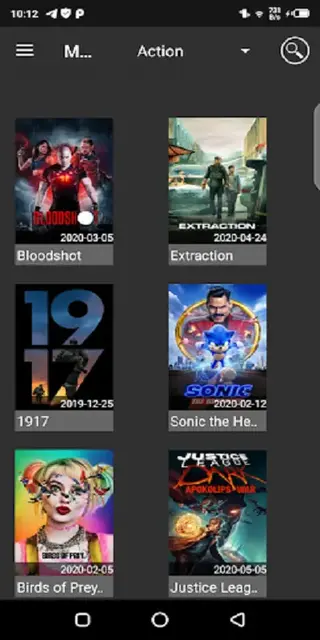
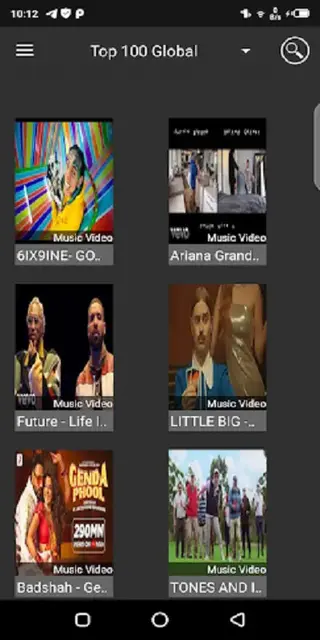
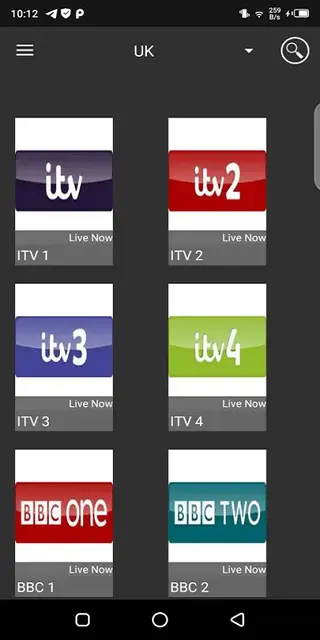
Movie and TV show categories
The Movies section in Media Lounge is organized by genre, making it easier to find something that matches your mood. Categories typically include action, adventure, animation, comedy, crime, drama, family, horror and fantasy, along with additional subgenres depending on the catalog available at any given time.
TV shows follow a similar pattern, where you can browse by category or search for specific titles. This layout helps you move between different types of content quickly without scrolling through a single long list.
Live TV and sports experience
The Live TV area groups channels by country, topic and audience, so you can focus on the content that is most relevant to you. Whether you want news, general entertainment or regional channels, you can explore them through category lists.
The Sports TV section highlights sports-focused channels, which can include football, basketball, cricket, wrestling and more, depending on the currently available sources. This makes it convenient to follow live matches and sports-related shows without leaving the app.
Parental controls and privacy
Media Lounge includes a grown-up section that contains adult-oriented content. To prevent unauthorized access, you can lock this section with a password inside the app. Once protected, it remains hidden until the correct password is entered.
This simple mechanism offers basic parental control and privacy, especially if your device is shared with family members or younger viewers.
FAQs
Pros
- Combines live TV, movies, series, sports and music in one app
- Simple interface that is easy to navigate on phones and TV boxes
- Includes genre-based movie and show categories for faster discovery
- Password-protected adult section adds basic privacy control
- Free to download and use on supported Android devices
Cons
- Requires a stable internet connection for smooth streaming
- Some channels or links may stop working over time
- No official Google Play Store version, so updates must be installed manually
- May contain in-app advertising during navigation or playback
Conclusion
Media Lounge is a practical IPTV and streaming app for Android users who want live channels, movies, TV shows, sports and music in one place. You can download the latest available APK directly from our website and install it on compatible phones, tablets or TV boxes to explore its content-focused interface and basic parental controls.




Comments
No approved comments yet.