

MKCTV
MKCTV is an IPTV and movie streaming app for Android that focuses strongly on Indonesian and international TV content. It combines live TV channels, films, and radio stations in one simple interface.
Users can unlock the service with an activation code and then browse channels by country and category, including news, sports, music, movies, and more. The app uses fast servers and multiple quality options to keep streams as stable as possible on different internet speeds.
You can download the official MKCTV APK file directly from our website, install it on your phone or tablet, and start exploring the available TV and movie library in just a few steps.
Rate this app
App details
- App name
- MKCTV
- Category
- Entertainment
- Version
- v4.0
- Size
- 37.01 MB
- Requirements
- 5.0 and Above
- Package name
- com.fikrul.mkctv
- Publisher
- FIKRUL
- Price
- Free
- Mod
- No
- Downloads
- 90,680
- Rating
- 4.7 / 5
- Rating count
- 33,652
- Play Store
- Yes
- Requires root
- No
- Offline support
- No
- Contains ads
- No
- In-app purchases
- No
- Updated
- May 18, 2026
- Age rating
- Rated for 7+
Table of contents
What is MKCTV APK
MKCTV is an Android IPTV application that lets users stream live TV channels, movies, and radio stations over the internet. It focuses on Indonesian TV but also includes various international channels organized by country and genre.
The app works as a free-to-access platform once you activate it with a valid code. After logging in, you can open premium-style TV channels, browse a movie library, and listen to radio streams using the built-in media player. Everything runs inside the app, so you do not need an external video player.
MKCTV is designed for phones and tablets running Android 4.4 and above. The interface uses horizontal panels for categories and vertical lists for channels, making it easy to move between live TV, movies, and other sections.
Why Download MKCTV for Android
MKCTV appeals to users who want quick access to live TV channels and movies on Android without using multiple separate apps. It brings Indonesian and global entertainment into one dashboard and organizes everything by country and type.
Because the app includes its own media player and category system, it is simple to install, unlock with a code, and start watching. You can switch between TV, movies, and radio, adjust quality based on your connection, and explore new channels without complex setup.
The APK file is available directly on our website, so you can download the latest version and keep it stored on your device whenever you need to reinstall or update manually.
How MKCTV is Useful
MKCTV is useful for users who rely on their Android devices as a primary screen for live television and on-demand content. It reduces the need for multiple separate IPTV playlists or apps by grouping a wide range of channels inside a single interface.
Indonesian viewers benefit from the strong local channel lineup, while international users can browse channels sorted by country, documentaries, movies, music, and news. The app also adds value with its movie library, where new titles appear regularly from different entertainment industries such as Hindi, Indonesian, and Japanese cinema.
Fast server response and adaptive quality options help keep streams smoother on unstable or slower connections. The built-in player handles both IPTV and media playback, which simplifies setup and makes MKCTV a practical option for everyday streaming.
In addition, there are a lot of other features in this app, which you can explore. So, download Shuffle TV Apk now and start streaming. If you encounter any problems downloading this app, feel free to contact us via the comments section below. Users can also explore alternative TV apps like elMubashir IPTV and KocengTV.
How to Download and Install MKCTV APK
You can download the official MKCTV APK file directly from our website and install it manually on your Android phone or tablet. Make sure your device runs Android 4.4 or higher before you begin.
Follow these steps to download and install MKCTV:
Scroll to the download area on this page and tap the APK download button.
Wait for the MKCTV APK file (version 1.2.2) to finish downloading to your device.
Open your device Settings and enable installation from unknown sources or allow your browser to install apps.
Locate the downloaded APK file in your Downloads folder and tap it.
Confirm the installation prompt and wait until the process completes.
Open MKCTV from your app drawer and enter the required activation code to access channels.
After installation, you can launch the app anytime and stream live TV, movies, and radio directly from your Android device.
Features
Large IPTV channel library
Offers a wide range of live TV channels, including many Indonesian and international stations.
Country based channel categories
Lets users browse channels by country, local stations, entertainment, music, movies, documentaries, and news.
Built in media player
Includes an internal player for both IPTV streams and media playback, so no extra player app is required.
Fast and responsive servers
Uses servers designed to provide quick response and smoother streaming, even on weaker connections where possible.
Movie library
Provides a collection of movies from different regions including Hindi, Indonesian, Japanese, and more.
Multiple language content
Hosts content in various languages, helping users find channels and movies they understand.
High definition streaming options
Supports HD streams where available, alongside lower resolutions for slower networks.
Customizable video quality
Allows users to adjust display quality depending on their internet speed and data limits.
Screenshots
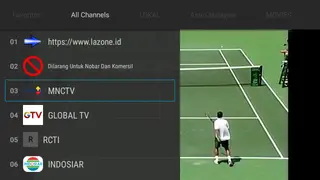
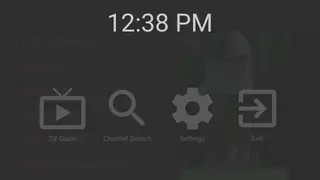
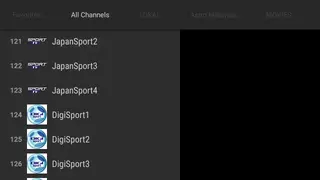

Live TV and IPTV Experience
MKCTV centers around live IPTV streaming. Once activated, you can open different categories such as local Indonesian TV, international channels, news, entertainment, music, and more. A horizontal panel at the top shows the main categories, while a vertical list displays available channels inside each section.
This layout helps you switch quickly between groups of channels without complex menus. You can test different streams, move across regions, and keep your favorite genres within easy reach.
Movies and On Demand Content
Besides live channels, MKCTV includes an on demand movie section. The library offers titles from several entertainment industries, including Hindi, Indonesian, and Japanese films. New movies are added regularly so users can find both older and more recent releases.
Movies stream through the same built in player used for IPTV, and you can pick the quality that fits your network speed. This allows you to watch long form content without switching apps.
Streaming Quality and Performance
The app aims to keep playback as smooth as possible by using responsive servers and multiple quality levels. When your connection is strong, you can choose HD quality for a clearer picture. On slower networks, you can lower the resolution to reduce buffering.
Because MKCTV streams everything online, actual performance will depend on your internet connection, device capability, and current server load, so results can vary between users.
FAQs
Pros
- Large collection of IPTV channels including many Indonesian stations
- Includes movies and radio along with live TV in one app
- Built in media player removes the need for external players
- Fast server response helps streams load quickly
- Content organized by country and category for easy navigation
- Supports HD quality with adjustable resolutions
Cons
- Requires an activation code to unlock the service
- Streaming depends on internet speed and stability
- Not available on the Google Play Store
- Content availability and working channels may change over time
Conclusion
MKCTV is a focused IPTV and movie streaming app for Android users who want Indonesian and international channels in one place. With its built in player, categorized channel list, and movie library, it can be a practical option for everyday streaming once installed and activated on your device.




Comments
Agus maulana
Bagi kode yang baru
Safri Nong
Tlg bagi code baru pls