

Myket
Myket is an independent Android app store that focuses strongly on Iranian and regional content while also listing popular global apps and games. It gives Android users another way to discover software that might not appear or be highlighted on Google Play in their country.
Through Myket you can browse curated collections, view detailed app pages, and install thousands of apps and games with a familiar, clean interface. The official Myket APK is available on our website so you can download and install it directly on your Android phone or tablet.
If you often hit regional limits, removed apps, or missing games on the default store, Myket provides an alternative catalog, fast downloads, and a simple search system that makes finding new apps much easier.
Rate this app
App details
- App name
- Myket
- Category
- Productivity
- Version
- v11.0.0
- Size
- 43.7 MB
- Requirements
- 4.0 and Above
- Package name
- ir.mservices.market
- Publisher
- M Services
- Price
- Free
- Mod
- No
- Downloads
- 56,249
- Rating
- 4.7 / 5
- Rating count
- 18,591
- Play Store
- No
- Requires root
- No
- Offline support
- No
- Contains ads
- Yes
- In-app purchases
- No
- Updated
- May 9, 2026
- Age rating
- Rated for 3+
Table of contents
What is Myket for Android
Myket is an Android application marketplace developed by M Services. It works as a full alternative to the default app store on your device and focuses heavily on apps and games that are popular in Iran and nearby regions, alongside many international titles.
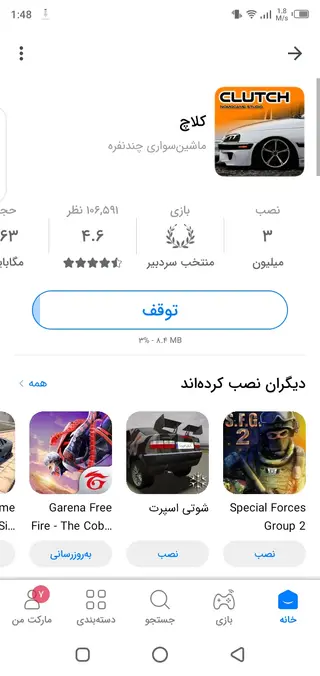
The app offers a large catalog of Android software grouped into clear sections such as apps, games, categories, and top charts. Each item usually includes screenshots, descriptions, version information, and user opinions, which helps you decide what to install.
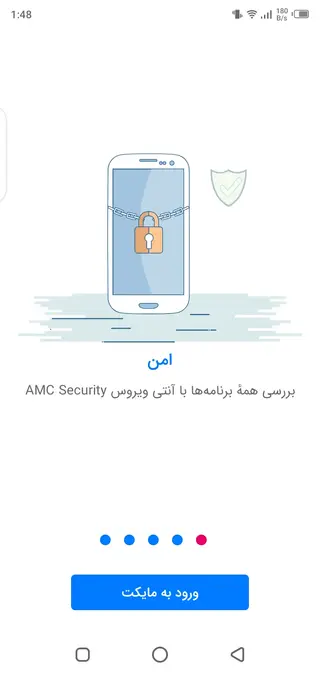
Myket was originally built to give Iranian users access to applications that might be restricted or hard to find on other stores. Today it can be used globally, and the client supports multiple languages, so users outside Iran can still navigate the interface and browse the store comfortably.
Once you install the Myket APK from our website, it acts as an additional store on your device. You open it like any other app, search for what you want, and then download and install apps directly from within Myket.
Myket Apk Download on your Android device and explore more about it. There are more things to explore in it, which might you like the most. So, if you are about to find out more about it, then get it on. If you are interested in the Chinese App Store, then get Xingtu and Dfast on your device.
Why download the Myket APK from our website
Installing the Myket APK on your Android device gives you access to a different app ecosystem with its own recommendations and regional content. If you live in Iran or often use apps developed for that market, Myket makes discovering and installing them far easier than searching for individual APKs around the web.
By downloading the official Myket APK directly from our website, you can:
Set up the store quickly without hunting for installers elsewhere.
Access apps and games that may not be listed or promoted in your default store.
Use a localized interface with language options that match your preferences.
Take advantage of Myket’s optimized servers designed to provide responsive browsing and relatively fast downloads.
For many users, Myket works as a second store: they keep Google Play for mainstream apps and use Myket when they want fresh regional content, specific Iranian apps, or another way to explore games and utilities.
How Myket can be useful for Android users
Myket is especially useful if you want broader access to Android apps than you currently have. Its catalog highlights local Iranian developers, niche utilities, and regional games that you might never see in standard app rankings elsewhere.
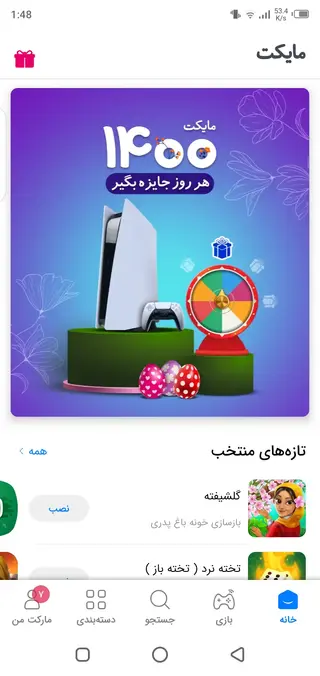
The home screen showcases new and updated apps, along with popular and trending titles, so you can quickly see what other users are installing. A dedicated games area, subcategories, and a search function help you filter content by genre or purpose, which saves time compared to scrolling through long generic lists.
Because Myket is designed as a full marketplace, you also benefit from structured app pages with descriptions and screenshots, plus a download system tuned for continuous use. All of this makes it a practical choice if you frequently install new apps, test tools, or look for region-specific software on Android.
How to download and install Myket APK
You can get the official Myket APK file directly from our website and install it manually on your Android device. Follow these steps to complete the process:
Scroll to the download area on this page and tap the Myket APK download button on our website.
Wait for the APK file to finish downloading to your phone or tablet.
Open your device settings and, if required, allow installation from unknown apps for your browser or file manager.
Locate the downloaded APK in your Downloads folder and tap it to start the installer.
Read the on-screen information and confirm the installation.
After installation, open Myket from your app drawer, set your language and basic preferences, and start browsing the store.
Whenever a newer version is available, you can return to this page and download the updated Myket APK from our website, then install it over your existing version.
Features
Alternative Android app store
Provides a full marketplace separate from your default store with its own catalog of apps and games.
Large collection of apps and games
Offers thousands of Android titles including many that focus on Iranian and regional users.
Clean and simple interface
Uses a user-friendly layout with clear sections for apps, games, categories, and updates.
Curated home screen content
Shows new, updated, and popular items on the main page for quick discovery.
Powerful search and categories
Lets you search by name or keyword and browse by category to find relevant apps faster.
Dedicated gaming section
Includes a separate area for games with both local and international titles.
App detail pages
Displays descriptions, screenshots, and other information to help you decide before installing.
Multi-language support
Supports multiple languages so users from different regions can navigate easily.
Screenshots
Device compatibility and requirements
The Myket app is built for Android smartphones and tablets running at least Android 4.0 or higher. This makes it compatible with a wide range of older and newer devices, although newer Android versions generally provide better performance and security.
To install the APK, you only need enough storage space for the app itself and the apps you download from the store. Myket can run over regular mobile data or Wi-Fi. For a smoother browsing and download experience, a stable internet connection is recommended.
Tips for using Myket effectively
After installing Myket, spend a few minutes exploring the main sections so you can find what you need quickly in the future. The home page is useful for discovering new or updated apps, while the games section helps you focus only on entertainment titles.
Use the search bar when you already know the name of an app or want to look up a specific type of tool. Browsing by category is helpful when you are exploring ideas, such as finding productivity apps, local services, or new mobile games to try.
FAQs
Pros
- Alternative app store focused on Iranian and regional content
- Large and growing catalog of Android apps and games
- Simple interface with clear sections and categories
- Built-in search and recommendations for easier discovery
- Supports multiple languages for broader accessibility
Cons
- Requires manual APK installation outside the default store
- Some apps and content may be primarily targeted at Iranian users
- Downloads and updates depend on Myket’s own servers and availability
Conclusion
Myket gives Android users a practical second app store with strong coverage of Iranian and regional content plus many global titles. If you want broader app choices and an additional place to discover games and tools, you can download the official Myket APK directly from our website and install it as a companion to your existing store.




Comments
No approved comments yet.