

Ninja WhatsApp
Ninja WhatsApp is a modified WhatsApp-style messaging client that focuses on privacy. It helps you read chats, media, and status updates without sending read receipts or showing that you are online.
With its incognito-style tools, you can stay active on WhatsApp while keeping your activity hidden from your contacts. Ninja WhatsApp processes your notifications in the background so you can preview and manage messages more discreetly.
You can download the official Ninja WhatsApp APK file directly from our website and install it on any compatible Android phone or tablet that meets the minimum system requirements.
Rate this app
App details
- App name
- Ninja WhatsApp
- Category
- Communication
- Version
- v1.0.0
- Size
- 10.02 MB
- Requirements
- 4.4 and Above
- Package name
- com.noline.whatsapp
- Publisher
- DesiDroid
- Price
- Free
- Mod
- No
- Downloads
- 485,361
- Rating
- 4.4 / 5
- Rating count
- 4,267
- Play Store
- No
- Requires root
- No
- Offline support
- No
- Contains ads
- Yes
- In-app purchases
- No
- Updated
- May 19, 2026
- Age rating
- Rated for 3+
Table of contents
What is Ninja WhatsApp APK
Ninja WhatsApp APK is a third-party modified messaging app built around the WhatsApp experience with extra privacy controls. It uses your existing WhatsApp account data and notifications to let you check new messages, voice notes, photos, and videos without updating your last seen, online status, or blue tick read receipts.
The interface looks very similar to the original WhatsApp, so most users can navigate it instantly. After installation, you grant the app notification access and relevant permissions. Once enabled, Ninja WhatsApp starts capturing incoming WhatsApp messages and shows them in its own clean chat view where you can read everything in private.
The app is popular with users who receive a high volume of messages and want more control over when they appear online or when others can see that a message has been read.
Why download Ninja WhatsApp for Android
Many people want to check their messages without feeling pressured to reply immediately. Ninja WhatsApp helps in these situations by letting you monitor chats invisibly. You can open messages, read long conversations, and play media while keeping read receipts disabled.
Busy professionals, students, and users who value privacy often use this type of modified messaging app so they can manage time better and avoid awkward situations where someone sees that a message was read but not answered.
Because the APK file is hosted directly on our website, you can download the current available version quickly and install it manually on supported Android devices.
How Ninja WhatsApp can be useful
Ninja WhatsApp is especially useful if you receive many personal or group messages during the day. Instead of opening the official app and triggering online status or blue ticks, you can open them in Ninja WhatsApp first, decide which chats need an answer, and then respond when it suits you.
It can also help if you are in situations where you do not want to appear online to specific contacts but still need to keep track of conversations. Its incognito-style reading mode gives you more control over your visibility and helps reduce social pressure around instant replies.
However, it is still a third-party modification that is not associated with WhatsApp LLC, so users should always understand the potential risks of using unofficial clients with their accounts.
How to download and install Ninja WhatsApp APK
You can get the Ninja WhatsApp APK directly from our website. Make sure your device meets the minimum Android version requirement before starting.
Follow these steps to download and install:
Open our Ninja WhatsApp page on your Android phone or tablet.
Tap the download button to save the official APK file to your device.
Wait until the download completes in your browser or download manager.
Go to your phone settings and open the Security or Privacy section.
Enable the option that allows installation from unknown or external sources for your browser or file manager.
Open your file manager and navigate to the Downloads folder.
Tap the Ninja WhatsApp APK file to launch the installer.
Read the prompts on screen and tap Install to begin the process.
When installation finishes, tap Open to launch the app or Done to exit.
After installation, open Ninja WhatsApp, grant the requested permissions, and configure your privacy options before you start using it.
Features
Incognito reading mode
Read incoming WhatsApp messages, media, and files without showing blue ticks or updating your last seen status.
Online status privacy
Hide your online presence so contacts cannot easily see when you are active or checking chats.
Familiar WhatsApp-style layout
Use a user interface that closely resembles the official WhatsApp app, making it simple to adapt and navigate.
Notification-based message access
Grant notification access so the app can capture and display messages for private reading without opening the main client.
Support for media messages
Open text, audio messages, videos, and attachments directly inside Ninja WhatsApp while remaining invisible to senders.
Simple setup process
Install the APK, enable unknown sources, and grant basic permissions to start using the app with your existing account.
Free to use
Download and use the available version of Ninja WhatsApp APK for free on compatible Android devices.
Basic security options
Adjust simple privacy and security-related settings from inside the app to match your preferred level of control.
Screenshots
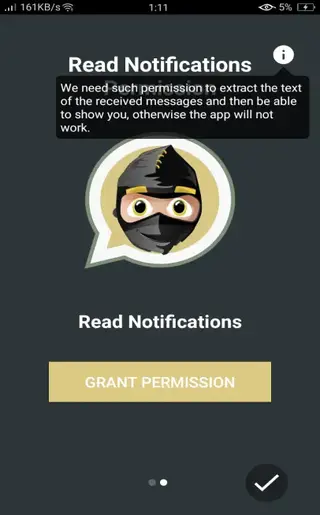
Is Ninja WhatsApp safe to use
Ninja WhatsApp is a third-party modification, so it does not go through the same review and security processes as apps on Google Play Store. The APK we share is the same file provided by the developer, but using any unofficial client with your WhatsApp account can carry risks.
Because it is not an official product, it may not follow WhatsApp LLC policies, and future updates can change behavior at any time. You should always stay aware of these limitations, avoid sharing highly sensitive data through modified apps, and keep your device’s security features active.
Compatibility and requirements
Ninja WhatsApp is designed for Android devices and typically works on phones and tablets running Android 4.4 or higher. Performance and compatibility can vary between manufacturers and custom Android skins, so older devices may experience slower performance.
For the best experience, use the app on a device with stable internet access, enough storage space for the APK and chat data, and updated system security patches.
Tips for using Ninja WhatsApp responsibly
When using a modded messaging client, it is important to manage your account carefully. Use strong device security such as screen lock or fingerprint, and avoid installing multiple similar mods that might conflict with each other.
Consider using Ninja WhatsApp mainly for privacy-focused reading and planning your replies, while keeping important backups with official tools where possible. This balanced approach helps you get the benefits of incognito-style messaging while staying aware of potential account and security implications.
FAQs
Pros
- Lets you read WhatsApp messages without sending blue tick read receipts
- Helps hide online status and last seen activity from contacts
- Interface is similar to official WhatsApp, making it easy to use
- Supports text, audio, video, and file messages in one place
- Free APK download is available directly from our website
Cons
- Third-party modified client that is not affiliated with WhatsApp LLC
- Use of unofficial mods may conflict with WhatsApp terms of service
- May not receive updates or security patches as regularly as the official app
- Potential risk of account limitations when using modded clients
Conclusion
Ninja WhatsApp gives Android users more control over how and when their WhatsApp activity is visible, thanks to its incognito-style reading and privacy tools. If you understand the risks of using third-party modifications and still want stronger control over read receipts and online status, you can download the Ninja WhatsApp APK directly from our website and install it on any compatible device.




Comments
No approved comments yet.