
Node Video
Node Video is a powerful non-linear video editor for Android that brings desktop-style controls to your phone and tablet. With limitless layers, advanced effects, and keyframe animation, it helps you turn raw clips into polished projects.
The app is suitable for social media creators, editors, and beginners who want more control than basic video trimming tools provide. You can build complex timelines, tweak colors, control speed, and fine-tune audio directly on your device.
You can download the official Node Video APK latest version directly from our website and start editing high-quality videos without needing extra hardware or a PC.
Rate this app
App details
- App name
- Node Video
- Category
- Video Players & Editors
- Version
- v8.7.0
- Size
- 144.61 MB
- Requirements
- 6.0 and Up
- Package name
- com.shallwaystudio.nodevideo
- Publisher
- Shallway Studio
- Price
- Free
- Mod
- No
- Downloads
- 52,002
- Rating
- 4.9 / 5
- Rating count
- 25,000
- Play Store
- Yes
- Requires root
- No
- Offline support
- Yes
- Contains ads
- Yes
- In-app purchases
- Yes
- Updated
- Jun 2, 2026
- Age rating
- Rated for 3+
Table of contents
What is Node Video APK
It is an Android Video Player and Editor like Nxxxa Ace Video Converter and Video Star Pro, which provides the best video editing features and services for users to make amazing changes in any clip. It provides the most advanced-level tools, through which anyone can be the best editor of clips. It is a free application, which provides most of its tools are free to use for everyone.
Node Video is an advanced video editing application for Android that focuses on layer-based editing and professional-grade effects. It works as a full video editor and player, allowing you to build complex compositions using multiple video, image, text, and audio layers.
The app includes a timeline editor with keyframe support, so you can animate almost every parameter over time. You can slow down or speed up sections, blend layers together, and apply detailed color corrections to give your footage a cinematic look.
Unlike simple clip editors that limit how much you can change, Node Video aims to bring flexible, desktop-style editing to mobile devices. It supports unlimited layers (based on device capability), various blend modes, masks, and 3D-style transformations, which makes it useful for both casual users and more experienced editors.
The core version of Node Video is free to use, and many tools are available without payment. Some advanced features and assets are offered as in-app purchases for users who need more professional control.
Why Download Node Video APK from Our Website
Downloading Node Video APK from our website gives you direct access to the official Android installer in just a few taps. You do not need to search multiple pages or navigate complicated menus to get the app.
Our download page provides the current version details, including version name and Android requirements, so you know exactly what you are installing. Once the file is on your device, you can install it and start editing immediately.
By keeping the APK on your phone, you can also reinstall the app later without downloading it again, which is useful if you often reset your device or test different setups.
How Node Video is Useful for Creators
Node Video is especially useful for creators who want to move beyond basic mobile editors and build more detailed projects. The unlimited layer system lets you stack clips, overlays, titles, and effects without being locked to a simple track-based layout.
With speed controls, curve editing, and masking, you can create smooth transitions, time remaps, and stylized sequences commonly seen in professional edits. Color correction tools help you fix exposure, adjust contrast, and match shots from different cameras.
Audio tools such as volume envelopes and an audio-reactive system allow visual elements to respond to sound, which is ideal for music videos and beat-synced social posts. Background separation and 3D-like rendering features open up creative possibilities such as fake depth, parallax movement, and virtual camera motions.
Because much of this can be done offline after installation, Node Video works well for traveling creators or users who edit on the go without reliable internet access.
How to Download and Install Node Video APK
You can get the latest Node Video APK directly from our website in a few simple steps. Make sure your device meets the minimum Android requirement before you start.
Follow these steps to download and install:
Scroll to the download section on this page.
Tap the download button to save the Node Video APK file to your Android device.
When the download completes, open your device's file manager and locate the APK file.
If prompted, enable installation from unknown sources in your device settings.
Tap the APK file and follow the on-screen instructions to complete the installation.
Once installed, open Node Video and grant the required permissions to start editing your videos.
After installation, you can use most features right away and optionally unlock premium tools through in-app purchases if you need them.
Features
Layer-based editing
Build complex projects with multiple video, image, text, and audio layers instead of a single simple track.
Unlimited layers
Add as many layers as your device can handle, which allows complex composites and detailed visual layouts.
Advanced presets and effects
Use built-in presets, filters, and visual effects to stylize your footage quickly or as a base for deeper tweaks.
Time and speed controls
Create slow motion, fast motion, and time remapping effects to emphasize key moments in your clips.
Audio control and audio reactor
Adjust audio levels and use an audio-reactive system so visuals react to music or sound effects.
Color correction tools
Tweak exposure, contrast, saturation, and color tones to give your video a consistent and cinematic look.
Background separation
Separate subjects from the background in supported scenarios to replace or stylize the scene behind them.
3D-style rendering
Apply 3D transforms and depth-like effects, and convert certain 2D elements into 3D-style compositions.
Screenshots
Editing Workflow and Interface
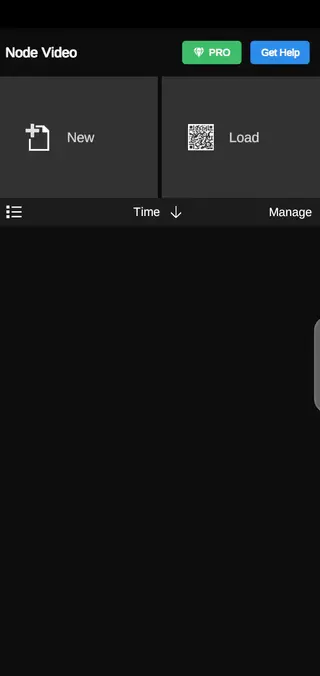
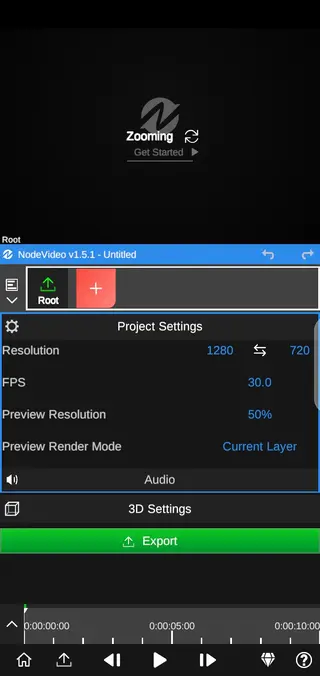
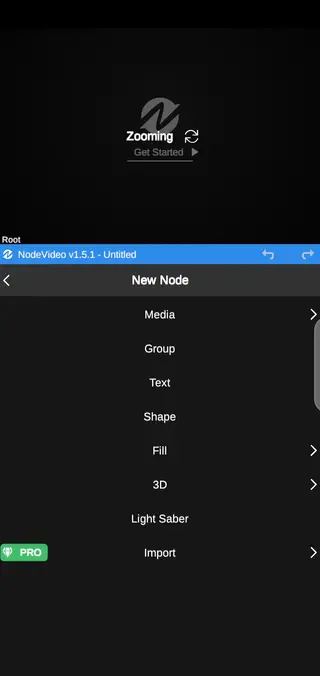
Node Video uses a timeline-based workflow similar to many desktop editors. You can drag and reorder layers, trim clips, and zoom in on the timeline for frame-level precision. Each layer has its own controls for opacity, blending mode, transform, and effects.
Keyframe animation is available for many properties, such as position, scale, rotation, and effect parameters. By adding keyframes, you can create smooth transitions, motion graphics, and dynamic text animations without leaving your phone.
Creative Effects and Visual Styles
The app includes a range of creative effects, from blur and glow to stylized filters and distortion tools. You can combine several effects on a single layer and adjust their order to fine-tune the final look.
Curves and masks give you more control over where and how effects appear. For example, you can apply a blur only to the background while keeping your subject sharp, or use a curved mask to reveal a scene gradually.
Performance and Device Requirements
Node Video is designed for devices running at least Android 6.0 or higher. Performance depends on your hardware, especially when working with many layers, high resolutions, or heavy effects.
To keep editing smooth, you can lower preview resolution, hide certain layers temporarily, or render sections when necessary. Closing other heavy apps while editing can also help free additional memory.
FAQs
Pros
- Desktop-style, multi-layer editing on mobile devices
- Many advanced tools and effects available in the free version
- Supports detailed speed control, masking, and color correction
- Audio-reactive features for music-based edits
- Can edit and preview projects offline after installation
- Regular updates with new features and improvements
Cons
- Advanced interface can be challenging for complete beginners
- High-end features may require a powerful device
- Some tools and assets are locked behind in-app purchases
- Complex projects can be demanding on storage and memory
Conclusion
Node Video brings powerful, layer-based video editing to Android, making it a strong choice for creators who want more control than simple mobile editors provide. Download the latest APK from our website to experiment with advanced effects, flexible timelines, and detailed color tools directly on your phone or tablet.




Comments
No approved comments yet.