
O2 TV SK
O2 TV SK is the official television app from O2 Slovakia that brings Slovak and international channels, movies and series to your Android phone or tablet. It is designed for subscribers who want to watch live TV and on‑demand content wherever they are.
With this app you can stream popular Slovak channels, restart shows from the beginning, browse a catalog of films and series, and manage your O2 TV profile on mobile. Picture quality adapts to your connection, with support for HD streams on compatible devices.
You can download the original O2 TV SK APK directly from our website and install it manually on supported Android devices, then sign in with your O2 TV account to start watching.
Rate this app
App details
- App name
- O2 TV SK
- Category
- Entertainment
- Version
- v2.48.0-rc.0
- Size
- 45.4 MB
- Requirements
- 6 and Up
- Package name
- tv.smartlabs.app.o2sk
- Publisher
- O2 Slovakia, s.r.o.
- Price
- Free
- Mod
- No
- Downloads
- 140,004
- Rating
- 4.6 / 5
- Rating count
- 40,000
- Play Store
- Yes
- Requires root
- No
- Offline support
- No
- Contains ads
- No
- In-app purchases
- Yes
- Updated
- Jun 3, 2026
- Age rating
- Rated for 3+
Table of contents
What is O2 TV SK?
O2 TV SK is an Android entertainment app from O2 Slovakia that extends the O2 TV service to mobile devices. It focuses on Slovak users and offers live TV channels, films, series and other on‑demand programs in one place.
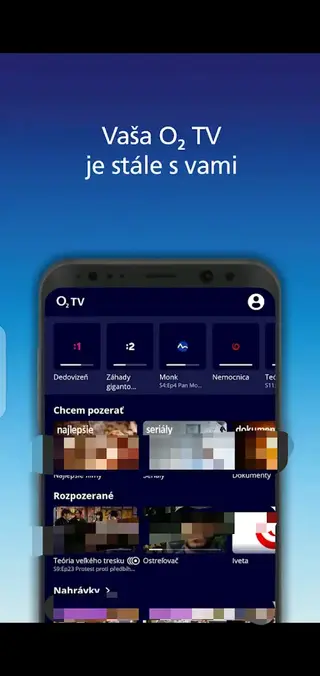
After signing in with a valid O2 TV account, you can watch dozens of national and selected international channels, including news, sports, movies, kids and lifestyle content. Many programs support time‑shift functions such as restart and archive playback, so you can catch up on shows you missed.
O2TV SK Android is the first available mobile application providing high-quality entertainment services. This mobile application is specially developed for Slovakian Android users to get a nonstop entertainment experience. Therefore, get various types of unique entertainment content on Android devices. Get details related to the available unique features of this app. Get similar entertainment services with Cricfy TV and Kora Extra.
The app interface is optimized for touch screens and supports user profiles, favorites and channel lists. Audio tracks and subtitles are typically available in Slovak, and for some content also in other languages where licensed. Streams can reach HD quality on a stable connection and suitable device.
Why download O2 TV SK APK from our website
Downloading the O2 TV SK APK from our website lets you get the official installation file directly on your device without going through extra steps. This is useful if the Play Store version is not available for your device, or if you prefer to keep a backup installer.
Once you download the APK file from our O2 TV SK page, you can install it manually, sign in with your O2 TV login and immediately access your subscribed channels and libraries. Our download section is kept focused on the current release listed for this app, so you do not need to search multiple pages to find it.
How O2 TV SK is useful for Slovak viewers
O2 TV SK is particularly useful for users in Slovakia who already have an O2 TV subscription and want flexibility in how they watch television. Instead of relying only on a set‑top box, you can stream the same channels on mobile while traveling, commuting or relaxing at home.
The app combines live TV, catch‑up and a catalog of movies and series, so it can replace traditional television viewing for many people. Support for Slovak audio and subtitles makes it comfortable for local audiences, while the mix of Slovak and international channels covers news, sports, kids content and films in one subscription.
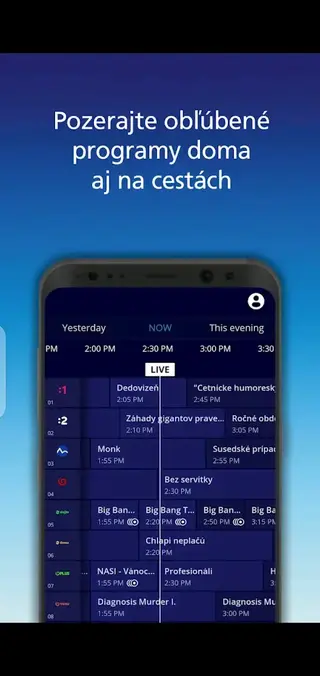
Time‑shift and program archive options, where available, help you fit TV into a busy schedule, and the mobile interface makes browsing the TV guide and content library quick and simple.
How to download and install O2 TV SK APK
You can get the official O2 TV SK APK file directly from our website and install it on your Android device in a few simple steps.
Scroll to the download area on this O2 TV SK page on our website.
Tap the download button for the available O2 TV SK APK file.
Wait until the APK finishes downloading to your device.
Open your device settings and enable app installs from unknown sources for your browser or file manager if needed.
Locate the downloaded APK in your Downloads folder and tap it.
Confirm the installation prompts to install O2 TV SK on your device.
Open the app and sign in with your O2 TV account to start watching.
After installation you can keep the APK file as a local backup or delete it and update the app later through a new download from our website when a newer version is listed.
Features
Live Slovak and international TV channels
Access a wide range of Slovak national channels along with selected international stations once you sign in with your O2 TV account.
Movies and TV series catalog
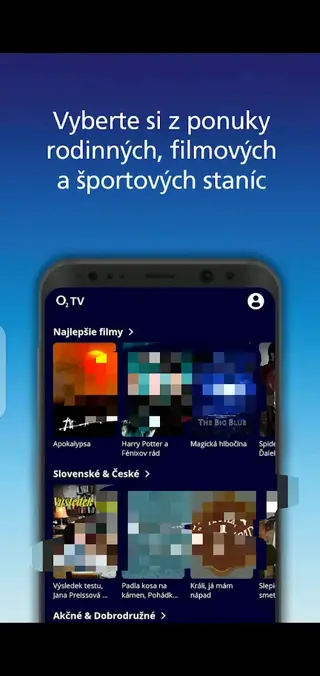
Browse and watch a library of films and series included in your O2 TV plan, with titles organized by genre and popularity.
Time shift and catch up
For supported channels you can restart ongoing programs or watch shows from the recent archive so you do not miss favorite content.
HD streaming quality
The app supports high definition streams on compatible devices and connections, with adaptive bitrate to keep playback smooth.
Slovak audio and subtitles
Many channels and titles provide Slovak audio or subtitles, with additional language tracks available where licensed.
User friendly interface
A clean layout with categories, electronic program guide and search helps you quickly find channels, movies or episodes.
Profiles and favorites
Create and manage basic viewing preferences such as favorite channels or saved content lists linked to your O2 TV account.
Cross device viewing
Watch O2 TV content on your phone or tablet so you can continue viewing away from the main TV at home.
Screenshots
Account and subscription requirements
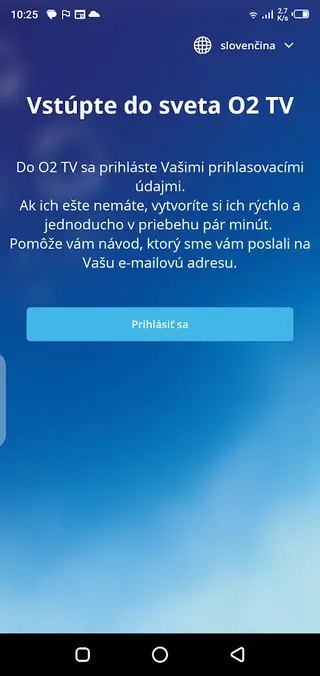
To use O2 TV SK you must have an eligible O2 TV service from O2 Slovakia. During the first launch the app asks you to sign in using your O2 TV credentials or through the login method provided by your operator. The channels, features and on‑demand library you see in the app depend on your active tariff and any extra packages you have purchased.
If you cannot log in, you should check your O2 TV contract or contact O2 Slovakia support, as account management and subscription changes are handled by the operator, not inside the APK file itself.
Streaming quality and data usage
O2 TV SK uses adaptive streaming, which adjusts video quality according to your current connection speed. On Wi‑Fi or fast mobile data, you can usually watch in HD quality. On slower connections, the app reduces resolution to keep playback from buffering.
Streaming TV can use a significant amount of data, especially at higher resolutions. If you watch over mobile networks, monitor your data allowance or connect to Wi‑Fi when possible to avoid unexpected charges from your operator.
Device compatibility and requirements
The O2 TV SK APK listed on our website is built for Android devices that meet the minimum version requirement provided in the app details. Most recent phones and tablets that run Android 6 or newer and have Google services can install the app.
Performance can vary on older or low‑end hardware, especially when streaming HD channels. For the best experience, use a device with stable Wi‑Fi, sufficient RAM and up‑to‑date system software.
FAQs
Pros
- Official mobile app for O2 TV Slovakia subscribers
- Offers Slovak and international live TV channels in one place
- Includes movies and series library alongside live channels
- Supports HD streaming quality on capable devices
- Provides Slovak audio and subtitle options for many programs
- Time shift and catch up available on supported channels
Cons
- Requires an active O2 TV subscription to watch content
- Focused on Slovak market so availability outside Slovakia is limited
- Continuous internet connection is needed for streaming
- Some content and features may vary by subscription plan
Conclusion
O2 TV SK is a practical companion app for O2 TV customers in Slovakia who want to watch live channels and on‑demand content on Android. You can download the official APK from our website, install it on a compatible device, and then enjoy your subscribed TV service on the go once you sign in with your O2 TV account.




Comments
No approved comments yet.