
OctoStream
OctoStream is an Android streaming app built around Trakt integration, designed mainly for Spanish-speaking users who love movies and TV series. It helps you manage and enjoy your Trakt library directly on your phone or tablet.
With this app you can browse a large catalog of films and shows, link your Trakt account, and sync what you watch across devices. Streaming, organization, and discovery all stay in one place.
You can download the official OctoStream APK directly from our website and install it on compatible Android devices to start watching in just a few minutes.
Rate this app
App details
- App name
- OctoStream
- Category
- Entertainment
- Version
- v1.9.0
- Size
- 24.87 MB
- Requirements
- 5.0 and Above
- Package name
- com.octostream
- Publisher
- OCTO Stream
- Price
- Free
- Mod
- No
- Downloads
- 86,166
- Rating
- 4.7 / 5
- Rating count
- 36,003
- Play Store
- No
- Requires root
- No
- Offline support
- No
- Contains ads
- No
- In-app purchases
- No
- Updated
- May 19, 2026
- Age rating
- Rated for 7+
Table of contents
What is OctoStream App
OctoStream is an Android entertainment application that connects with your Trakt account and offers access to a wide catalog of movies and TV series in Spanish. Instead of acting as a traditional video-on-demand platform, it focuses on organizing and streaming content linked to your Trakt profile.
The app is especially oriented to Spanish-speaking users, so most of the available titles, descriptions, and interface texts appear in Spanish. This focus helps fans of Spanish content find films, series, and episodes quickly without language barriers.
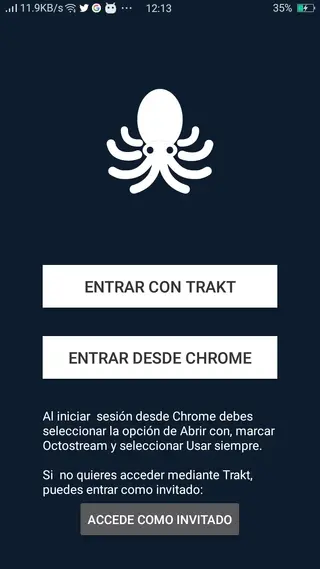
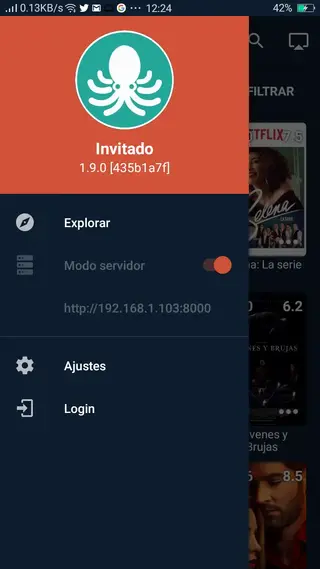
You can sign in with your Trakt account, use a Chrome login option, or explore the app as a guest. Guest mode lets you test the interface, browse categories, and check the main features before you decide to link your main account.
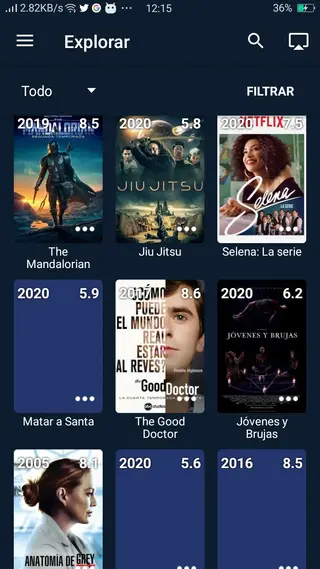
Within the app you will find sections dedicated to movies, series, and other categories, each with descriptions and basic information to help you decide what to watch. OctoStream also supports Chromecast, so you can send streams from your phone to a compatible TV and enjoy content on a larger screen.
There are tons of more amazing features available in this application, which you can explore in it. Users can explore many similar apps on this site such as Logan Play and Chiwi TV. If you still have any queries, then feel free to contact us, through the comment section below.
Why Download OctoStream APK from Our Website
Downloading the OctoStream APK from our website gives you direct access to the official installation file for Android. You do not need to search anywhere else, and you can install the app on smartphones or tablets that meet the minimum system requirements.
By using the APK from our site, you can:
Install OctoStream on devices where the app is not available through app stores.
Keep a backup of the current version in case you want to reinstall it later.
Access Spanish-language streaming and Trakt integration quickly, without extra registration steps outside the app.
The file listed on this page corresponds to the version and package name shown in the app details, so you can check compatibility with your device before installing.
How OctoStream is Useful for Movie and Series Fans
OctoStream is useful for users who rely on Trakt to manage what they watch and prefer an experience tailored to Spanish content. The app brings your lists, favorites, and watching habits into a single interface, making it easier to continue where you left off.
Well-organized categories, search filters, and descriptions help you discover new movies and shows that match your taste. Because the interface focuses on Spanish, it feels natural for users who want to browse and read summaries in their own language.
Support for Chromecast adds extra convenience. You can start streaming on your phone and then cast it to a bigger screen to watch with friends or family. Combined with smooth playback on decent connections, OctoStream can become a central hub for your daily entertainment.
How to Download and Install OctoStream APK
You can get the OctoStream APK file directly from our website. Follow these steps to download and install it on your Android device:
Scroll to the download area on this page and tap the download button for the OctoStream APK.
Confirm the download in your browser and wait until the APK file is fully saved on your device.
Open your device settings, go to security or privacy options, and enable installation from unknown sources if it is not already allowed.
Locate the downloaded APK in your downloads folder using a file manager.
Tap the APK file and follow the on-screen prompts to complete the installation.
Once installed, open OctoStream, choose guest mode or sign in with your Trakt account, and start exploring the catalog.
After the first setup, you can update the app by downloading newer APK versions from our website when they become available.
Features
Trakt account integration
Connect your Trakt account to sync watch history, lists, and preferences across devices.
Spanish-focused catalog
Browse movies and series primarily in Spanish, with titles and descriptions oriented to Spanish-speaking users.
Multiple login options
Access the app using Trakt, Chrome-related options, or continue as a guest to test features first.
Online streaming
Stream movies and TV episodes directly on your Android phone or tablet with compatible internet speeds.
Downloadable content support
Save selected titles inside the app for later viewing, depending on what the app currently allows.
Chromecast support
Cast video from your Android device to a compatible TV to enjoy content on a larger screen.
Organized categories
Explore well-defined sections for movies, series, and other content to find something to watch quickly.
Filter and search tools
Use filters and search to narrow results by different criteria and locate specific titles faster.
Screenshots
App compatibility and requirements
OctoStream targets Android phones and tablets that meet the minimum system requirement listed for the APK version. Devices running Android 5.0 or higher generally have the best chance of working correctly with this package.
Performance will depend on your hardware and network quality. For smoother playback, a stable broadband or mobile data connection is recommended, especially when casting content to a TV through Chromecast.
Trakt integration and library management
One of the core strengths of OctoStream is its connection to Trakt. After signing in, the app can reflect your watch history, favorite lists, and progress across different devices and platforms that also support Trakt.
This integration helps you avoid losing track of what you have already watched. You can open an episode on your TV or computer and then continue from your Android device, or the other way around, with your status kept in sync.
Tips for a better streaming experience
To get the most out of OctoStream, keep your app version updated using the APKs published on our website. New versions may improve stability, compatibility, and feature behavior.
Using Wi-Fi or a strong mobile data signal usually delivers smoother playback than weak connections. If you plan to cast via Chromecast, make sure both your phone and TV device are connected to the same network.
FAQs
Pros
- Deep integration with Trakt for tracking movies and series
- Interface and catalog oriented to Spanish-speaking users
- Multiple login modes including guest access
- Supports Chromecast for TV playback
- Organized categories and search filters for easy navigation
- APK available directly from our website for manual installation
Cons
- Mainly focused on Spanish content, which may not suit all users
- Requires a stable internet connection for smooth streaming
- Not available on Google Play based on current information
- Offline usage is limited because content relies on online streaming
Conclusion
OctoStream is a practical option for Spanish-speaking movie and series fans who rely on Trakt and want a simple Android app for streaming and tracking what they watch. By downloading the APK from our website, you can install it on compatible devices, link your account, and enjoy an organized, Chromecast-ready viewing experience.




Comments
No approved comments yet.