

OkeStream
Okestream is an Android IPTV app focused on live football streams from international leagues and tournaments. It brings live matches, schedules, and highlights together in one simple interface on your phone or tablet.
With this app, you can follow your favorite teams and watch matches in different video qualities using multiple streaming servers. The official APK file for Okestream is available on our website, so you can download and install it directly on compatible Android devices.
Okestream mainly targets Indonesian football fans, but anyone comfortable with the language can use it to enjoy live football action, important fixtures, and post-match highlights without subscription fees.
Rate this app
App details
- App name
- OkeStream
- Category
- Entertainment
- Version
- v13
- Size
- 5.48 MB
- Requirements
- 4.1 and Above
- Package name
- com.oke.stream
- Publisher
- OKESTREAM
- Price
- Free
- Mod
- No
- Downloads
- 69,307
- Rating
- 4.6 / 5
- Rating count
- 21,982
- Play Store
- No
- Requires root
- No
- Offline support
- No
- Contains ads
- Yes
- In-app purchases
- No
- Updated
- May 19, 2026
- Age rating
- Rated for 3+
Table of contents
What is Okestream APK
Okestream APK is a sports streaming application for Android that focuses on football (soccer) content. It works as an IPTV-style app, giving users access to different online streams for live matches, tournaments, and replays.
The app offers multiple servers for each event, so if one link fails or buffers too much, you can quickly switch to another. Video quality is adjustable, letting you choose higher resolution when you have strong internet or lower quality to save data and keep the stream smooth.
Okestream is mainly available in the Indonesian language and is designed for viewers who want a simple way to watch football on mobile without logging in or buying a subscription plan. Once you install the APK on your Android device, you can open the app, browse the schedule, and start streaming live games directly.
There is a lot more, that you can explore in this application. So, download this application and have the best entertainment. If you have any queries about it, then feel free to contact us through the comment section below. Users can explore more IPTV apps here like Futbal Max and CEP TV.
Why Download Okestream for Android
Football fans download Okestream because it brings live matches and highlights into a compact, easy-to-use Android app. Instead of jumping between different sites for streams and schedules, you can manage everything in one place.
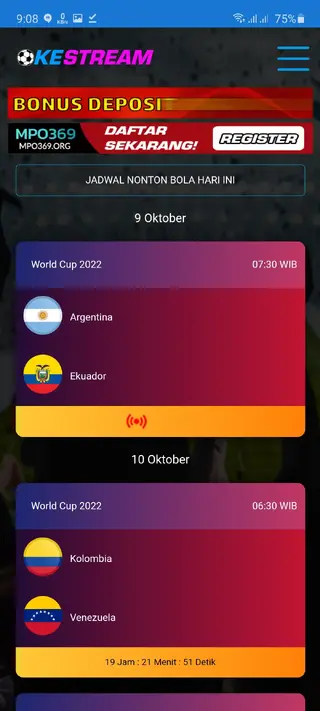
The app lists ongoing and upcoming fixtures, so you can see when your team plays and plan ahead. When match time arrives, you choose a server and start watching right inside the app.
Another reason to download Okestream is that it does not require user registration or paid plans in the version provided here. You can install the APK, open it, and start exploring streams immediately. The APK file is available directly on our website, so you can get the latest version and update it manually whenever needed.
How Okestream Is Useful for Football Fans
Okestream is especially useful for fans who want flexible access to football on mobile devices. You can watch matches while traveling, at work breaks, or at home without relying on a TV broadcast.
The scheduling feature helps you follow international tournaments, league fixtures, and special events in a single timeline. This is handy when multiple games are played on the same day and you do not want to miss key kickoffs.
Adjustable quality and multiple streaming servers make the app practical for different network conditions. If your connection is unstable, you can lower the resolution or switch to another server to reduce buffering.
For Indonesian users, the local language interface makes navigation familiar and straightforward. Even if you are not fluent, the simple layout and match listings are easy enough to understand once you get used to them.
How to Download and Install Okestream APK
You can download the official Okestream APK file directly from our website and install it manually on your Android device. Follow these basic steps to get started.
Scroll to the download area on this page and tap the Okestream APK download button.
Wait until the APK file finishes downloading to your Android phone or tablet.
Open your device settings, go to the security or privacy section, and enable installation from unknown sources if it is disabled.
Use a file manager to locate the downloaded Okestream APK, usually in the Downloads folder.
Tap the APK file and confirm the installation prompts on screen.
Once installation completes, open Okestream from your app drawer and start exploring live football streams.
Whenever a new release becomes available on our website, you can repeat these steps with the latest APK to update the app manually.
Features
Live football streaming
Watch live football matches from different international leagues and tournaments directly on your Android device.
Multiple streaming servers
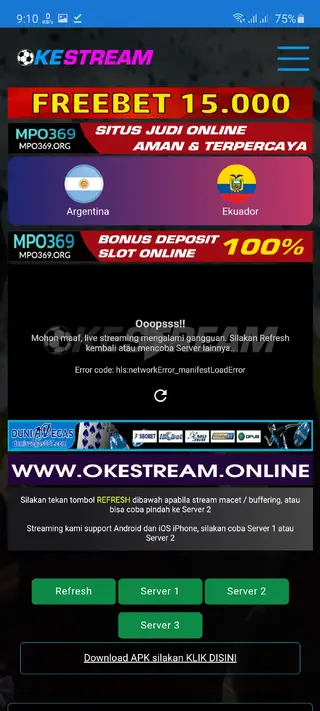
Choose from several servers for each match to find a stream that plays more smoothly on your connection.
Adjustable video quality
Switch between higher and lower resolutions to balance picture quality and data usage based on your internet speed.
Match schedules and fixtures
View upcoming and ongoing matches in a dedicated schedule section so you always know when games will start.
Highlights and replays
Access match highlights and replays to catch key moments if you missed the live broadcast.
Free to use
Use the app without paid subscription plans or recurring fees in the version offered here.
No registration required
Start streaming without creating an account or signing in with email or social profiles.
Simple user interface
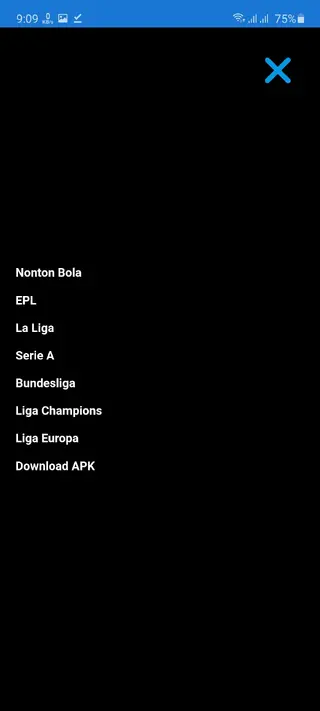
Navigate through matches, servers, and settings with a straightforward and beginner-friendly design.
Screenshots
App compatibility and requirements
Okestream targets Android users who want lightweight sports streaming. According to the available information, the app requires Android 4.1 or higher, which covers most modern smartphones and tablets. This makes it suitable for older devices that may not handle heavier streaming apps well.
For a good viewing experience, a stable Wi-Fi or mobile data connection is important. Higher resolutions need more bandwidth, while lower resolutions work better on limited connections.
Tips for smoother streaming in Okestream
Because Okestream relies on online streams, performance can vary with your network and server load. You can improve your experience with a few simple habits.
Connect to a reliable Wi-Fi network whenever possible for more stable playback.
If the stream buffers frequently, lower the video quality inside the app settings if that option is available.
Try switching to a different server for the same match if the first one is unstable.
Close background apps that may consume bandwidth or system resources.
These small adjustments can help reduce buffering and keep streams more consistent during live matches.
Safety and legal considerations
Okestream acts as a streaming tool that finds and plays football content from online sources. Availability of streams and the way they are provided can vary by region and over time.
Users should always follow local laws and regulations related to online streaming and sports broadcasting in their country. Our website only provides the original APK file as shared in the source data, and you decide how to use the app on your device.
FAQs
Pros
- Provides live football streams from multiple servers in one app
- Shows match schedules and fixtures to track upcoming games
- Free to use with no mandatory registration in this version
- Adjustable video quality helps handle slow or unstable networks
- Lightweight APK suitable for older Android versions
Cons
- Interface and content are mainly in Indonesian, which can be hard for non-speakers
- Requires a stable internet connection and does not work offline
- Streaming links can sometimes buffer or stop depending on server load
- Not available on the official Google Play Store in many regions
Conclusion
Okestream APK offers a straightforward way to watch live football and highlights on Android, especially for Indonesian users. If you want a simple, free IPTV-style app focused on soccer, you can download the latest Okestream APK directly from our website and follow the schedule to enjoy matches on your mobile device.




Comments
No approved comments yet.