
Old Roll
Old Roll is a vintage camera app that recreates the look and feel of classic film cameras on your Android phone. It lets you shoot with ready-made filters that mimic popular analog films and lenses.
Instead of editing for hours, you choose a camera style, frame your shot, and capture it with built-in effects applied instantly. The app focuses on a realistic retro look, light leaks, and film grain that feel close to real analog photography.
As you know, there are multiple types of cameras, which people use to take pictures. Similarly, there were some vintage cameras, that were quite popular for classic photography and people loved to use them. EnhanceFox and Butter Camera are popular apps used as Camera. Hence, try the new app with unique features.
You can download the official Old Roll APK directly from our website and start shooting nostalgic photos on your mobile or tablet within minutes.
Rate this app
App details
- App name
- Old Roll
- Category
- Photography
- Version
- v6.4.5
- Size
- 180.83 MB
- Requirements
- 5.0 and Up
- Package name
- com.accordion.analogcam
- Publisher
- Accordion
- Price
- Free
- Mod
- No
- Downloads
- 120,000
- Rating
- 4.6 / 5
- Rating count
- 32,000
- Play Store
- Yes
- Requires root
- No
- Offline support
- Yes
- Contains ads
- Yes
- In-app purchases
- Yes
- Updated
- Jun 1, 2026
- Age rating
- Rated for 3+
Table of contents
What is Old Roll Android App
Old Roll is a photography app for Android that simulates classic film cameras. Developed by Accordion, it offers a collection of camera presets that are inspired by real vintage models and film stocks. Each preset comes with its own color tone, grain, frame style, and vignetting so photos look like they were shot on an old analog camera.
The app works as a live camera rather than only a photo editor. You choose a camera style such as Classic M, 503 CM, INS P, TOY F, ROL 3.5, NK F, Leather Cavity, Cheese, Kodak Portra 400, Kira, and others, then preview the effect in real time before pressing the shutter.
Old Roll targets users who enjoy retro aesthetics, instant film vibes, and film-like colors without needing advanced editing skills. It runs on Android 5.0 and above, and you can install the APK on both phones and tablets.
Why Download Old Roll APK from Our Website
Downloading Old Roll APK from our website lets you get the latest available version quickly and install it on any compatible Android device, even if the Play Store is slow or not accessible on your phone. The official package name and version details match the Play Store release, so you can enjoy the same core experience.
With the APK file ready on our download page, you can save it for offline installation, share it between your devices, or reinstall it later without repeating the search process. This is especially useful if you like to keep a collection of photography tools ready to use.
Once installed, you can immediately start shooting with retro cameras, choose from different aspect ratios, and create social media ready photos that stand out from common digital filters.
How Old Roll Is Useful for Mobile Photography
Old Roll is useful for users who want stylish photos without complex editing. The app offers camera profiles that are tuned to deliver a specific look straight out of the camera, so you focus on composition instead of sliders.
Content creators, influencers, and casual users can all benefit from its quick workflow. You open the app, select a camera style, shoot, and share. The built-in framing options help you create content for stories, posts, and profile feeds with minimal cropping.
Because many effects work offline, you can shoot with film-style filters anywhere, including when you do not have an internet connection. This makes Old Roll practical for travel, street photography, and everyday snapshots.
How to Download and Install Old Roll APK
You can download the Old Roll APK file directly from our website and install it on any supported Android device. Follow these steps to get started:
Scroll to the download section on this page.
Tap the download button to save the Old Roll APK file to your device.
Wait until the download completes and locate the file in your Downloads folder or notification bar.
If this is your first manual install, enable installation from unknown sources in your Android settings when prompted.
Tap the APK file, review the permissions, and press Install.
After installation finishes, open Old Roll from your app drawer and grant camera and storage permissions to start shooting.
Once installed, you can keep the APK stored on your device or backup drive so you can reinstall Old Roll later without downloading it again.
Features
Retro camera simulations
Shoot with camera profiles inspired by classic models like Classic M, 503 CM, INS P, TOY F, ROL 3.5, NK F, and more.
Film-style filters and effects
Apply light leaks, film grain, soft tones, and vintage colors in real time while you frame your shot.
Instant live preview
See how each filter looks through the viewfinder before taking the photo, so you do not need heavy post editing.
Multiple frame sizes
Capture in different aspect ratios suitable for feeds, stories, and prints for better composition control.
Simple and user friendly interface
Use an intuitive layout with large controls so beginners can start shooting vintage photos instantly.
Classic film stock looks
Access looks inspired by film such as Kodak Portra 400 and other popular analog color profiles.
Regular effect updates
Get new cameras, filters, and minor refinements through ongoing updates over time.
Social media ready output
Create aesthetic photos suited for Instagram, TikTok, and other platforms without extra editing apps.
Screenshots
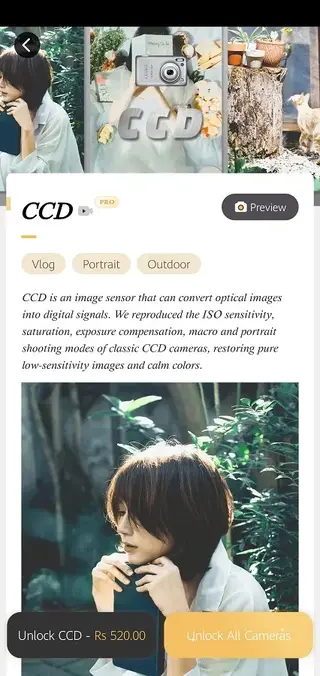
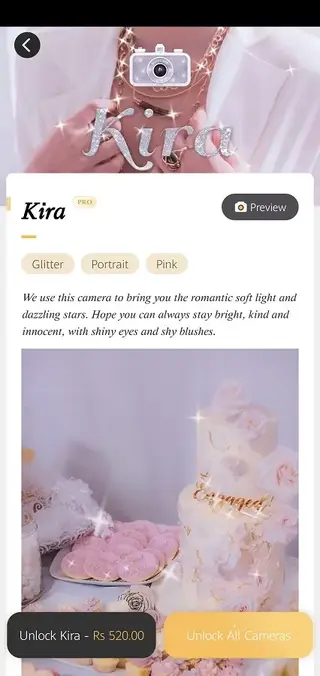
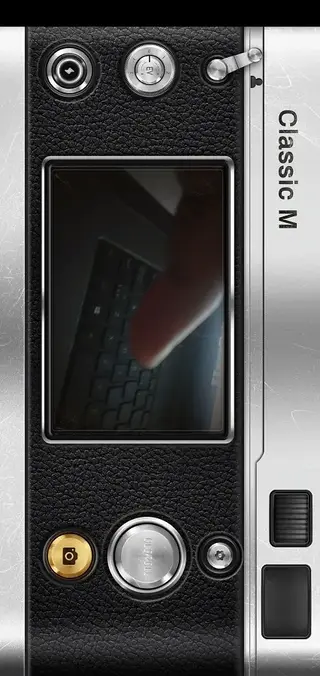
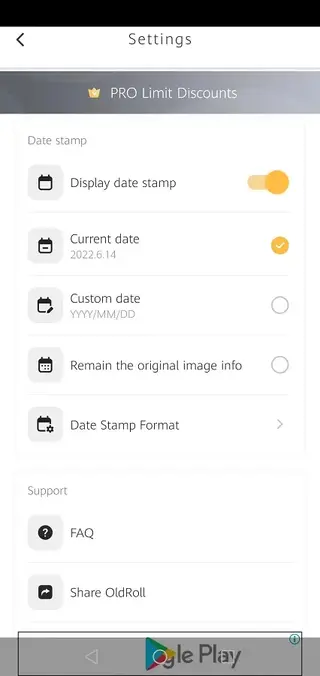
Old Roll Camera Presets and Styles
One of the main attractions of Old Roll is its collection of camera presets, each modeled after a different classic style. Options like Classic M, 503 CM, INS P, TOY F, ROL 3.5, NK F, Leather Cavity, Cheese, Kodak Portra 400, Kira, and others give you a variety of moods ranging from warm and nostalgic to cool and cinematic.
Each preset adjusts color balance, contrast, grain, and vignetting in a coordinated way, so your photos keep a consistent aesthetic within a series. This is especially helpful when you want to build a unified visual style for your social media feed or project.
Editing and Sharing Workflow
Old Roll focuses on getting the image right at the moment of capture, but it also supports basic tweaks after shooting. You can review your shots, select the ones you like, and export them in high quality for other apps or direct upload.
The app integrates smoothly with Android sharing options, so posting to Instagram, TikTok, WhatsApp, or cloud storage takes only a few taps. Because the filters are already baked into the image, you rarely need another editor, which keeps your workflow fast and simple.
Device Compatibility and Permissions
Old Roll is designed for Android devices running version 5.0 and above. It works on a wide range of phones and tablets, though performance can vary depending on your hardware. For the best experience, a device with a reasonably recent processor and camera is recommended.
The app requires permissions such as camera access to capture photos and storage access to save and load images. Granting these permissions ensures that the live preview, saving, and sharing features function correctly.
FAQs
Pros
- Realistic vintage camera looks with ready-made profiles
- Live previews make it easy to compose and shoot with filters applied
- Simple interface suitable for beginners and casual users
- Multiple aspect ratios tailored to social media formats
- Works for many features even when offline, ideal for travel use
Cons
- Free version shows ads during use
- Some premium camera packs and filters require in-app purchases
- Limited manual control compared to advanced DSLR-style camera apps
- Processing may feel heavy on low-end or older Android devices
Conclusion
Old Roll offers a straightforward way to capture film-style photos on Android without complex editing. If you like retro aesthetics and instant vintage filters, downloading the APK from our website lets you install the official app quickly and start shooting nostalgic images right away.




Comments
No approved comments yet.