

Open Tunnel
Open Tunnel is a lightweight VPN client for Android that lets you create secure, tunnel-based connections using custom configuration files. It is designed for users who want more control over how they connect and route their mobile traffic.
With support for multiple connection modes and manual server integration, Open Tunnel helps you hide your IP address, bypass regional restrictions, and protect your data on public networks. You can download the official Open Tunnel APK directly from our website.
The app focuses on simplicity, so both beginners and advanced users can set up a secure VPN tunnel in just a few steps and start browsing with better privacy on their Android phones or tablets.
Rate this app
App details
- App name
- Open Tunnel
- Category
- Tools
- Version
- v1.0.4-rev9
- Size
- 19.02 MB
- Requirements
- 4.1 and Above
- Package name
- com.opentunnel.app
- Publisher
- Rooster Kid
- Price
- Free
- Mod
- No
- Downloads
- 854,756
- Rating
- 4.4 / 5
- Rating count
- 43,921
- Play Store
- Yes
- Requires root
- No
- Offline support
- No
- Contains ads
- No
- In-app purchases
- Yes
- Updated
- May 11, 2026
- Age rating
- Rated for 7+
Table of contents
What is Open Tunnel APK
Open Tunnel APK is an Android VPN tool that uses a tunnel-based connection system to secure your internet traffic. Instead of relying only on preconfigured servers, it lets you manually add and manage configuration files and payloads, giving you more flexibility in how you connect.
The app supports different protocols and connection modes depending on your configuration file, which can help you encrypt your traffic, mask your IP address, and reach content that is not normally available in your region. It is commonly used to improve privacy on mobile networks and Wi-Fi hotspots.
Open Tunnel is free to install and easy to operate, with a clean, user-friendly interface. Once you load a working config file, the app routes all or selected traffic through the secure tunnel so that third parties have less visibility into your online activity.
Why Download Open Tunnel for Android
People download Open Tunnel because it offers more control than many one-tap VPN apps. You are not limited to a fixed list of built-in servers, and you can use custom configs shared by your network provider, organization, or trusted community.
The app helps you:
Secure your connection when using public or shared Wi-Fi networks.
Access apps and websites that may be restricted in your country or by your provider.
Experiment with different tunneling methods and headers to optimize speed and stability.
Use both free and premium server configurations, depending on what you load into the app.
If you want a configurable VPN client instead of a fully locked-in service, downloading Open Tunnel APK from our website is a practical choice.
How Open Tunnel is Useful
Open Tunnel is useful for users who care about privacy, flexibility, and network experimentation. It allows you to protect sensitive activities such as messaging, logins, and online payments by sending them through an encrypted tunnel, depending on the configuration you use.
Because the app accepts external configuration files, it is also handy for mobile carriers, small organizations, and tech communities that share ready-made configs with their users. You can quickly import these files and connect without performing complex manual network setup.
For advanced users, Open Tunnel serves as a compact lab for testing custom payloads, SNI tricks, and different tunneling methods to see which works best on a specific network. For everyday users, it remains simple enough to act as a one-button connect VPN once a profile has been added.
If you don’t want to go through the hard manual configuration system, then you guys should try iTop VPN Mod and DS Tunnel. Both of these are some of the most popular VPNs, which provide similar services.
How to Download and Install Open Tunnel APK
You can download the official Open Tunnel APK directly from our website and install it on your Android device in a few simple steps.
Follow these steps to get started:
Scroll to the download area on this page and tap the Open Tunnel APK download button.
Wait for the APK file to finish downloading to your device.
Open your device settings and enable installation from unknown sources if it is not already allowed.
Locate the downloaded APK in your notifications or file manager and tap it.
Confirm the installation prompts and wait until the process completes.
Launch Open Tunnel from your app drawer, import or create a configuration, and tap connect.
After installation, you can return to this page whenever you need to download the latest available version of Open Tunnel for your device.
Features
Configurable VPN client
Use external configuration files to define servers, ports, payloads, and connection behavior instead of relying only on fixed built-in servers.
Tunnel-based traffic routing
Route mobile data through a secure tunnel so your IP and traffic details are less visible to network observers and trackers.
Bypass regional restrictions
Connect through servers in other locations to help access apps and websites that may be blocked or limited in your country.
Simple, user-friendly interface
Clean layout with clear buttons and status indicators so both beginners and power users can connect quickly.
Multiple connection modes
Support for different tunneling methods depending on the configuration file, which can help you adapt to various networks.
Manual server integration
Add, import, or update configuration files to switch between different servers or providers without reinstalling the app.
Low resource usage
Lightweight application that is designed to run smoothly on most Android devices without heavy battery or memory usage.
No root required
Works on standard Android phones and tablets without needing root access or system-level modifications.
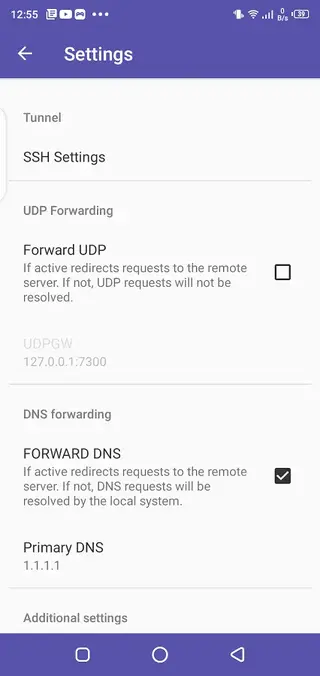
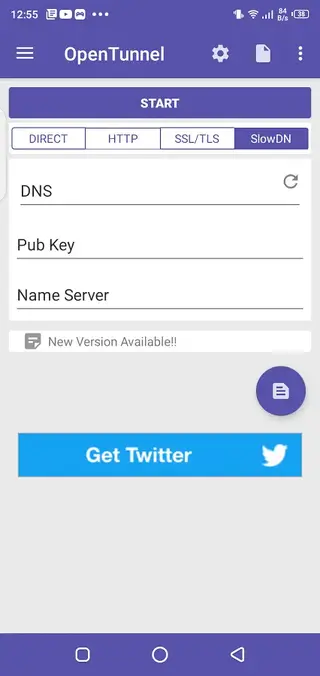
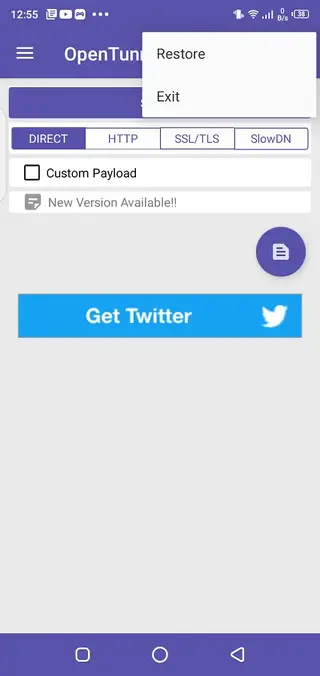
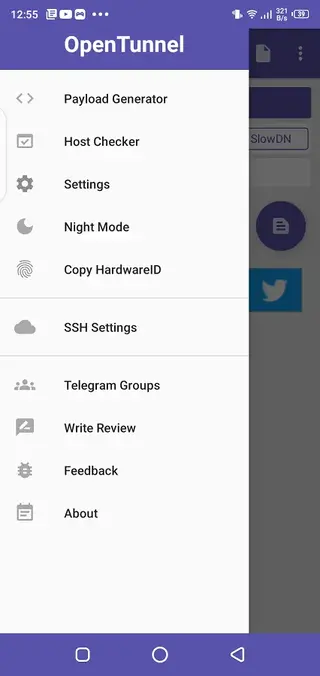
Screenshots

App Details and Compatibility
Open Tunnel is published by Rooster Kid and is available on the Google Play Store as well as in APK format on our website. The package name is com.opentunnel.app, and the version available here matches the latest release listed in our download section.
The app targets Android 4.1 and above, which means it supports a wide range of phones and tablets, including many older devices. Because it does not require root, most users can install it like any other standard application.
Getting Started After Installation
Once you have installed Open Tunnel, you need at least one working configuration before you can connect. In many cases, this will be a config file shared by your network community, service provider, or administrator.
Basic setup usually looks like this:
Open the app and go to the configuration section.
Import or load a config file from your device storage.
Check that server address, port, and payload values are present.
Save the profile and tap the connect button.
Wait for the connection status to show that the tunnel is active.
After the tunnel connects, your selected traffic will start passing through the configured server, and you can browse or use apps as usual.
Security and Privacy Considerations
Open Tunnel provides the client-side tools needed to route your traffic through a tunnel, but the actual level of encryption and privacy depends on the configuration and server setup you use. Always make sure your configuration comes from a source you trust and is designed to use secure protocols.
It is also a good idea to avoid sharing personal configuration files or account details publicly. Treat your configs like credentials, especially if they include login data or premium server access.
FAQs
Pros
- Gives advanced users control over VPN configuration and server setup
- Supports tunnel-based connections that can help protect privacy on public networks
- Lightweight app with a simple and clean user interface
- No root access is required to use the application
- Can be used with both free and premium configuration files depending on your provider
Cons
- Requires external configuration files, which can be confusing for beginners
- Connection quality and speed depend heavily on the configs and servers you use
- May not offer as many built-in one-tap locations as traditional consumer VPN apps
- Some advanced options can be difficult to understand without networking knowledge
Conclusion
Open Tunnel is a flexible VPN client for Android users who want more control over how they connect, route, and protect their mobile traffic. If you are comfortable using or importing configuration files and need a lightweight tunnel-based solution, you can download the official Open Tunnel APK from our website and start securing your connection in just a few minutes.




Comments
No approved comments yet.