

Picto
Picto is a social drawing app that lets you create illustrations and share them with a community of art lovers on Android. It combines a simple canvas with a feed where you can post, discover and discuss artwork.
Users can draw with basic tools, upload images from their gallery, add captions and tags, and follow other artists they like. Everything is designed to be lightweight, so you can quickly sketch ideas and publish them from your phone or tablet.
You can download the official Picto APK directly from our website and install the latest available version on any compatible Android device without needing root access.
Rate this app
App details
- App name
- Picto
- Category
- Entertainment
- Version
- v1.7.0
- Size
- 10.58 MB
- Requirements
- 5.0 and Above
- Package name
- com.vrd.picto
- Publisher
- Vayland
- Price
- Free
- Mod
- No
- Downloads
- 587,143
- Rating
- 4.2 / 5
- Rating count
- 46,712
- Play Store
- Yes
- Requires root
- No
- Offline support
- No
- Contains ads
- Yes
- In-app purchases
- Yes
- Updated
- May 18, 2026
- Age rating
- Rated for 3+
Table of contents
What is Picto Android app?
Picto is an Android entertainment and creativity app focused on digital drawing and art sharing. It gives mobile artists a place to sketch, post their work, and interact with other creators in a dedicated community.
After a quick email-based sign-up, you create your profile and start publishing drawings from your device. You can either draw directly inside Picto using its simple drawing pad or upload artwork saved in your gallery. Each post can include tags and a short description so others can find and understand your piece more easily.
The app also works like a compact social network for artists. You can browse a feed of new artwork, search by keywords or tags, follow your favorite creators, and get notified when they post something new. This makes Picto suitable for both sharing your own work and discovering new styles and ideas.
If you are looking for more similar applications, then don’t worry about it. We have multiple apps, which provide similar services for the users. So, you guys can try NoteIt and Supertype, both of these are quite popular applications.
Why download Picto APK from our website?
Downloading the Picto APK from our website lets you install the official release directly on your Android device, even if you face issues with store access or device compatibility. You get the same package name and version used on Google Play, with no extra modification required.
The app is free to use, so you can join the community, set up your profile, and start drawing without any upfront cost. If you are a beginner, the simple canvas and minimal interface make it easy to start sketching. If you are more experienced, Picto offers a focused audience of people specifically interested in illustrations and doodles.
Our download page keeps the main information about the app, such as version, Android requirement and basic details, in one place so you can quickly check compatibility and then install the APK in a few straightforward steps.
How Picto is useful for artists?
Picto is useful for artists who want a lightweight way to practice drawing and share their work from a mobile device. Instead of just storing sketches locally, you can post them to a community that understands and appreciates digital art.
The app helps you:
Build a small but engaged audience around your artwork by posting consistently and using relevant tags.
Explore the community feed to see how others use color, composition and line work, which can inspire new ideas.
Stay motivated by following artists you like and receiving interactions on your own posts.
Use your profile and gallery as a simple, mobile-friendly portfolio that you can update anytime.
Because everything runs inside a single app, you do not need complex software or a desktop setup to keep drawing and sharing regularly.
How to download and install Picto APK?
You can get the official Picto APK directly from our website and install it manually on your Android phone or tablet. Follow these steps to complete the process safely and correctly on your device.
Scroll to the download section on this page.
Tap the available Picto APK download button.
Wait for the APK file to finish downloading to your device.
If this is your first manual install, open your phone settings and allow installs from your browser or file manager.
Open your file manager and locate the downloaded Picto APK.
Tap the file and confirm Install when the Android installer appears.
Wait for the installation to complete, then tap Open to launch Picto and start setting up your account.
Once installed, you can update to newer versions in the future by downloading the latest APK from our website and installing it over the existing app.
Features
Community-driven art platform
Share your drawings with a community focused on illustrations, doodles and creative sketches.
Simple drawing pad
Use a basic canvas with multiple colors and papers to create quick drawings directly inside the app.
Profile and avatar creation
Set up a personal profile and create or upload a custom profile picture that matches your style.
Upload existing artwork
Import drawings and images from your device storage and publish them as posts in your feed.
Tags and descriptions
Add tags and short descriptions to each artwork so others can find and understand your creations.
Follow artists you like
Subscribe to other users, follow their profiles and see their latest posts in your feed.
Notifications for new posts
Receive alerts when artists you follow publish new drawings or updates.
Search and discovery
Use keyword search and browsing tools to discover specific themes, styles or topics in the community.
Screenshots

Account setup and profile customization
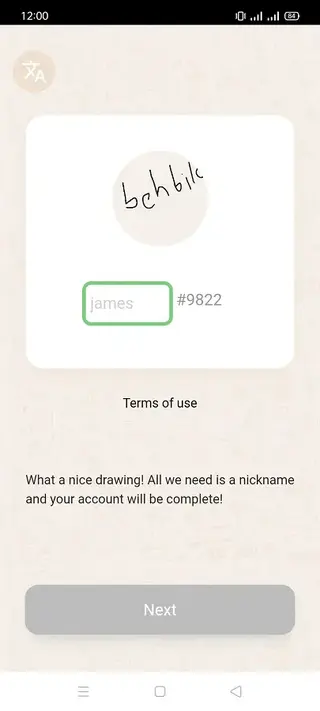
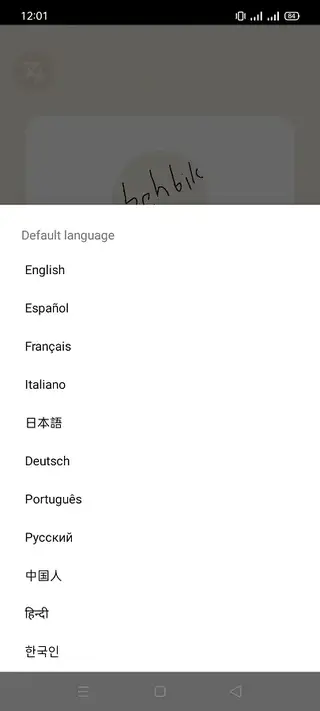
When you first open Picto, you register with a valid email address and create a basic profile. You can then choose a profile picture by drawing one in the app or uploading an image from your device. A recognizable avatar and short bio help other users identify your style and remember your work.
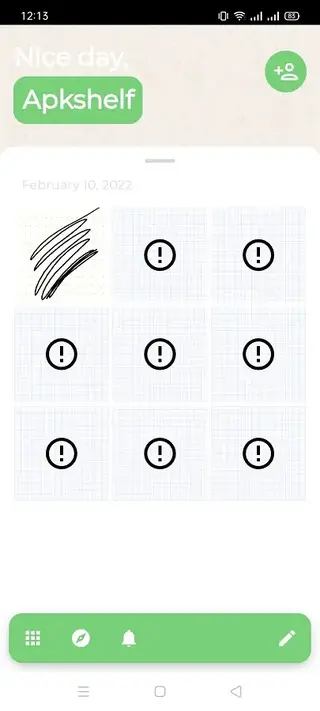
Over time, your profile collects all the drawings you post, effectively acting as a simple portfolio. Other users can visit your profile, follow you, and browse your published pieces in one place.
Creating and sharing your first drawing
To start drawing, open the drawing pad from the main screen and pick your preferred color and paper style. The tools are intentionally simple so you can focus on line work and ideas rather than complex settings. Once your sketch is ready, you can post it with a title, short description, and relevant tags.
After publishing, your drawing appears in the community feed and on your profile. Other users can view it, interact, and discover more of your art through your profile page.
Exploring the Picto community
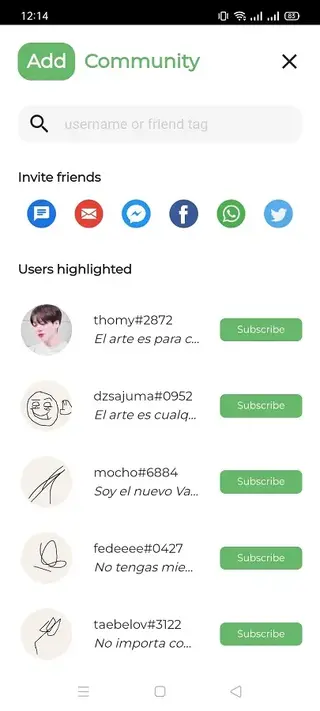
Picto includes a community feed and search options that help you find artwork aligned with your interests. You can browse recent posts, use keywords to look for specific topics, or follow artists whose style you enjoy.
By following creators, you build a personalized feed where you see their latest drawings first. Notification alerts help you stay updated whenever they upload new content, so you never miss fresh inspiration.
FAQs
Pros
- Free to download and use for basic features
- Simple drawing pad suitable for quick sketches
- Dedicated community focused on art and creativity
- Easy profile setup with custom avatar options
- Ability to upload existing artwork from device storage
- Follow system to keep up with favorite artists and styles
Cons
- Drawing tools are relatively basic compared to full-featured art apps
- Requires an internet connection for community features and sharing
- User base and content volume may be smaller than on large social networks
Conclusion
Picto offers a straightforward way to draw, share, and explore artwork from your Android device without complex tools or setup. If you want a focused space to practice sketching, post your creations, and connect with other artists, downloading the Picto APK from our website is a simple way to get started.




Comments
No approved comments yet.