

Play Diary
Play Diary is a video streaming and media management app that lets you watch movies, web series and other shows directly on your Android phone or tablet. It focuses on Hollywood and Bollywood titles along with a built-in player for smooth playback.
With a clean interface, multiple streaming servers and support for many video formats, Play Diary helps you organize and enjoy your media library in one place. You can stream online, mark favorites and continue watching from where you left off.
You can download the official Play Diary APK file directly from our website and install it on compatible Android devices without any extra tools.
Rate this app
App details
- App name
- Play Diary
- Category
- Entertainment
- Version
- v1.0.0
- Size
- 27.95 MB
- Requirements
- 4.4 and Up
- Package name
- com.movie.diary.play
- Publisher
- HunyFunny
- Price
- Free
- Mod
- No
- Downloads
- 100,005
- Rating
- 4.6 / 5
- Rating count
- 25,000
- Play Store
- No
- Requires root
- No
- Offline support
- No
- Contains ads
- Yes
- In-app purchases
- No
- Updated
- May 22, 2026
- Age rating
- Rated for 3+
Table of contents
What is Play Diary App?
Play Diary is an Android entertainment application designed for streaming and organizing video content. It focuses on Hollywood and Bollywood movies, TV shows and web series, and combines them with a built-in media player so you can manage and watch everything inside a single app.
The app groups content into simple sections, so you can quickly move between films, series and other videos. It supports high-quality playback, multiple servers for smoother streaming and an audio-only mode for background listening.
We have more entertainment applications provided here, which you can also access and have fun with. So, if you are willing to have more fun, then we suggest Dizimia and Moonklat. Both of these are quite popular available games, which you can play.
Besides online streaming, Play Diary also works as a local media player. It can scan storage, read different video formats and help you keep all your videos in one elegant player with options like favorites, playlists and trailers.
Why Download Play Diary APK from Our Site
Downloading the Play Diary APK from our website gives you direct access to the latest available version for Android without searching around. The file information, version name and package details are clearly listed, so you know exactly what you are installing.
Our download page keeps everything in one place: app description, Android requirements and the official installer file. You simply save the APK to your device and install it manually, which is especially useful because this app is not listed on Google Play due to its access to premium films.
If you like watching movies and web series on your phone, installing the APK from our site lets you start using Play Diary immediately, with no extra registration or external stores required.
How Play Diary is Useful for Users
Play Diary is useful for anyone who wants a simple way to watch and manage video content on Android. Instead of jumping between different apps and websites, you can open one interface and access a wide mix of titles from Hollywood, Bollywood and other categories.
The built-in player supports many formats and resolutions, so you can play most of your files without installing extra codecs. Features like the favorites section, trailers and remote video links make it easier to discover content and pick up where you left off.
Because Play Diary combines streaming, local playback and basic media management, it can serve as your daily entertainment hub on both phones and tablets, especially when you want to relax with movies or long web series.
How to Download and Install Play Diary APK
You can get the official Play Diary APK file directly from our website. Follow these steps to download and install it on your Android device:
Scroll to the download section on this page and tap the Play Diary APK download button.
Wait for your browser to finish downloading the APK file to your device storage.
Open your phone settings, go to Security or Apps, and enable installation from unknown sources if it is not already allowed.
Use a file manager to locate the downloaded APK file in your Downloads folder.
Tap the APK file, review the permissions and confirm Install.
Once the installation completes, open Play Diary from your app drawer and start exploring the content.
Features
Free to download and use
The app can be downloaded and installed on Android devices without any purchase required.
Large catalog of movies and shows
Offers access to a wide range of Hollywood and Bollywood movies, TV shows and web series.
High quality video playback
Supports high quality display options for a better viewing experience on phones and tablets.
Multiple streaming servers
Provides more than one server for many titles to improve availability and reduce buffering.
Simple and user friendly interface
Clean layout makes it easy to browse categories, open videos and control playback.
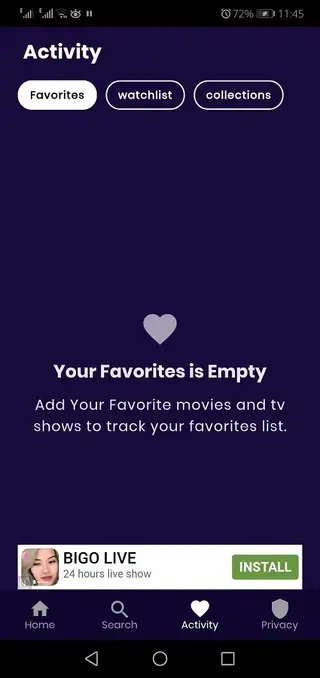
Favorites section for quick access
Users can save movies and episodes to their favorites list to find them again quickly.
Audio playback mode
Audio playback allows you to listen to content in the background similar to a music player.
Remote video links support
Lets you open and play remote video links directly inside the built in player.
Screenshots

Streaming Quality and Performance
Play Diary is designed to deliver smooth playback on a wide range of Android phones and tablets. The app offers multiple servers for many titles, which can help reduce buffering or downtime when one route is slow. You can switch between servers if playback becomes unstable.
The built in video player provides basic controls like play, pause, seek and volume adjustments, along with support for different resolutions depending on the source. On capable devices and networks, you can enjoy sharper output that suits modern displays.
FAQs
Pros
- Simple interface for browsing movies and web series
- Built in media player that supports many video formats
- Multiple servers help reduce buffering issues
- Favorites and trailers make content discovery easier
- Free to download and install on Android
Cons
- Not available on Google Play Store
- Streaming usually requires a stable internet connection
- May not always provide official licenses for all content
Conclusion
Play Diary is a straightforward entertainment app that combines movie and series streaming with a capable media player in one place. If you want an easy way to watch and organize video content on your Android device, you can download the APK from our website and start using it within minutes.




Comments
No approved comments yet.