

PokeDialer
PokeDialer is a themed dialer app that turns your phone calls into classic Pokémon-style battle scenes. Incoming and outgoing calls appear as a retro fight screen instead of the default Android interface.
With customizable trainers and monsters, simple controls and smooth animations, it offers a fun way to personalize your call screen without changing how your phone actually works.
You can download the official PokeDialer APK directly from our website and install it on compatible Android phones and tablets in just a few steps.
Rate this app
App details
- App name
- PokeDialer
- Category
- Communication
- Version
- v2.0.8
- Size
- 11.18 MB
- Requirements
- 7.0 and Above
- Package name
- com.ajamalen.pokedialer
- Publisher
- Alen Ajam
- Price
- Free
- Mod
- No
- Downloads
- 55,904
- Rating
- 4.7 / 5
- Rating count
- 16,982
- Play Store
- No
- Requires root
- No
- Offline support
- Yes
- Contains ads
- No
- In-app purchases
- No
- Updated
- May 16, 2026
- Age rating
- Rated for 7+
Table of contents
What is PokeDialer APK?
PokeDialer APK is a communication and customization app for Android that replaces the standard call interface with a Pokémon-inspired battle screen. When you receive or make a call, the screen shows two trainers and their monsters facing each other in a classic turn-based battle layout.
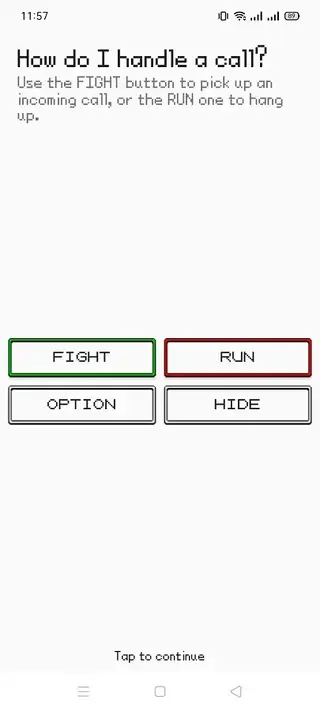
Instead of the usual answer and decline buttons, the app presents options styled as battle commands, such as Fight to answer and Run to reject the call. This creates the feeling that every call is a small battle scene while still keeping the core calling functions intact.
The app focuses on visual customization rather than changing your phone number or network. You use your normal dialer or contacts to place calls, and PokeDialer handles how the screen looks when the call connects. Because it is a lightweight interface overlay, it generally works on most modern Android devices that meet the version requirement.
Fans of the Pokémon franchise will recognize the retro pixel-art style, battle layout and animations. You can choose different trainers and creatures, adjust some visual elements and enjoy a nostalgic look every time your phone rings.
Why download PokeDialer for Android?
PokeDialer is mainly for users who want a more playful and nostalgic way to handle calls. If you grew up with Pokémon games or still enjoy them today, the familiar battle interface can make everyday communication feel more personal and entertaining.
The app gives your device a unique identity without needing complex setup or technical knowledge. Once installed and granted the required permissions, it automatically shows battle-style screens for supported calls. You can switch characters, explore different combinations and keep your call experience fresh.
Because the APK is available directly on our website, you can quickly download the latest version, install it manually and keep it as a dedicated theme for your phone calls.
How PokeDialer can be useful
Although PokeDialer is mostly a fun customization tool, it still offers several practical benefits.
Clear visual distinction for calls: The bright retro battle screen makes it harder to miss an incoming call compared to a plain default interface.
Personal expression: Choosing trainers and monsters lets you align your phone with your interests, which can be especially appealing for Pokémon fans.
Easy to understand controls: The fight and run style options are mapped to normal answer or decline actions, so you do not need to relearn how to use your phone.
Lightweight customization: The app focuses on the call UI rather than deep system tweaks, so it is typically easier to install and manage than full themes or custom ROMs.
Overall, PokeDialer is useful for anyone who wants a more engaging and themed call experience without changing core phone features.
How to download and install PokeDialer APK
You can get the official PokeDialer APK file directly from our website and install it manually on your Android device. Follow these steps to complete the process safely and correctly.
On your Android phone or tablet, open your browser and visit our PokeDialer app page.
Tap the download button to start downloading the latest PokeDialer APK file from our server.
Wait until the APK finishes downloading, then open your Downloads folder or the browser download notification.
If this is your first manual install, enable installation from unknown apps for your browser or file manager in Android settings when prompted.
Tap the PokeDialer APK file and select Install to begin the installation process.
After installation completes, open PokeDialer from your app drawer.
Grant the required permissions, such as call overlay or display over other apps, so the battle interface can appear during calls.
Customize your trainer and monster settings, then place or receive a test call to see the new call screen in action.
If you want to update to a newer version later, download the latest APK from our website again and install it over the existing app.
Features
Pokémon-style battle call screen
Incoming and outgoing calls appear as a retro battle interface with trainers and monsters instead of the stock Android call UI.
Themed answer and decline actions
Use battle-like options such as fighting to answer a call or running to reject it, mapped to the standard call controls.
Character customization
Choose from multiple trainer and monster combinations to personalize how your call screen looks.
Fresh communication interface
Replaces the boring default call interface with colorful animations and a nostalgic game-inspired layout.
Simple setup and controls
After installation and permissions, the app works automatically with straightforward tap controls for calls.
Free to download and use
The APK is offered as a free download and can be installed on compatible Android devices without a purchase.
Ad-free experience
The app is described as not supporting ads, providing a cleaner and less distracting call screen.
User-friendly design
Menus, options and screens are kept simple so both casual users and fans can configure the app quickly.
Screenshots
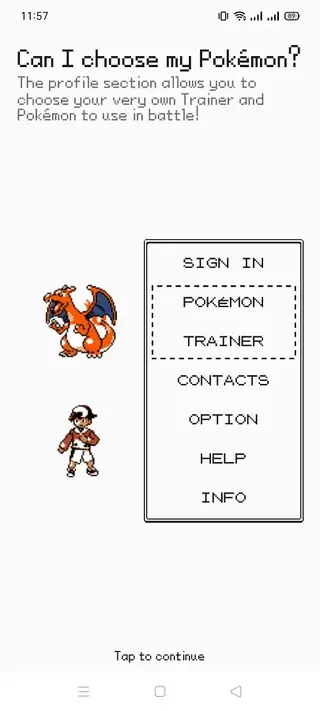
App compatibility and requirements
PokeDialer is built for modern Android devices and, according to the available information, requires Android 7.0 or higher. This covers a wide range of phones and tablets released in recent years.
Because device manufacturers modify Android in different ways, behavior can vary slightly between brands. If you notice issues with the battle screen not appearing, check that PokeDialer has permission to appear on top of other apps and that battery optimization is not restricting it.
For the smoothest experience, keep your device updated, grant all requested permissions and test the app with a few calls after installation.
Tips for getting the best PokeDialer experience
To make the most of PokeDialer, spend a few minutes exploring its customization options. Choose trainers and monsters that you enjoy seeing often, and adjust any available settings so the interface matches your style.
Test both incoming and outgoing calls to confirm that the battle UI appears correctly.
Disable aggressive battery saver modes if they stop the overlay from showing.
Keep the APK updated by downloading newer versions from our website when available.
If you ever want to switch back to the default call interface, you can disable or uninstall the app from Android settings.
These quick adjustments help ensure the themed call screen works reliably and remains enjoyable over time.
FAQs
Pros
- Creative Pokémon-style battle interface for calls
- Makes the incoming call screen more eye-catching and fun
- Free to download and use on compatible Android devices
- Ad-free experience according to the original description
- Lightweight app focused mainly on visual customization
- Simple setup process with straightforward controls
Cons
- Not available on Google Play Store at the time of writing
- Requires manual APK installation and permission changes
- May not support every Android skin or dialer combination perfectly
- Primarily cosmetic with limited functional improvements
- Heavily themed design may not suit users who prefer a minimal look
Conclusion
PokeDialer turns routine phone calls into nostalgic battle scenes using a Pokémon-inspired interface. If you enjoy themed customization and want a playful call screen on Android, you can download the official PokeDialer APK directly from our website and set it up in a few minutes. So, if you are willing to make some changes, then you can get the Apk file from here Apkoll. For more apps, keep following us.




Comments
No approved comments yet.