

Project Sekai
Project Sekai is a colorful rhythm game where you tap along to Vocaloid and anime-style songs while following the stories of original characters and virtual singers.
This Android version brings arcade-quality music gameplay, voice-acted story scenes, and character interactions directly to your phone or tablet.
You can download the official Project Sekai APK file directly from our website and start playing on compatible Android devices in just a few steps.
Rate this app
App details
- App name
- Project Sekai
- Category
- Music
- Version
- v6.5.5
- Size
- 450.9 MB
- Requirements
- 5.0 and Up
- Package name
- com.sega.pjsekai
- Publisher
- SEGA CORPORATION
- Price
- Free
- Mod
- No
- Downloads
- 137,010
- Rating
- 4.8 / 5
- Rating count
- 47,000
- Play Store
- Yes
- Requires root
- No
- Offline support
- Yes
- Contains ads
- Yes
- In-app purchases
- Yes
- Updated
- Jun 2, 2026
- Age rating
- Rated for 3+
Table of contents
What is Project Sekai APK?
Project Sekai APK is the Android package of the mobile rhythm game officially titled "Hatsune Miku: Colorful Stage" (also known as Project Sekai Colorful Stage). It is published by SEGA CORPORATION and features popular Vocaloid characters such as Hatsune Miku alongside original bands and school idol units.
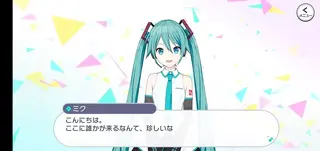
The game combines high-speed music gameplay with anime-style storytelling. You select a song, choose a difficulty level, and tap, hold, or flick notes in time with the music. Between songs, you unlock fully voiced episodes, character interactions, and visual-novel style cutscenes that expand the world of each unit.
We have more similar games available here, which you can also play and have fun with. So, if you want to get more music games, then get Osu Droid and Friday Night Funkin Music Game Beta. Both of these are quite popular available games, which anyone can play.
After a simple account setup, you can access story chapters, rhythm stages, events, and customization options. The APK available on our website lets you install the game on supported Android devices without going through any complicated steps.
Why download Project Sekai for Android?
Project Sekai stands out among music games because it blends fast-paced rhythm charts with a strong focus on narrative and character development. Each group has its own theme, songs, and emotional storyline, which gives every play session a sense of progress.
On Android, you can enjoy short rhythm stages during small breaks or get immersed in longer story sessions whenever you have time. Touch controls are responsive, and the 2D visuals are optimized for phones and tablets, so you can enjoy the same core experience that players have on other platforms.
By downloading the APK directly from our website, you can keep the installer ready on your device or backup storage and reinstall whenever needed without downloading it again from other sources.
Why is Project Sekai useful for players?
Project Sekai is useful if you want a game that can work both as a quick rhythm challenge and as a relaxing story experience. You can play a single song in a few minutes, push your skills on higher difficulties, or spend time reading character episodes and event stories.
The progression system rewards regular play with character cards, costumes, and resources, which gives you clear goals instead of random grinding. Players who like Vocaloid or J-pop can also treat the game as an evolving music library, discovering new tracks and arrangements.
Because many stages can run with minimal connection once data is downloaded, Project Sekai can also serve as a convenient option for short offline sessions when you are traveling or do not want to use much mobile data.
How to download and install Project Sekai APK
You can download the official Project Sekai APK file directly from our website and install it on any supported Android phone or tablet.
Follow these basic steps:
Scroll to the download section on this page and tap the download button for Project Sekai.
Wait until the APK or XAPK file finishes downloading to your device.
Open your device settings and allow installation from your browser or file manager if asked.
Locate the downloaded file in your downloads folder and tap it to start installation.
Complete the installation wizard, then launch Project Sekai from your app drawer.
After installation, the game may download additional data when you run it for the first time, so make sure you have enough storage space and a stable internet connection.
Features
Anime-style rhythm gameplay
Tap, hold, and flick notes to match Vocaloid and J-pop songs with multiple difficulty levels for all skill ranges.
Official Vocaloid songs and covers
Play famous tracks such as World Is Mine, Tell Your World, Into The Night and many more arrangements and covers.
Multiple character units
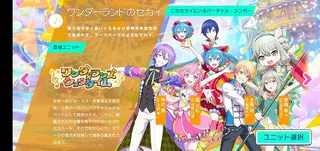
Follow several bands and idol groups, each with its own members, music style, and story arc to explore.
Story-driven progression
Unlock visual-novel style episodes, bonding scenes, and voiced dialogue as you clear songs and participate in events.
High-quality 2D graphics
Enjoy vibrant illustrations, animated backgrounds, and polished interface design optimized for mobile screens.
Character customization
Collect cards, outfits, and accessories to customize the appearance and performance units of your favorite characters.
Event and ranking modes
Join limited-time events, clear special missions, and compete in ranking boards to earn extra rewards.
Flexible difficulty settings
Choose from several difficulty levels so both newcomers and advanced rhythm players can enjoy the gameplay.
Screenshots


Gameplay modes and difficulty options
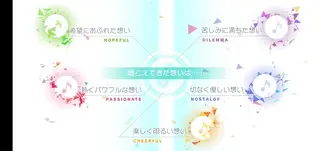
Project Sekai offers several ways to enjoy its rhythm stages. Standard live shows let you choose songs and clear them for rewards, while event lives focus on limited-time tracks and give extra points. You can also practice charts without consuming stamina so you can learn difficult patterns safely.
Each song typically has multiple difficulty levels, from easy to expert and beyond. This structure lets new players learn timing and note types slowly, while experienced rhythm gamers can challenge themselves with dense patterns and higher speed settings.
Story, characters, and world
The narrative side of Project Sekai is built around different units, each exploring themes such as friendship, self-expression, and performance anxiety. As you play, you unlock chapters that show how characters grow, overcome conflicts, and connect with the virtual singers.
Character episodes, event stories, and side conversations deliver a steady stream of new scenes. This storytelling focus makes the game appealing even if you are not always in the mood for high-intensity rhythm gameplay.
Tips for new Project Sekai players
If you are starting Project Sekai for the first time, begin on easy or normal difficulty to get used to the timing and note types. Turn on or adjust visual and audio cues in the settings until you find a layout that feels comfortable on your device.
Try different units and songs early so you can discover which styles you like most, then focus your resources on leveling cards and teams around those units. Logging in during events, even for short sessions, helps you collect more rewards over time without heavy grinding.
FAQs
Pros
- Wide selection of Vocaloid and anime-style songs
- Strong focus on character stories and worldbuilding
- Multiple difficulty levels for beginners and advanced players
- High-quality 2D graphics and polished presentation
- Frequent events and missions keep gameplay fresh
Cons
- Requires large storage space due to music and assets
- Online connection needed for many features and events
- Progress and gacha elements can feel grindy over time
- Interface and text can be dense for new players
Conclusion
Project Sekai offers a polished mix of rhythm gameplay, Vocaloid music, and character-driven storytelling on Android. You can download the official APK directly from our website and enjoy a modern music game experience with flexible difficulty, regular events, and a large catalog of songs and stories to explore at your own pace.




Comments
No approved comments yet.