

Sayayin TV
Sayayin TV is an Android app that focuses on Japanese anime and manga, offering a large catalog of titles that you can stream on your phone, tablet, or TV devices. It is designed mainly for fans who enjoy series like Dragon Ball, Naruto, My Hero Academia, and many others.
The app brings anime episodes and selected manga chapters together in one place with a simple, TV-style interface. You can download the official Sayayin TV APK file directly from our website and install it on compatible Android devices without creating an account.
If you like watching anime on Smart TV, TV boxes, or Google TV and Fire TV devices, Sayayin TV also aims to work on those platforms, giving you a big‑screen experience with basic navigation and categorized sections.
Rate this app
App details
- App name
- Sayayin TV
- Category
- Entertainment
- Version
- v1.0.0
- Size
- 38.74 MB
- Requirements
- 4.4 and Above
- Package name
- sayayin.tv
- Publisher
- SAYAYIN
- Price
- Free
- Mod
- No
- Downloads
- 120,105
- Rating
- 4.7 / 5
- Rating count
- 65,293
- Play Store
- No
- Requires root
- No
- Offline support
- No
- Contains ads
- Yes
- In-app purchases
- No
- Updated
- May 13, 2026
- Age rating
- Rated for 7+
Table of contents
What is Sayayin TV APK
Sayayin TV APK is an entertainment application for Android that combines streaming anime episodes with access to manga content. The app focuses heavily on popular shounen series and classic titles, giving fans a simple way to browse, select, and play episodes directly on their devices.
You do not need to create an account or log in to start using the main features. After installing the APK, you can open the app and move through sections such as anime series, movies, and manga lists. The interface is built to feel similar to a TV box layout, so it works comfortably on phones, tablets, and certain Android TV or TV box setups.
Sayayin TV is especially popular among Dragon Ball and general anime fans who want a quick way to jump into episodes, discover related shows, and explore manga chapters without complex setup. The APK available on our website is the same package identified by the package name sayayin.tv and version 1.0.0 for Android 4.4 and above.
If you want to download more similar apps, then we have some of the best suggestions available for you all. You can try Zoro.to and Saikou B, both of these are quite popular available apps, which you can also download on your Android.
Why Download Sayayin TV for Android
Anime fans download Sayayin TV because it puts many well-known series and manga titles into a single, easy-to-browse app. Instead of moving between multiple services, you can open one app, pick your favorite show, and start watching.
The application does not force registration, so you can get into the content quickly after installation. Categories, lists, and a search function help you find series like Pokemon, Dragon Ball, Naruto, and more without scrolling endlessly.
Another reason people choose Sayayin TV is its focus on TV-style use. If you have a Smart TV, Android TV box, Google TV, or Fire TV device that supports installing APK files, Sayayin TV can be an option for turning your screen into an anime hub.
How Sayayin TV Can Be Useful
Sayayin TV can be useful if you want a lightweight anime hub that works on multiple Android devices. Instead of relying on a browser, you use a dedicated application that organizes anime episodes, movies, and manga sections in a format similar to TV menus.
The app groups content into clear categories, which makes it simpler to continue watching a series or discover a new one. A filter-based search helps you narrow down titles, while mini-games and extra sections can give you something to do between episodes.
Because Sayayin TV supports Android 4.4 and higher, it can run on many older phones and TV boxes that users still keep for media playback. This makes it a practical choice for reusing older hardware as a basic anime streaming device.
How to Download and Install Sayayin TV APK
You can download the official Sayayin TV APK file directly from our website. Follow these steps to get the app on your Android phone, tablet, or compatible TV device.
Scroll to the download area on this page and tap the Sayayin TV APK download button.
Wait for the APK file (version 1.0.0) to finish downloading to your device.
On your Android device, open Settings and enable installation from unknown sources for your browser or file manager if it is not already allowed.
Open your file manager, locate the downloaded APK file named similar to sayayin.tv.apk.v1.0.0.apk, and tap it.
Confirm the installation prompt and wait until Android finishes installing the app.
Launch Sayayin TV from your app drawer or TV apps list and start exploring the anime and manga sections.
Whenever a new version becomes available on our website, you can repeat the same process by downloading and installing the updated APK over the existing one.
Features
Large anime catalog
Access a wide range of popular Japanese anime series and movies, including well-known shounen titles.
Manga section
Read selected manga content alongside anime episodes inside the same application.
No mandatory registration
Use the core streaming features without creating an account or logging in.
TV box and Smart TV friendly
Interface is designed to work on Android TV boxes, Smart TVs, Google TV, and Fire TV devices that support APK installation.
Filter-based search
Search and filter titles to quickly find specific anime or manga you want to watch or read.
Mini-games included
Enjoy multiple small games built into the app for extra entertainment.
Well-organized sections
Separate areas for anime, manga, and other content keep browsing simple and structured.
Support for Dragon Ball content
Special focus on Dragon Ball and related series that many fans specifically look for.
Screenshots


Anime and Manga Catalog Highlights
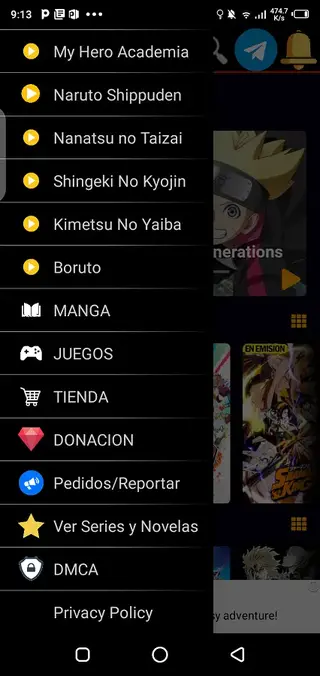
Sayayin TV focuses strongly on fan-favorite Japanese series. While the exact catalog can change over time, users often look for titles like Pokemon, Dragon Ball, Naruto, My Hero Academia, Boruto, Nanatsu no Taizai, and Kimetsu no Yaiba inside the app.
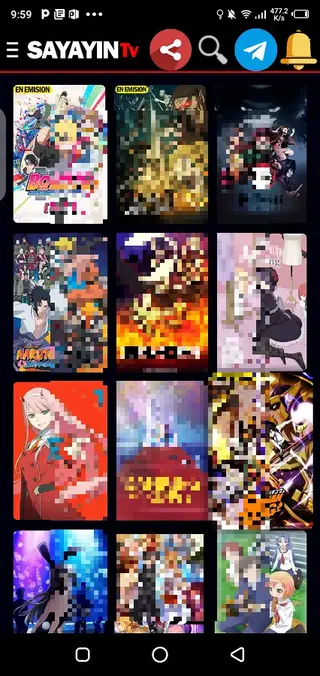
These titles are usually presented in separate sections or lists, so you can quickly jump into the season or episode you want. Combined with the manga area, Sayayin TV gives you multiple ways to follow your favorite stories.
Using Sayayin TV on TV Devices
One of the strengths of Sayayin TV is its TV-friendly interface. If you have an Android TV box, Smart TV with Android, Google TV dongle, or compatible Fire TV device, you can often install the APK and navigate with a remote.
Menus use large tiles and simple categories, making it easier to move between anime series and manga with directional keys. This setup lets you watch episodes on a bigger screen without relying only on your phone.
Tips for Smoother Streaming
For the best experience with Sayayin TV, a stable internet connection is important. If you notice buffering or connection issues, you can try switching to a different Wi-Fi network, reducing other traffic on your connection, or using a wired connection on TV boxes when possible.
If the app has trouble loading on certain networks, some users also try adjusting DNS settings or using a VPN with another region, which can sometimes help with routing and access issues, depending on local restrictions.
FAQs
Pros
- Combines anime streaming and manga reading in one app
- No sign-up or registration is required to start using it
- Interface is suitable for phones, tablets, and TV boxes
- Filter-based search and clear sections improve navigation
- Focus on popular anime titles such as Dragon Ball and Naruto
Cons
- Requires a stable internet connection; not designed for offline viewing
- Content availability and stability can vary over time
- Contains advertising inside the app
- Not available on the official Google Play Store
Conclusion
Sayayin TV APK gives anime and manga fans a simple way to enjoy their favorite series across Android phones, tablets, and compatible TV devices. Download the official APK directly from our website, install it on a supported device, and explore its catalog with straightforward navigation and no mandatory registration.




Comments
No approved comments yet.