

Shimeji
Shimeji is a fun personalization app that adds small animated characters that walk, climb and play on your Android screen while you use your phone as usual.
The app offers a large collection of anime-style mascots and meme characters that you can enable, move and interact with in real time. It runs as an overlay on top of your apps, so your favorite shimejis are always visible.
You can download the official Shimeji APK latest version directly from our website and start customizing your home screen and apps with these interactive on-screen companions.
Rate this app
App details
- App name
- Shimeji
- Category
- Personalization
- Version
- v12.3
- Size
- 21.82 MB
- Requirements
- 4.1 and Up
- Package name
- com.digitalcosmos.shimeji
- Publisher
- Digital Cosmos
- Price
- Free
- Mod
- No
- Downloads
- 10,000,000
- Rating
- 4.6 / 5
- Rating count
- 55,000
- Play Store
- Yes
- Requires root
- No
- Offline support
- Yes
- Contains ads
- Yes
- In-app purchases
- Yes
- Updated
- May 14, 2026
- Age rating
- Rated for 3+
Table of contents
What is Shimeji APK
Shimeji is an Android personalization application developed by Digital Cosmos that places animated characters on top of your screen. These tiny companions walk around, climb app windows, sit on icons and respond to simple interactions while you continue using your device normally.
As you know live wallpapers are quite popular, but the wallpapers always work in the background. So, you cannot get any effects on the display except your try apps like Fake Game Collection and X Icon Changer Pro. Moreover, we are here with the Shimeji App for you all, which can provide you with better services.
The app includes a wide variety of characters, including anime-inspired heroes, mascots and internet icons such as Miku, Neko, Mr. Trollface, Sans, Slenderman, Hinata, Sasuke, Sherlock and many others. Each character comes with its own set of animations that loop and react as they move across the display.
Shimeji works similarly to a live wallpaper overlay, but instead of only animating the background, it brings moving characters to the foreground. You can choose which characters are active, adjust how many appear at once and control where they are allowed to move on the screen.
Why download Shimeji for Android
Shimeji is popular with users who want their phone to feel more personal, playful and alive. Instead of a static home screen, you get lively mascots that follow you across apps and react as you tap or drag them.
The app is easy to set up, does not require root access and lets you start with a free collection of characters and slots. If you enjoy the experience, you can expand it later with optional premium features and additional character actions.
Because the official APK is available on our website, you can download and install Shimeji directly, then keep your favorite companions on your screen wherever you go.
How Shimeji can be useful
Although Shimeji is mainly for fun, it can make daily phone use feel more engaging. Animated companions can:
Give your device a unique look that stands out from typical themes and wallpapers.
Make long browsing or study sessions feel less boring as characters wander around the screen.
Add a light, relaxing visual element that you can fidget with by dragging, dropping and throwing characters.
Offer quick visual variety without changing your icons, launcher or main wallpaper.
For users who enjoy anime, mascots and customization, Shimeji provides an always-on visual companion that stays visible across most apps while remaining simple to control or disable at any time.
How to download and install Shimeji APK
You can download the official Shimeji APK file directly from our website and install it on your Android device by following these steps:
Scroll to the download section on this page.
Tap the download button for the Shimeji APK file.
Wait for the APK file to finish downloading to your device.
Open your phone settings and enable installation from unknown sources if it is not already allowed.
Locate the downloaded APK in your downloads folder and tap it.
Follow the on-screen prompts to complete the installation.
Open Shimeji, grant the required overlay and accessibility permissions, then choose your first characters.
After installation, you can return to our website whenever you need to download the APK again or update to a newer version when it becomes available.
Features
Animated characters on screen
Place small animated characters that walk, climb and interact on top of your Android screen while you use other apps.
Large character collection
Choose from many anime-style, meme and mascot characters such as Miku, Neko, Sans, Slenderman, Hinata, Sasuke and more.
Multiple character slots
Use character slots to enable several companions at once, with two slots available for free and more in the premium version.
Interactive animations
Tap, drag or throw characters and watch them react with different animations and movements across the display.
Custom behavior controls
Adjust options like character size, movement speed and where they can appear so they do not interfere with important buttons.
Overlay across apps
Keep your characters visible over the home screen, apps and some games to create a consistent companion experience.
Simple user interface
Use an easy, beginner-friendly interface to select shimejis, turn them on or off and tweak core settings.
Optional premium upgrade
Unlock extra slots, more actions and deeper control through in-app purchases if you want an expanded experience.
Screenshots
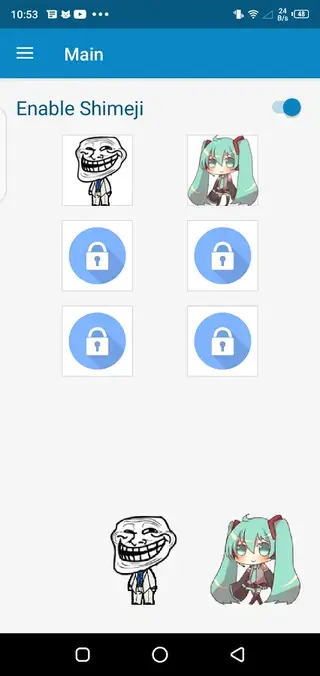
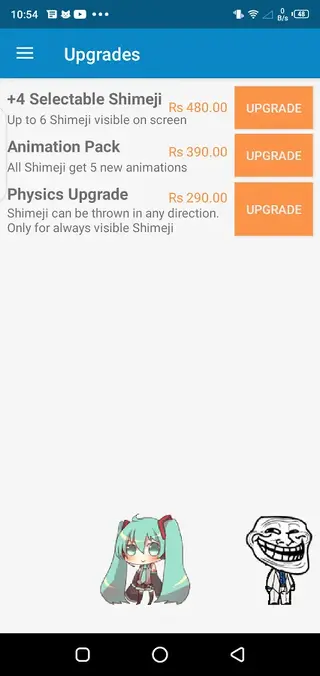
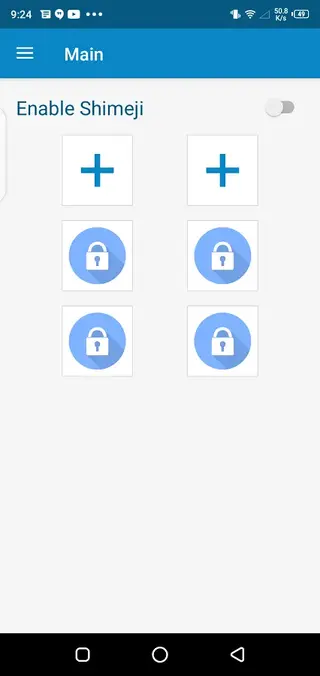
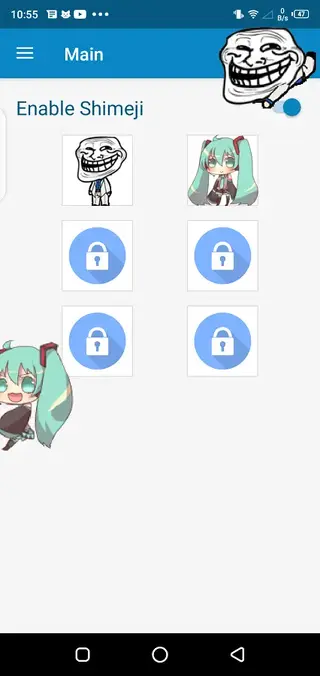
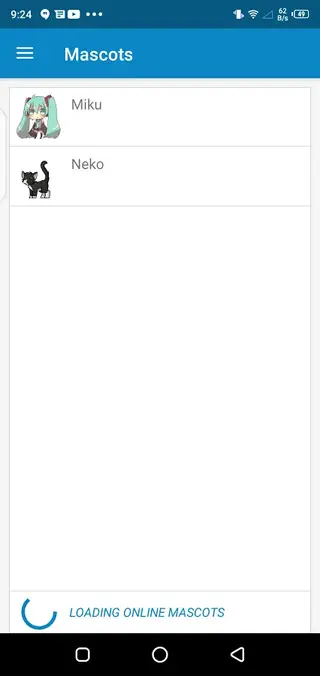
Permissions and performance
To function correctly, Shimeji needs permission to draw over other apps and may use accessibility services depending on your device. These permissions are required so the characters can move across the screen while you use different apps.
On most modern phones, Shimeji runs smoothly in the background with a modest impact on battery life. If you notice performance issues, you can reduce the number of active characters, lower animation intensity or pause the app when you do not need the companions.
Tips for a better Shimeji experience
To get the most out of Shimeji, start by enabling only one or two characters and adjusting their size and positions so they do not block navigation keys or important controls. Explore the settings to limit where they can walk, such as keeping them away from the keyboard or notification shade.
You can also experiment with different character combinations, swap themes depending on your mood and pause the app during gaming or video sessions. Fine-tuning these small details helps keep Shimeji fun and unobtrusive during everyday use.
FAQs
Pros
- Fun animated characters that make the screen feel lively and unique
- Large and growing library of anime and meme-style mascots
- Works as an overlay without needing root access
- Simple controls and quick setup suitable for beginners
- Free version includes characters and basic slots so you can try it easily
- Optional premium upgrade for more slots and extra actions
Cons
- On some devices characters can cover buttons if settings are not adjusted
- Continuous animations may slightly increase battery usage
- Contains ads in the free version
- Full feature set requires in-app purchases
Conclusion
Shimeji is a lighthearted personalization app that adds animated companions to your Android screen, giving your device a playful, custom look. If you enjoy anime-style mascots and on-screen widgets, you can download the official Shimeji APK from our website, try the free features and decide later if you want to unlock the premium options.




Comments
No approved comments yet.