

Shizuku
Shizuku Apk is the most advanced-level tool, especially developed to get complete control on Android device. With this tool, unlock additional system functions and use apps to their full capacity. No need to root Android anymore and access root level services with this amazing app.
Built for Android users who want to unlock advanced-level services. Therefore, users can remove restrictions of the operating system with this new tool and enjoy more control over the device. Enjoy unlocking high-end services and have fun using complete control.
Rate this app
App details
- App name
- Shizuku
- Category
- Tools
- Version
- v13.6.0.r1091.b844bc49
- Size
- 2.48 MB
- Requirements
- 7.0 and Above
- Package name
- moe.shizuku.privileged.api
- Publisher
- Xingchen & Rikka
- Price
- Free
- Mod
- No
- Downloads
- 81,813
- Rating
- 4.8 / 5
- Rating count
- 20,471
- Play Store
- Yes
- Requires root
- No
- Offline support
- No
- Contains ads
- No
- In-app purchases
- No
- Updated
- Jul 20, 2026
- Age rating
- Rated for 3+
Table of contents
What is Shizuku Apk?
Shizuku Apk is a utility Android tool specially developed for Android applications to perform high-end tasks on Android devices. It uses Android Debug Bridge (ADB) or Root access to communicate with Android system APIs. This allows supported applications to perform tasks that normally require additional permissions.
Android device hardware is more compatible with performing tons of high-end functions. However, the Android Operating System restricts control and allows limited access to services. This affects the performance of the application. Therefore, this application allows users to bypass the restriction instantly. Enhance app performance instantly with this newly available tool.
The application is an open-source project designed especially for Android users. Take more control of your Android device with this application and enjoy. Instead of rooting the entire device, use this new application to access root-level features. Try the Clickmate Pro or Asisten Klik to get similar services.
Why download Shizuku APK?
Downloading the Shizuku App is an excellent choice for users who want to unlock advanced Android device services. The app will automatically allow compatible apps to access additional system features without requiring full root access. Unlock more app functionality with this simple Android utility.
Apart from improving app capabilities, it also gives greater control over Android system functions. Compatible applications can perform advanced operations more efficiently, making the overall Android experience more flexible and convenient.
How is Shizuku Apk useful?
The application is useful for Android users who want to use advanced features of Android and apps. No need to root your device completely with this app. Users can simply install this application and use the offered safer way of accessing the unique features.
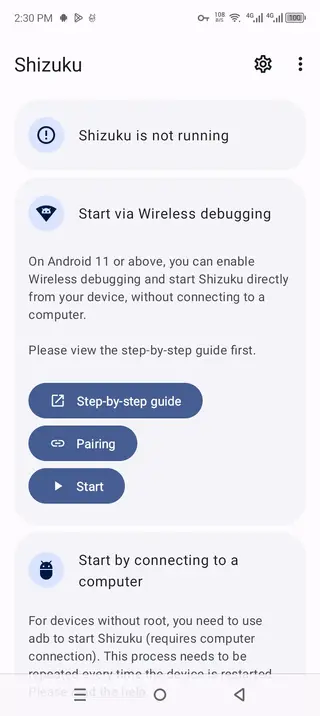
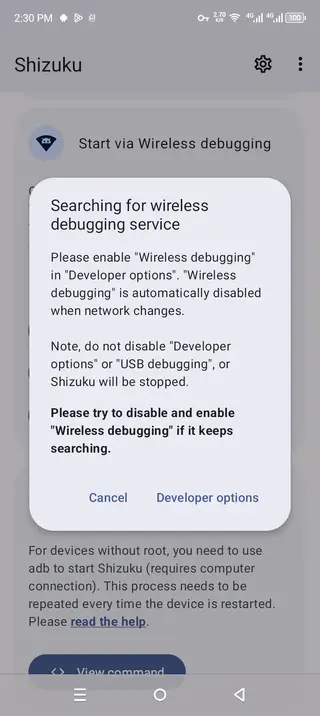
The application supports Wireless debugging on compatible Android devices. It allows users to start Shizuku without connecting a computer. This will enhance the overall Android and application performance, allowing it to be more useful and fun.
How to download and install Shizuku Apk?
The downloading process of this mobile tool is simple and easy. This website provides the latest updated version with all the latest features. Therefore, Android users can easily install this application and access all available unique features and have unlimited fun.
Follow these steps to download and install the APK file:
Find the download section on this page.
Tap on the Download APK button and wait for the process to complete.
Access the Android Settings section and open the Security panel.
Checkmark Install from Unknown Sources, if it is unchecked.
Open Android File Manager and access the Downloads folder.
Find the downloaded APK file and tap on it.
Select the install option and wait for the process to complete.
Launch the Apk, start exploring the amazing features, and enjoy unlocking high-end services.
Features
Wireless Debugging Support
Activate wireless debugging to access all available services without connecting a computer after initial pairing.
ADB Startup
Get high-end services on non-rooted devices using the ADB (Android Debug Bridge). This startup allows access to advanced features through a simple computer connection.
Root Startup
The app allows compatible applications to access supported Android System APIs. This enables additional functions, which normally require higher system permissions.
Compatible App Integration
Works with various applications that support Shizuku services. Compatible Apps can unlock additional tools and advanced functions through the API.
Open-Source Project
It is an open-source project that allows the community to improve services. Regular updates based on community response offer high-end services and fix bugs instantly.
ADB Command Generator
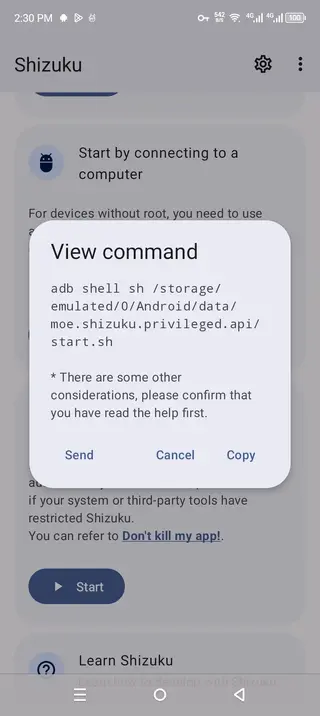
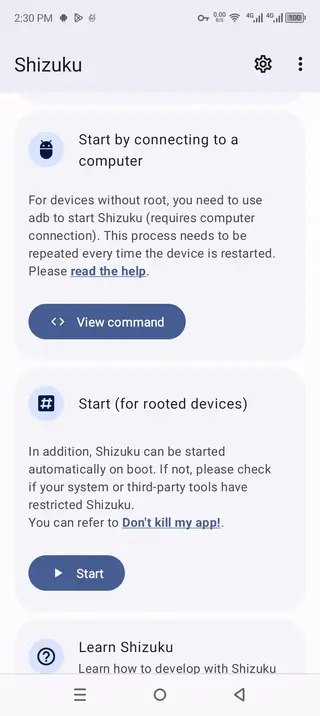
Computer-based activation offers a command startup system. Users can easily use the ready-to-use ADB Command system and access the amazing services.
Start on Boot
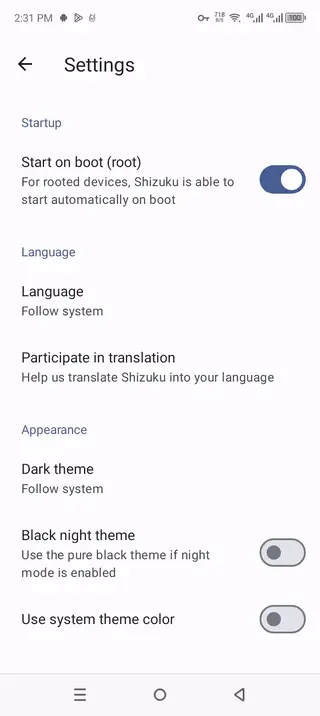
No need to manually start the application after each boot. Enabling the start on boot will automatically root devices after the startup.
Dual Themes Support
The application support Dark and light theme, which can easily be switched. The interface will automatically set to the Android system theme. However, users can also change the theme manually.
Language Customization
The application supports English as the default system language. However, this app does support multiple languages that can be changed according to compatibility.
Screenshots
How to use Shizuku without root?
Shizuku allow Android users to access advanced features with and without rooting Android. Users can use the Wireless debugging by completing the pairing process from the application. Once connected, compatible apps can begin using the app-supported system APIs.
This is the safest and most alternative way to use the available high-end services without rooting Android. It provides a simple way to access advanced-functions without modifying the entire operating system.
How to start Shizuku using ADB?
Users with non-rooted Android devices can start Shizuku through Android Debug Bridge using a computer. The application provides a ready-to-use startup command that can be copied and executed through an ADB terminal, making the startup process easier.
The application services don’t remain active after the device restarts on non-rooted devices. Therefore, the ADB startup process must be repeated after every reboot. This method provides access of all services without rooting your device.
FAQs
Pros
- Free and open-source Android Tool.
- No full root required on Android devices.
- Wireless Debugging support.
- ABD and Root startup options.
- Compatible with supported Android apps.
- Automatic startup on rooted devices.
- Multiple Customization Themes.
- Lightweight and regularly updated.
Cons
- Advanced features may be difficult for beginners.
- Some setup methods require ADB or Wireless Debugging.
- Non-root users must restart the services after reboot.
- Only works with compatible apps.
Conclusion
Shizuku Download on an Android device to get a powerful utility tool. Enhance device functionality without relying on full root access. The app provides a simple and flexible way to unlock additional features in compatible applications. Download the latest version and access all the unique features offered in this mobile app.




Comments
No approved comments yet.