
Soloop
Soloop is a smart video editor from ColorOS designed to turn everyday clips and photos into polished short videos in a few taps. It focuses on speed, simplicity, and ready-made styles.
With automatic media recognition, templates, filters, and music tools, you can create social-ready stories without learning complex timelines or desktop software.
There are more amazing features available in the app, which you can explore in it. So, download Sloop For Android Smartphones or Tablets and explore more about it. If you want to do professional editing, then you should try Premoment or Video Star Pro. More amazing apps are available on this website.
You can download the Soloop APK latest version directly from our website and install it on compatible Android 10 and above devices.
Rate this app
App details
- App name
- Soloop
- Category
- Video Players & Editors
- Version
- v1.47.9
- Size
- 124.09 MB
- Requirements
- 10 and Above
- Package name
- com.coloros.videoeditor
- Publisher
- ColorOS
- Price
- Free
- Mod
- No
- Downloads
- 107,722
- Rating
- 4.8 / 5
- Rating count
- 51,920
- Play Store
- No
- Requires root
- No
- Offline support
- Yes
- Contains ads
- No
- In-app purchases
- No
- Updated
- May 30, 2026
- Age rating
- Rated for 7+
Table of contents
What is Soloop APK
Soloop is an Android video and photo editing application developed by ColorOS. It is best known as a lightweight, template-based editor that helps you create short, stylized videos from your gallery in seconds. The app analyzes your clips and photos, matches them with built-in templates and music, and generates an edited video that you can fine-tune.
Unlike traditional editors that demand manual timelines and layers, Soloop focuses on automation and ease of use. You can import existing footage or record directly within the app, apply filters, trim clips, add subtitles, and attach background music with a simple, touch-friendly interface.
The APK available on our website matches the Soloop package name com.coloros.videoeditor and targets Android 10 and above, giving newer devices an optimized experience for social media content creation.
Why download Soloop for Android
Soloop offers a fast way to create shareable videos without advanced editing skills. Its smart templates automatically recognize faces, scenes, and key moments, then sync them with transitions and music so you get a polished result with minimal effort.
If you often record trips, daily vlogs, or casual clips but never find time to edit, Soloop can turn that raw media into highlight reels in just a few steps. You still retain control over key details like clip order, text, filters, and audio, but the app handles most of the repetitive work.
Another reason to download the Soloop APK from our website is offline access. Once installed, you can edit videos, apply effects, and export files without relying on a constant internet connection.
How Soloop is useful
Soloop is especially useful for users who want good-looking edits without a steep learning curve. Influencers, casual creators, and anyone active on platforms like Instagram, TikTok, or YouTube Shorts can quickly repurpose their clips into vertical or horizontal videos.
The automatic categorization of photos and videos helps you find relevant media quickly. You can combine multiple images, control display duration, trim unwanted parts, and add notes or subtitles to tell a story more clearly.
Support for HD resolutions such as 720p and 1080p keeps your exports crisp, while filters, color adjustments, and sleek templates give your videos a consistent visual style. Because most core tools work offline, Soloop is also handy when traveling or working in low-connectivity environments.
How to download and install Soloop APK
You can get the official Soloop APK file directly from our website. Follow these simple steps on your Android device:
Tap the download button for the Soloop APK on this page to start downloading the latest version.
Wait until the APK file finishes downloading to your device.
Open your phone settings and enable installation from unknown sources if it is not already allowed.
Locate the downloaded APK in your Downloads folder or file manager and tap it.
Confirm the installation prompts and wait for the process to complete.
Launch Soloop from your app drawer and start editing your videos and photos.
Features
Smart templates
Use built-in templates that automatically arrange clips, transitions, and music into a ready-made video style.
Automatic media recognition
Soloop can recognize videos and photos on your device and intelligently select suitable moments for highlight reels.
HD video editing
Edit and export videos in common high-definition resolutions such as 720p and 1080p for clear playback.
Easy import and live recording
Import media from internal or external storage, or record new clips directly in the app for instant editing.
Photo to video slideshows
Combine multiple photos into a single video, adjust each photo duration, and add transitions for slideshow-style edits.
Music and audio support
Attach background music or other audio tracks from your device storage and sync them with your video cuts.
Filters and basic adjustments
Apply filters, cropping, and simple visual adjustments to quickly refine the look of your videos and photos.
Subtitles and text overlays
Add titles, captions, or subtitles to explain scenes, add context, or enhance engagement on social media.
Screenshots
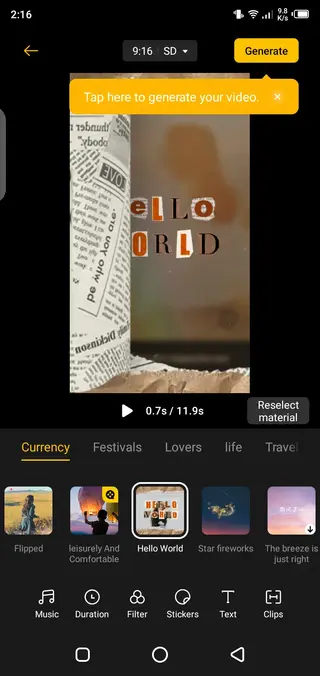
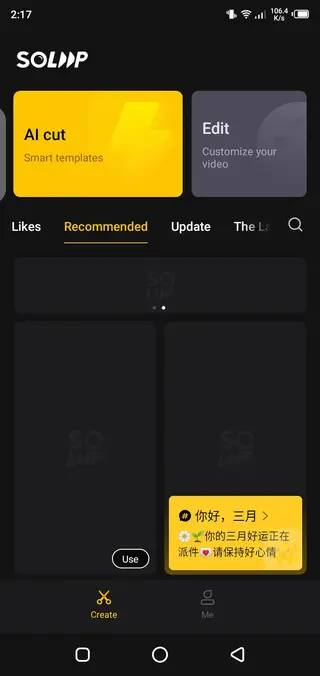
Compatibility and system requirements
The Soloop package name com.coloros.videoeditor targets devices running Android 10 and above. It is commonly found on smartphones running ColorOS and related ecosystems, but you can also install the APK on other compatible Android phones that meet the version requirement.
For the best experience, ensure that your device has sufficient storage space for both the app and exported videos, and keep enough free RAM to handle HD editing operations smoothly.
Editing workflow overview
Soloop keeps the editing workflow simple. After launching the app, you typically:
Select photos and videos from your gallery or record new footage.
Choose a template style and optional background music.
Let the app automatically cut and arrange clips to match the template.
Refine the result by trimming segments, adjusting order, and adding text.
Apply filters or basic adjustments to unify the look of your project.
Export the final video to your device and share it on your preferred platforms.
This streamlined process makes Soloop suitable for quick edits when you want results in minutes rather than spending a long time on manual timelines.
FAQs
Pros
- Very easy to use compared to traditional timeline editors
- Automatic templates save time on cuts and transitions
- Supports HD video editing for 720p and 1080p exports
- Works largely offline once installed
- Good for quick social media ready short videos
Cons
- Official app availability can vary by device and region
- Feature set is simpler than professional desktop editors
- Limited advanced manual control compared to pro-grade apps
Conclusion
Soloop is a simple yet capable video editor that focuses on fast, template-based storytelling. If you want to turn everyday clips and photos into clean, shareable videos without learning complex tools, downloading the Soloop APK from our website is a practical choice for Android 10 and above devices.




Comments
No approved comments yet.