

Spatial Touch
Spatial Touch is an Android tool that lets you control supported apps with hand and finger gestures instead of directly touching the screen. It is designed to make media consumption and social apps easier to navigate from a distance.
By tracking simple poses, taps and drags in the air, the app translates your movements into actions like play, pause, next video or scroll. This offers a convenient way to operate your phone when the screen is hard to reach or you want a more touch-free experience.
You can download the latest Spatial Touch APK directly from our website and start using gesture controls on popular entertainment and social apps without any complicated setup.
Rate this app
App details
- App name
- Spatial Touch
- Category
- Tools
- Version
- v1.2.3
- Size
- 163.21 MB
- Requirements
- 7.0 and Above
- Package name
- io.vtouch.spatial_touch
- Publisher
- VTouch
- Price
- Free
- Mod
- No
- Downloads
- 64,225
- Rating
- 4.7 / 5
- Rating count
- 24,023
- Play Store
- Yes
- Requires root
- No
- Offline support
- No
- Contains ads
- Yes
- In-app purchases
- Yes
- Updated
- Jun 5, 2026
- Age rating
- Rated for 12+
Table of contents
What is Spatial Touch APK
Spatial Touch APK is a gesture-control tool for Android that turns supported smartphones into partially touch-free devices. Instead of always tapping or swiping on the screen, you can use specific finger poses and movements in the air to trigger actions inside compatible apps.
The app focuses on entertainment and social media usage. Once configured, Spatial Touch can map gestures to common actions such as play and pause, next or previous video, volume adjustment, scrolling and pointer control. This is particularly useful when you are watching videos at a distance or when direct touch is inconvenient.
Spatial Touch works as an accessibility-style overlay on top of Android. After you give the required permissions, it can recognize your gestures and send the corresponding commands to apps like YouTube, Netflix, TikTok, Instagram and more, depending on your configuration.
Spatial Touch Android is the first Android application providing a Hands Gesture Control System. This means Android users can make changes on the Android without touching the screen. So, get a completely new experience of using Android devices with the available unique services of this mobile app. Explore the available features of this mobile app here. Get similar services with the X8 Sandbox.
Why download Spatial Touch for Android
Downloading Spatial Touch on your Android device gives you a new way to interact with your favorite apps. Instead of always holding the phone and tapping the screen, you can perform quick hand gestures to control playback, navigate feeds and move a pointer.
For people who often watch streaming content, shorts or reels, gesture control can make the experience more comfortable. You can stay on the couch, keep the phone on a stand and still manage key actions with simple finger movements. It can also support situations where frequent touching of the screen is less practical.
The app offers a free tier so you can test the core idea, plus premium options that unlock additional features such as advanced pointer control, removal of ads and access to more apps. You can get the original APK file directly from our website and start exploring how gesture control fits into your daily use.
How Spatial Touch is useful
Spatial Touch is useful for users who want more flexible and comfortable control over their phones, especially during media playback or social browsing. Instead of repeatedly reaching for the device, you can use predefined gestures that feel natural after a short learning period.
It can also support light accessibility needs where reducing touch interactions is helpful. With customizable range and sensitivity, you can adapt gesture recognition to your room layout, lighting conditions and personal comfort.
Because it works with many popular entertainment and social apps, Spatial Touch can centralize gesture-based control in a single tool rather than relying on different solutions for each platform.
How to download and install Spatial Touch APK
You can download the latest Spatial Touch APK directly from our website without any complicated process. Follow these steps to get started on your Android device:
Visit this Spatial Touch page on your Android phone or tablet.
Tap the download button to save the APK or XAPK file from our website.
Open your device settings and enable installation from unknown sources for your browser or file manager if needed.
Locate the downloaded file in your downloads folder and tap it to start installation.
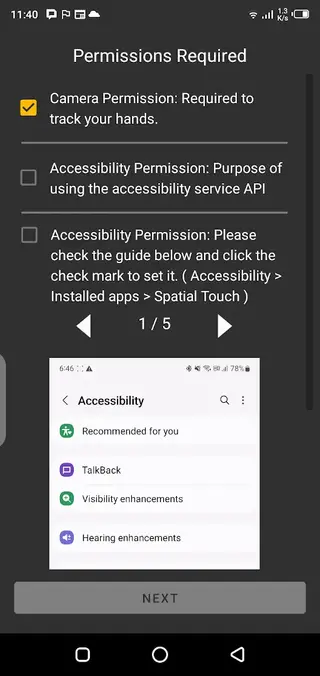
Follow the on-screen prompts to complete installation and grant the required permissions, such as accessibility and overlay.
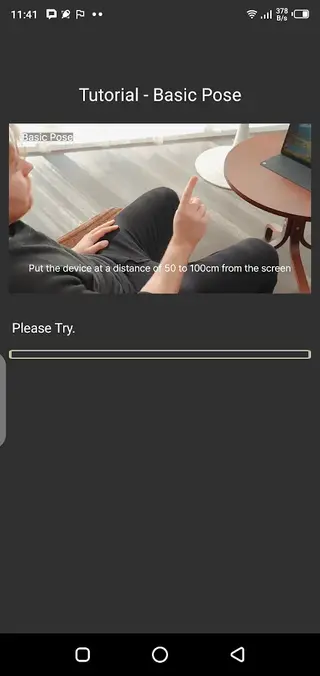
Open Spatial Touch, run the initial tutorial and calibrate gestures according to your preference.
After these steps, you can link supported apps and begin controlling them with hand gestures.
Features
Hand gesture control
Use finger poses, taps and movements in the air to trigger actions instead of touching the screen directly.
Support for popular apps
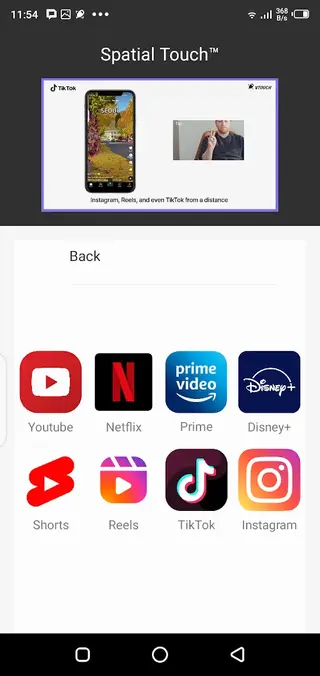
Works with major entertainment and social platforms such as YouTube, Netflix, Prime, Disney Plus, TikTok and Instagram, depending on configuration.
Finger gesture modes
Includes basic pose and tap, two finger pose and tap, drag gestures and pointer control for more precise navigation.
Customizable sensitivity
Adjust range, sensitivity and recognition behavior so gestures work reliably in your specific environment.
Pointer and drag control
Move a virtual pointer and drag elements on the screen using supported gestures for more detailed control.
Media and feed navigation
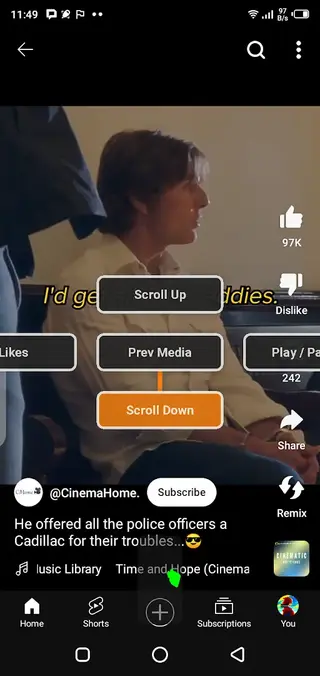
Control playback, switch between videos, scroll through shorts, reels and feeds using gesture shortcuts.
On-screen guidance
Provides in-app guidance and instructions so new users can learn each gesture and its effect step by step.
Free basic version
Try the core functionality at no cost before deciding whether premium capabilities are necessary.
Screenshots
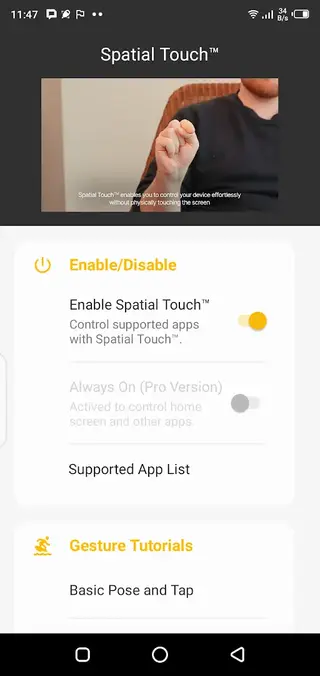
Gesture types and controls
Spatial Touch is built around a small set of clearly defined gestures so users can remember them easily. Basic pose and tap can be linked to actions such as play, pause or select. Two finger pose and tap can be mapped to secondary actions like skipping or going back.
Drag gestures are helpful for scrolling through feeds or lists, while pointer control lets you move a cursor across the screen for more precise selections. By combining these simple building blocks, you can manage most everyday navigation tasks in supported apps without repeatedly tapping the display.
Supported apps and scenarios
The app focuses on entertainment and social media experiences. Common use cases include controlling YouTube or Netflix while the phone is on a stand, browsing shorts and reels without holding the device, or moving through TikTok and Instagram feeds while keeping interaction light.
Support may expand over time, but the core goal remains the same: make it easier to control video streaming and social content using intuitive gestures instead of constant touch input.
FAQs
Pros
- Enables touch-free control for supported apps using hand gestures
- Useful for comfortable media viewing at a distance
- Supports several popular entertainment and social platforms
- Customizable range and sensitivity for better recognition
- Offers both free and premium options to match different needs
- Includes pointer and drag controls for more precise navigation
Cons
- Requires camera and accessibility permissions which some users may find sensitive
- Works only with supported apps and specific use cases
- Gesture recognition may vary depending on lighting and environment
- Premium features require a paid subscription or purchase
Conclusion
Spatial Touch brings gesture-based control to supported Android apps, making media and social browsing more comfortable in many scenarios. By downloading the official APK from our website, you can try the free features, tune gesture sensitivity and decide whether the advanced premium tools add value to your daily use.




Comments
No approved comments yet.