

Spritchat
Spritchat is a social networking and chat app that helps you connect with new people, share posts, and build your own community on Android. It combines a public feed, friends list, and messaging in one simple interface.
With an easy registration process and flexible privacy controls, you can choose whether to share posts publicly or only with friends. The app focuses on real-time interaction so you can chat, react, and stay active on the platform.
You can download the official Spritchat APK directly from our website and install the latest available version on your Android mobile or tablet without any complicated steps.
Rate this app
App details
- App name
- Spritchat
- Category
- Social
- Version
- v2.5
- Size
- 73.79 MB
- Requirements
- 4.2 and Above
- Package name
- com.gudnet.spritchat
- Publisher
- Gudnet Inc
- Price
- Free
- Mod
- No
- Downloads
- 521,847
- Rating
- 4.4 / 5
- Rating count
- 4,260
- Play Store
- No
- Requires root
- No
- Offline support
- No
- Contains ads
- No
- In-app purchases
- No
- Updated
- May 16, 2026
- Age rating
- Rated for 12+
Table of contents
What is Spritchat App
Spritchat is a social media and messaging application for Android devices. It offers a mix of public timelines, private posts, and chat tools so you can meet new people, follow friends, and stay engaged in conversations.
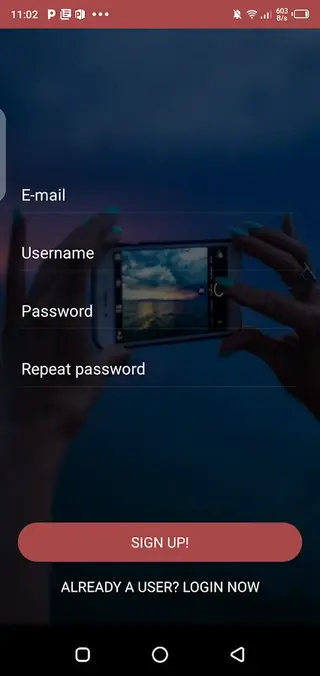
After a quick sign-up with your email address, you can create a profile, choose a username, and start posting content. The platform is designed to be simple for new users, with a clean layout that makes it easy to browse the feed, check notifications, and open chats.
Spritchat separates activity into social posts, public content, and friends-only updates. This gives you more control over who sees what you share. You can publish posts for everyone on the platform, keep them limited to your friend circle, or use private chats for one-to-one communication.
The app focuses on conversation and interaction. Users can join ongoing discussions, react to posts, and send messages to other members. It aims to provide a more flexible and open space for socializing than many traditional messaging tools.
Why Download Spritchat APK from Our Website
Downloading the Spritchat APK from our website lets you get the latest available version directly on your Android device. You do not need to search multiple sources, as the current release is already provided here for quick access.
Installing the APK manually is useful if you want to try the app on devices where it might not be easily available through other channels, or if you prefer to keep a backup copy of the installer. Our download page lists the version information and Android requirements so you can check compatibility before installing.
Once installed, you can sign up, build your profile, and start using all the social and chat features right away. You can join public discussions, add friends, and explore the platform at your own pace.
How Spritchat Can Be Useful
Spritchat can be useful if you want a light social platform that focuses on communication and discovery. It is designed for users who like to post updates, chat quickly, and find people with similar interests.
The public area allows you to share your thoughts and see what others are talking about. If you are trying to grow your presence or simply want to meet new people, appearing in the public feed can help you reach more users.
For closer connections, the friends section and private chat tools make it easier to keep in touch with people you know or have just met on the platform. You can switch between public interactions and private conversations without leaving the app.
The app also supports sharing different types of media, so you can attach pictures and other content to your posts and messages. This helps you express yourself more clearly and keep your timeline visually engaging.
We have more similar apps available here, which you can also explore and enjoy. So, if you are willing to get more similar apps, then you should try Social Maker and Truth Social. Both of these are quite popular available apps, which you can also access on your Android device.
How to Download and Install Spritchat APK
You can download the official Spritchat APK file directly from our website. Follow these steps to get the latest available version on your Android device.
Scroll to the download section on this page.
Tap the download button for the Spritchat APK file.
Wait for the APK to finish downloading on your device.
Open your device settings and allow installation from unknown sources if required.
Locate the downloaded APK file in your downloads folder.
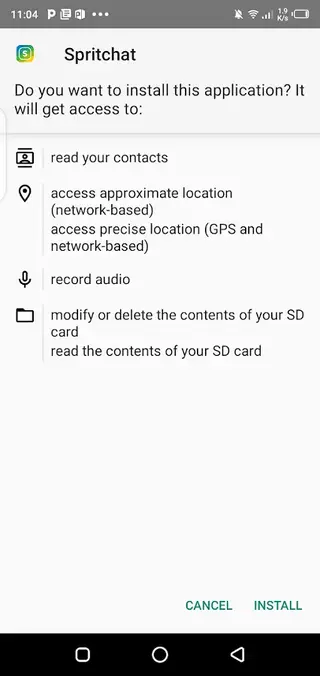
Tap the file and follow the on-screen prompts to complete installation.
Open Spritchat, sign up or log in, and start using the app.
Features
Simple registration
Create an account quickly using your email address and basic details so you can start using the app without a long setup process.
Profile and username options
Set up a personal profile and choose from a wide range of usernames because the platform is still relatively new and less crowded.
Public feed
Post content publicly so it can be seen by everyone on the platform and discover posts shared by other users worldwide.
Friends-only sharing
Limit specific posts and updates to your friends list to keep certain content more private and targeted.
Private and group chat
Use built-in chat tools to message users individually or in groups for real-time conversations and quick replies.
Media sharing
Attach pictures and other media to your posts or messages to make conversations and timelines more expressive.
Picture editing tools
Use the in-app picture editor to adjust and enhance images before sharing them with others.
Multiple communication modes
Combine text posts, comments, and chat to communicate in different ways depending on the context.
Screenshots

Account Setup and Profile Management
After installing Spritchat, you start by creating an account with your email address. The app asks for basic information so it can build your profile and connect you with the platform.
Once your account is active, you can choose a username, upload a profile picture, and add brief details about yourself. Because the service is still growing, you may have more flexibility to claim the username you prefer, which is often difficult on older, crowded platforms.
Your profile becomes the central place where others can see your posts, interact with you, and start conversations. Keeping it updated helps other users understand who you are and what topics you enjoy discussing.
Public Timeline and Discovery
The public section of Spritchat is where most open activity happens. Here you can browse posts from many users, react to content, and join ongoing discussions.
Sharing posts in the public area can help you gain visibility and connect with people you have never met before. It is especially useful for users who want to grow an audience, promote ideas, or simply see what others are sharing in real time.
You can switch between reading public posts and focusing on your friends’ updates, which keeps your experience balanced between discovery and close connections.
Friends and Community Building
Spritchat allows you to add users as friends so you can follow each other more closely. Friends-only posts appear with a narrower audience, making it easier to share everyday moments without broadcasting them to the entire platform.
By building a list of friends, you can create your own small community inside the app. This is useful if you prefer more personal interaction while still having the option to participate in public conversations when you want to.
Chatting and Real-Time Conversations
Messaging is a central part of Spritchat. The app supports private chats where you can talk directly with another user, as well as more open chat spaces connected to public activity.
These tools make it easy to move from a public discussion into a private conversation. When you find someone with similar interests, you can send a message, share media, and continue the conversation in a more focused environment.
Notifications help you keep track of new messages and interactions so you can respond promptly and stay active in your conversations.
FAQs
Pros
- Simple and clean interface suitable for new users
- Offers both public posts and friends-only sharing
- Built-in private and public chat options
- Supports media attachments and basic image editing
- Registration process is quick and straightforward
Cons
- Requires an internet connection for almost all features
- User base may be smaller compared to major social networks
- Not available in all regions through official app stores
- Features and stability may vary between versions
Conclusion
Spritchat gives Android users a straightforward way to socialize, post updates, and chat with others in one place. You can download the APK directly from our website, install it on your device, and explore the public feed, friends area, and chat tools to see if this social platform fits your style of communication.




Comments
No approved comments yet.