
Stream View TV
Stream View TV is an IPTV and video player for Android that lets you load your own playlists and watch live TV channels, movies, and series with a smooth playback experience.
Instead of relying on preloaded channels, you add Xtream Codes or M3U playlists from your provider and enjoy fast streaming with a powerful built-in player and subtitle support.
You can download the official Stream View TV APK directly from our website and install it on compatible Android phones, tablets, and TV boxes in just a few steps.
Rate this app
App details
- App name
- Stream View TV
- Category
- Entertainment
- Version
- v2.2.1
- Size
- 58.38 MB
- Requirements
- 5.0 and Above
- Package name
- streamview.streamviewiptvbox
- Publisher
- Streamview
- Price
- Free
- Mod
- No
- Downloads
- 68,215
- Rating
- 4.8 / 5
- Rating count
- 28,659
- Play Store
- No
- Requires root
- No
- Offline support
- No
- Contains ads
- Yes
- In-app purchases
- No
- Updated
- May 7, 2026
- Age rating
- Rated for 3+
Table of contents
What is Stream View TV APK?
Stream View TV is an Android IPTV and video player application designed to play content from your own IPTV provider or playlist source. It does not host or embed channels or movies by itself. Instead, it works as a client where you log in with Xtream Codes API details or load M3U / M3U8 playlists and stream the media they provide.
The app focuses on smooth playback and easy control of live channels, movies, and TV series. Once you add your playlist, it organizes content into categories and lets you switch between channels, browse on-demand titles, and manage your favorites from one simple interface.
Because Stream View TV is only a player, users must supply their own IPTV credentials or playlist URLs that they have the legal right to use. The APK available on our website is the original Android version that you can sideload on phones, tablets, and Android TV boxes running Android 5.0 or later.
There are tons of features, which you can easily explore in it. So, just download this application and get access to the best application. If the services of this app feel limited, users can explore similar alternatives such as Xplayer Pro and Dark Play.
Why download Stream View TV for Android?
Many IPTV users want more control over their viewing experience than basic provider apps allow. Stream View TV gives you a flexible player that supports Xtream Codes and M3U playlists, so you can connect different services in one place.
The app offers a clean layout, fast channel switching, and a capable built-in media player with subtitle and audio track options. You can also apply parental control to hide adult or sensitive content from children.
Downloading the Stream View TV APK from our website lets you install the current version directly to your device whenever you need, without depending on other distribution channels.
How is Stream View TV useful?
Stream View TV is useful for anyone who already has IPTV access and wants a convenient way to watch it on Android devices. By supporting both Xtream Codes API and M3U playlists, it works with many IPTV subscriptions and playlist formats.
Parents can set up playlists and then enable parental controls so kids only see appropriate channels and content. The built-in player helps reduce buffering issues on stable connections and gives you control over subtitles, language, and playback behavior.
Because it runs on a wide range of Android devices, you can use the same app on your phone, tablet, or Android TV box, keeping your IPTV experience consistent across screens.
How to download and install Stream View TV APK
You can get the official Stream View TV APK directly from our website and install it manually on your Android device. Follow these steps to complete the process safely:
Scroll to the download area on this page and tap the APK download button for Stream View TV.
Confirm the download in your browser and wait until the APK file finishes downloading to your device.
Open your device settings and enable installation from unknown sources for your browser or file manager if it is not already allowed.
Locate the downloaded APK file in your Downloads folder using a file manager app.
Tap the APK file, review the requested permissions, and press Install to start the installation.
After the installation completes, open Stream View TV from your app drawer and add your Xtream Codes or M3U playlist details to start streaming.
Whenever a new version becomes available on our website, you can download the updated APK and install it over the existing one to keep your app current.
Features
IPTV and video player only
Works as a client to play IPTV and video content from your own playlists or provider without hosting media itself.
Xtream Codes API support
Lets you log in with Xtream Codes credentials from your IPTV provider to sync channels, VOD, and series.
M3U playlist compatibility
Allows loading local M3U files or remote playlist URLs to build a custom list of channels and videos.
Built in media player
Includes an internal player optimized for IPTV with smooth playback and quick channel switching.
Custom channel and VOD lists
Enables manual creation and management of your own entertainment lists, favorites, and categories.
Parental control options
Provides parental control tools so you can restrict adult or unwanted content from kids.
Multiple subtitle support
Supports multiple subtitle tracks on compatible streams so you can choose the language you prefer.
Multi device compatibility
Designed for Android phones, tablets, and TV boxes running Android 5.0 and above.
Screenshots
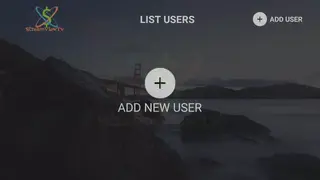
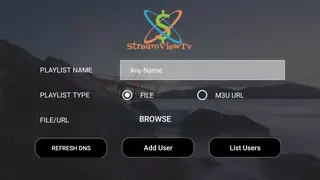
Device compatibility and requirements
Stream View TV targets Android devices running Android 5.0 and higher. It works on many smartphones, tablets, and Android TV boxes that meet this requirement. Performance will depend on your device hardware and the quality of your internet connection.
For a stable experience with live channels and HD streams, a reliable broadband or fiber connection is recommended. Using Wi Fi instead of mobile data can also help reduce buffering when watching IPTV content.
Privacy and legal considerations
Stream View TV functions as a media player and does not host or store any third party content. Users are responsible for the playlists, IPTV subscriptions, and media sources they add to the app.
Always make sure you have the legal rights to access and stream any channels, movies, or series you load through the app. Respect local laws, content licenses, and your IPTV provider terms when using Stream View TV.
FAQs
Pros
- Supports Xtream Codes API and M3U playlists for flexible IPTV access
- Does not bundle content, giving users full control over what they add
- Built in media player offers smooth playback and subtitle options
- Parental control helps restrict adult or sensitive content
- Works on a wide range of Android phones, tablets, and TV boxes
Cons
- Requires users to already have IPTV credentials or playlists
- Cannot be used to watch content offline because it depends on streams
- Interface and performance depend on the quality of your IPTV source
- May include ads in the interface or during playback
Conclusion
Stream View TV is a practical IPTV and video player for Android users who already have access to IPTV services or playlists and want better control over how they watch. With Xtream Codes and M3U support, a solid built in player, and parental controls, it can unify live TV, movies, and series in one app. Download the latest Stream View TV APK from our website, install it on your device, and connect your existing IPTV subscription or playlist to start streaming.




Comments
No approved comments yet.