

Streamer Simulator Indonesia
Streamer Simulator Indonesia is a 3D life-simulation game where you build a virtual career as a content creator. Create your character, explore the city, and slowly grow from a beginner to a popular streamer.
The game focuses on daily activities, streaming sessions, and smart money management. You set up your PC, complete small tasks, and interact with NPCs to unlock new opportunities and upgrade your setup.
As you know getting popularity is one of the most common dreams of every streamer. So, if you want to turn your dreams into virtual reality, then stay with us for a while. Warnet Life and My Journey Sebastia are quite popular high-end simulation gameplay. Hence, try the newly available game and enjoy.
You can download the official Streamer Simulator Indonesia APK directly from our website and start playing on your Android phone or tablet without any complex setup.
https://apkoll.com/streamer-simulator-indonesia/
Rate this app
App details
- App name
- Streamer Simulator Indonesia
- Category
- Simulation
- Version
- v0.5
- Size
- 153.94 MB
- Requirements
- 5.0 and Above
- Package name
- com.kajewDev.StreamerSimulator
- Publisher
- kajewDev
- Price
- Free
- Mod
- No
- Downloads
- 96,108
- Rating
- 4.8 / 5
- Rating count
- 34,221
- Play Store
- No
- Requires root
- No
- Offline support
- Yes
- Contains ads
- No
- In-app purchases
- No
- Updated
- May 16, 2026
- Age rating
- Rated for 7+
Table of contents
What is Streamer Simulator Indonesia?
Streamer Simulator Indonesia is an offline simulation game for Android developed by kajewDev. It puts you in the role of a young streamer who arrives in a small Indonesian town with limited money and big ambitions. Your goal is to build a streaming setup, attract viewers, and slowly become a well-known content creator.
The game starts with character customization, where you adjust your avatar’s appearance to match your style. After that, your character is dropped into the town, and you are free to move around, explore locations, and interact with different NPCs.
Using your starting cash, you buy essential items such as a PC, desk, and other tools needed to start streaming. As you progress, you complete tasks, gain followers and likes, and unlock better equipment to improve your virtual channel.
The gameplay is presented in 3D with a relatively large map, simple joystick controls, and a focus on casual, open-ended progression rather than competitive action. The game primarily targets Indonesian players, and most of the in-game text uses the Indonesian language.
Why Download Streamer Simulator Indonesia APK?
Streamer Simulator Indonesia is ideal for players who enjoy slow-paced, creative simulation games. Instead of fast combat or intense challenges, it focuses on building a lifestyle and career around streaming.
By downloading the APK from our website, you get direct access to the official installation file without needing any additional tools. You can jump into the town, customize your character, and immediately start working on your streaming journey.
The game combines open-world exploration, character interactions, and life-management elements. You decide how to spend your money, what to upgrade first, and how to balance roaming the city with building your channel. This freedom of choice makes each playthrough feel slightly different.
How Is Streamer Simulator Indonesia Useful for Players?
Streamer Simulator Indonesia is useful for players who like to relax with a casual simulation experience and enjoy the idea of role-playing as a streamer. It offers a simple way to understand the basic loop of content creation: invest in equipment, produce content, attract an audience, and then reinvest your earnings.
Because it runs offline, you can play anywhere without a constant internet connection. The focus on Indonesian language and setting can also be engaging for local players who want a relatable environment with familiar names, signs, and cultural touches.
For newcomers to simulation games, the controls are straightforward and easy to learn. You move using an on-screen joystick, tap buttons to interact, and follow simple visual cues to manage tasks and purchases, making it accessible even for casual gamers.
How to Download and Install Streamer Simulator Indonesia APK
You can download the official Streamer Simulator Indonesia APK directly from our website. Follow these simple steps to get the game on your Android device:
Scroll to the download section on this page.
Tap the download button for the Streamer Simulator Indonesia APK file.
Wait for the download to complete on your device.
Open your device settings and enable installation from unknown sources if it is not already allowed.
Locate the downloaded APK file in your downloads folder.
Tap the file and follow the on-screen prompts to install the game.
Once installation finishes, launch the game from your app drawer and start your streaming journey.
Features
Streamer life simulation
Play as an aspiring streamer, build your setup, and try to grow your virtual audience over time.
3D open town map
Explore a 3D town with different locations, shops, and NPCs that make the world feel alive.
Character customization
Adjust your avatar’s body and appearance to match your preferred style before starting the game.
Offline gameplay
Play the game without an active internet connection once it is installed on your device.
Simple joystick controls
Use an on-screen joystick for movement and dedicated action buttons for interaction and activities.
NPC interactions
Talk to non-player characters to receive information, hints, and tasks that support your progress.
Progressive upgrades
Use your limited starting money to buy productive items, then earn and reinvest to improve your streaming setup.
User-friendly interface
Navigate menus, inventory, and settings easily thanks to a clean, beginner-friendly layout.
Screenshots
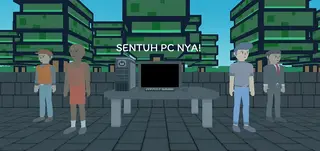

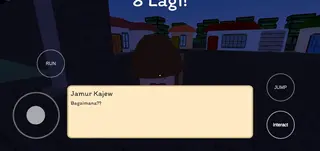


Gameplay Overview
In Streamer Simulator Indonesia, you start with limited resources and a simple room. Your first task is to buy the most important items for streaming, such as a basic computer and desk. Once your setup is ready, you begin streaming sessions to attract viewers.
As you play, you move around the town to find shops, NPCs, and different points of interest. Completing activities and tasks can reward you with money or progression, which helps you upgrade your equipment. Over time, better gear and smart decisions lead to more success as a virtual streamer.
Controls and Interface
The control system uses a virtual joystick on one side of the screen for movement and several buttons on the other side for actions. This layout makes it easy to walk, interact with objects, and start or stop activities.
Menus are straightforward, allowing you to check your money, items, and settings quickly. Even if you are new to simulation games, you can understand the basic controls in a short time.
Tips for New Players
If you are just starting, focus on using your initial money wisely. Purchase the core items you need to stream before spending on extras. Basic upgrades that improve your streaming setup often have the biggest impact on your progress.
Exploring the town is also important. Talking to NPCs and checking different locations can reveal tasks or hints that make it easier to advance and earn more in-game currency.
FAQs
Pros
- Engaging streamer-themed life simulation concept
- Offline gameplay once installed
- 3D open town with exploration and NPCs
- Simple joystick controls suitable for beginners
- Character customization and progressive upgrades
Cons
- Interface and text focused on Indonesian language may be difficult for non-Indonesian players
- Graphics and animations are modest compared to big-budget titles
- May feel repetitive for players who prefer fast-paced action games
Conclusion
Streamer Simulator Indonesia offers a relaxed, streamer-themed life simulation set in a 3D Indonesian town. If you enjoy building a virtual career step by step, managing money, upgrading equipment, and exploring at your own pace, this game is a solid choice. Download the APK from our website to start your journey as a rising content creator on Android.




Comments
No approved comments yet.