

Syncler
Syncler is an Android streaming app that helps you organize and access movies, TV series and IPTV-style channels from multiple provider packages in one place. It focuses on a clean interface, powerful categorization and simple navigation.
With support for debrid services, external players and Android TV devices, Syncler aims to give entertainment fans more control over how they discover and watch content. You can get the official Syncler APK directly from our website and install it on compatible phones, tablets and TV boxes.
There are different devices, through which people can access entertainment websites or applications like Tele Latino and Filmymeet. But there is a large number of Android communities, there are billions of Android users all over the globe. So, we are here with another entertainment application for you all.
If you enjoy keeping up with the latest releases, back catalog titles and trending shows, this app offers a flexible way to browse, track and stream from different sources without relying only on traditional streaming platforms.
Rate this app
App details
- App name
- Syncler
- Category
- Entertainment
- Version
- v1.3.5.1
- Size
- 93.51 MB
- Requirements
- 5.0 and Above
- Package name
- com.syncler
- Publisher
- SYNCLER
- Price
- Free
- Mod
- No
- Downloads
- 81,649
- Rating
- 4.8 / 5
- Rating count
- 21,847
- Play Store
- No
- Requires root
- No
- Offline support
- No
- Contains ads
- Yes
- In-app purchases
- Yes
- Updated
- Jun 1, 2026
- Age rating
- Rated for 3+
Table of contents
What is Syncler APK?
Syncler is an entertainment-focused Android application designed to act as a content organizer and streaming front-end. Instead of hosting its own media library, it connects to provider packages and debrid services so users can browse and play movies, TV shows and other video content from different sources in a single interface.
The app supports phones, tablets, Android TV, Fire TV and compatible emulators. It includes advanced filtering, watchlist tools and episode tracking so you can follow entire seasons easily. Syncler also works with external players such as MX Player, giving you flexibility in how you handle playback quality, subtitles and hardware acceleration.
The APK available on our website is the Android package you can download and install manually. Once installed, you can configure provider packages and optional premium debrid accounts according to your own preferences.
Why download Syncler for Android from our website
Syncler appeals to users who want more control over how they discover and stream video content on Android. Instead of juggling multiple separate apps, you can manage movies, shows and IPTV-style channels in one place with a consistent interface and powerful search tools.
By downloading the official Syncler APK directly from our website, you can install the latest available version on supported Android devices, even though it is not offered in the Google Play Store. This allows you to stay up to date with new features, improvements and compatibility updates without waiting for store approvals.
The app is particularly attractive if you already use debrid services or external players. Syncler integrates these tools and presents links in a structured way, making it easier to pick quality sources, continue watching where you left off and track multiple series across seasons.
How Syncler is useful for movie and TV fans
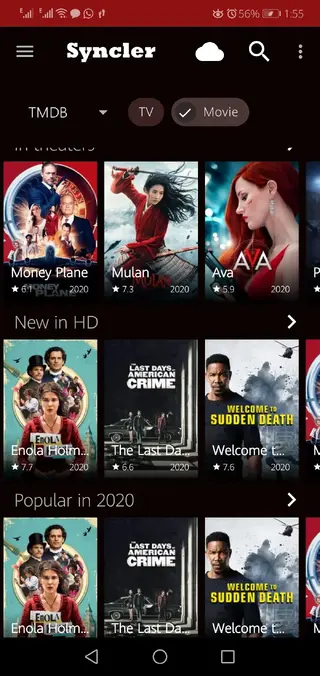
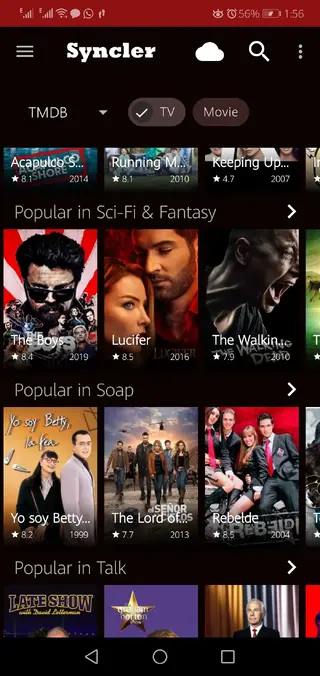
Syncler is useful because it brings many scattered entertainment options into a single dashboard. You can browse by genre, year, popularity or recent releases, then quickly check details, seasons and episodes before you start streaming.
For TV series, the episode structure helps you avoid missing parts of a season. For movies, categorization by year and quality makes it simpler to find exactly what you want to watch. Integration with debrid services can provide more reliable links and higher resolutions, depending on your own accounts and settings.
If you watch content on different devices, Syncler’s Android TV support and compatibility with Fire TV and emulators make it easier to keep a familiar interface everywhere. Combined with an internal player and external player options, it gives you a flexible toolkit for daily streaming.
How to download and install Syncler APK
You can download the official Syncler APK file directly from our website and install it manually on your Android device. Make sure you are using a device running Android 5.0 or higher.
Follow these steps to install:
Scroll to the download area on this page and tap the Syncler APK download button on our website.
Wait for the APK file to finish downloading to your Android phone, tablet or TV device.
Open your device settings, go to security or apps, and allow installation from unknown sources for your browser or file manager.
Locate the downloaded APK in your downloads folder and tap it to start the installer.
Confirm the installation prompts and wait until the process completes.
Open Syncler from your app drawer or Android TV home screen, then configure provider packages and playback options.
After installation you can update the app in the future by returning to our website and downloading the newer APK version over the existing one.
Features
Content aggregation interface
Browse movies, TV shows and channels from multiple provider packages in a single streamlined Android interface.
Advanced categorization
Use filters for genres, year, trending titles and other categories to quickly narrow down large libraries of content.
TV series episode structure
View shows by seasons and episodes so you can follow full storylines and continue watching without losing your place.
Built in video player
Play content directly inside Syncler with a built in player that supports essential playback and subtitle controls.
External player support
Open streams in external players such as MX Player if you prefer their decoding options or custom playback settings.
Debrid service integration
Connect Real Debrid and similar services to access additional streaming links and manage premium host accounts.
Android TV and Fire TV support
Use the app on Android TV boxes, Fire TV Stick and Fire TV Cube with layouts adapted for TV screens and remotes.
Fast link loading and playback
Designed to fetch and display links quickly, helping you reach working streams with fewer delays when conditions allow.
Screenshots
Device compatibility and requirements
Syncler targets a wide range of Android powered devices. The version available on our website is built for Android 5.0 and higher, which covers most modern smartphones, tablets and TV boxes.
On Android TV and Fire TV devices, Syncler offers a layout that is easier to control with a remote. You can also run it inside popular Android emulators on desktop, although performance will depend on your computer hardware and emulator configuration.
For the best experience, use a stable broadband connection and, where possible, a device that supports hardware accelerated video decoding to handle higher resolutions smoothly.
Tips for better streaming performance
Streaming quality in Syncler depends on your network connection, chosen sources and device capabilities. You can improve your experience with a few practical steps.
Use a reliable Wi Fi or wired connection instead of mobile data when possible.
Select streams that match your connection speed rather than always choosing the highest resolution.
Try an external player such as MX Player if you experience stuttering or audio sync issues.
Keep your Android firmware and Syncler APK updated using the latest version available on our website.
Adjusting these factors can help reduce buffering and make playback smoother while you browse and watch content through the app.
FAQs
Pros
- Centralizes movies and TV shows from multiple provider packages in one interface
- Strong categorization and search options make it easier to find specific content
- Supports both built in and external video players for flexible playback control
- Compatible with phones, tablets, Android TV, Fire TV and many emulators
- Works with debrid services such as Real Debrid for enhanced streaming options
Cons
- Not available on the Google Play Store, so updates require manual APK installation
- Requires configuration of provider packages, which may be confusing for beginners
- Needs a stable internet connection for reliable streaming and browsing
Conclusion
Syncler is a versatile Android entertainment app that brings movies, series and IPTV style content into one organized interface. If you prefer a flexible streaming setup with debrid and external player support, downloading the Syncler APK from our website gives you a practical way to run it on compatible Android phones, tablets and TV devices.




Comments
No approved comments yet.