

Tubi TV
Tubi TV is a free, ad-supported streaming app that lets you watch thousands of movies and TV shows on your Android phone or tablet. You do not need a paid subscription to start watching.
The app focuses on licensed content from major studios and organizes everything into clear categories such as action, drama, comedy, and more. You simply install the APK, sign in if you want extra features, and start streaming.
It offers new and latest movies, television shows, and many more. It isn’t for a single country. It has connected with all over the world. Free Entertainment apps such as Filme Flix TV and Senpai Stream are also popular. Try all available unique apps and have fun.
You can download the official Tubi TV APK directly from our website and enjoy a simple way to stream full-length films and series on Android with no monthly fees.
Rate this app
App details
- App name
- Tubi TV
- Category
- Entertainment
- Version
- v10.18.0
- Size
- 90.59 MB
- Requirements
- 5.0 and Up
- Package name
- com.tubitv
- Publisher
- Tubi TV
- Price
- Free
- Mod
- No
- Downloads
- 54,005
- Rating
- 4.7 / 5
- Rating count
- 20,000
- Play Store
- Yes
- Requires root
- No
- Offline support
- No
- Contains ads
- Yes
- In-app purchases
- No
- Updated
- May 12, 2026
- Age rating
- Rated for 3+
Table of contents
What is Tubi TV APK
Tubi TV is a legal, ad-supported video streaming app that offers a large catalog of movies, TV series, and specials without any subscription fees. You watch content in exchange for short commercial breaks, similar to free-to-air television.
On Android, the Tubi TV APK lets you access the same library you find on other Tubi platforms. After installing the app, you can browse by genre, search for specific titles, or explore curated rows like Featured, New Releases, and Most Popular.
Creating a free Tubi account unlocks extra options such as watchlist management and viewing progress sync across devices, while basic streaming works even without registration.
Why download Tubi TV for Android
Many users download the Tubi TV APK to get a subscription-free streaming option on Android. The app brings together films, series, and niche content in one interface and plays them in full HD when your connection supports it.
You can stream across multiple categories such as Movie Night, Not on Netflix, Award Winners, Cult Classics, Foreign Language Films, and more. Because Tubi runs on an ad-supported model, you avoid monthly payments while still getting a rotating catalog of licensed titles.
Another reason to install the APK is flexibility. You can put it on phones, tablets, and some Android TV devices, making it easy to watch on different screens using the same account.
How Tubi TV is useful
Tubi TV is useful for viewers who want a no-cost way to discover and watch movies and TV shows. Instead of managing multiple paid subscriptions, you can open one app and explore different genres, from drama and thrillers to sci-fi and family content.
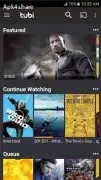
The app organizes everything into clear rows, such as Featured, High Rated on Rotten Tomatoes, Weekly Watchlist, Continue Watching, and Recently Added. This structure helps you quickly find something to watch without scrolling through endless menus.
Parental controls, subtitle support, and account-based watch history add practical benefits for families and regular viewers. Parents can limit mature content, while subtitles help when watching in noisy environments or in a non-native language.
How to download and install Tubi TV APK
You can download the official Tubi TV APK file directly from our website. Make sure you are using an Android device running at least version 5.0 or higher before you start.
Follow these steps to download and install:
Tap the download button on our Tubi TV APK page to save the installation file to your device.
When the download finishes, open your phone’s settings and enable installation from unknown apps for your browser or file manager, if required.
Open your file manager and navigate to the Downloads folder.
Tap the Tubi TV APK file to start the installer.
Review the permissions, then tap Install and wait for the process to complete.
After installation, open Tubi TV, accept the terms, and start browsing or sign in to your account.
Features
Free ad-supported streaming
Watch thousands of movies and TV shows without any subscription fees, supported by short ad breaks.
Large content library
Access a wide selection of genres including action, drama, comedy, horror, sci-fi, and family-friendly titles.
Curated categories and rows
Browse themed rows such as Featured, Movie Night, Not on Netflix, Award Winners, New Releases, and Cult Classics.
Account-based features
Sign up for a free account to sync watch history, continue watching across devices, and manage a personal watchlist.
Parental controls
Set viewing restrictions to filter content for adults, teens, older kids, or younger children.
Subtitle support
Turn subtitles on or off and select available languages for clearer viewing.
HD video playback
Stream in high quality when your device and internet connection can support higher resolutions.
Cross-device availability
Use the same Tubi account across phones, tablets, smart TVs, and supported streaming devices.
Screenshots


Parental controls and family use
Tubi TV includes basic parental controls to help families manage what younger viewers can watch. Inside the account settings, adults can adjust content restrictions so that the app only shows content appropriate for teens, older kids, or little kids.
This makes Tubi a practical choice for shared devices. Parents can keep access to mature films and series while limiting what appears in the main interface when children use the same phone, tablet, or TV.
Content categories and discovery
Finding something to watch is easier when content is grouped well, and Tubi TV focuses heavily on this experience. Beyond standard genres like Action, Drama, Comedy, and Thrillers, you get editorial collections such as Featured, Movie Night, Weekly Watchlist, High Rated on Rotten Tomatoes, and Award Winners and Nominees.
Special rows like Not on Netflix, Cult Classics, Foreign Language Films, Recently Added, and Leaving Soon highlight lesser-known titles and time-limited options. These discovery tools help you move beyond the same popular picks and explore more of the catalog.
Account options and cross-platform use
While you can watch Tubi TV without signing up, creating a free account improves the experience. Your watch history, queue, and recommendations stay synced so that you can start a movie on your phone and finish it later on another supported device.
The same account can be used on various platforms, including smart TVs and web browsers, making Tubi TV a flexible choice for viewers who move between different screens throughout the day.
FAQs
Pros
- Free to use with no subscription fees
- Large catalog of licensed movies and TV shows
- Simple interface with clear categories and curated rows
- Supports HD streaming and subtitles on many titles
- Optional account with watchlist and continue watching features
- Includes parental controls for safer family viewing
Cons
- Content library varies by region and may exclude some popular titles
- Requires a stable internet connection and does not support offline downloads
- Ads interrupt playback at intervals
- Not all titles are available in full HD or with multiple subtitle languages
Conclusion
Tubi TV APK gives Android users a straightforward way to stream movies and TV shows for free using a legal, ad-supported model. If you want extra entertainment without another monthly bill, downloading the app from our website is an easy option to try.




Comments
No approved comments yet.