

VTuber
VTuber is an Android app that helps you follow virtual YouTubers more easily on your phone or tablet. It brings VTuber channels, clips, and stream schedules into one place so you can quickly see what is new.
With a simple, image-focused interface and Japanese language support, the app lets fans browse registered VTubers, preview short clips, and jump straight to full videos or ongoing streams.
You can download the VTuber APK directly from our website and install the latest available version on any compatible Android device running Android 7.0 or higher.
Rate this app
App details
- App name
- VTuber
- Category
- Entertainment
- Version
- v2.9
- Size
- 6.55 MB
- Requirements
- 7.0 and Above
- Package name
- nsproject.vtuber
- Publisher
- NsProject
- Price
- Free
- Mod
- No
- Downloads
- 82,445
- Rating
- 4.7 / 5
- Rating count
- 36,034
- Play Store
- No
- Requires root
- No
- Offline support
- No
- Contains ads
- Yes
- In-app purchases
- No
- Updated
- May 29, 2026
- Age rating
- Rated for 7+
Table of contents
What is VTuber APK
VTuber APK is an entertainment app for Android that focuses on virtual YouTubers and anime-style streamers. It collects information about different VTuber channels and presents it in an organized feed so fans can see new uploads, short clips, and upcoming live shows.
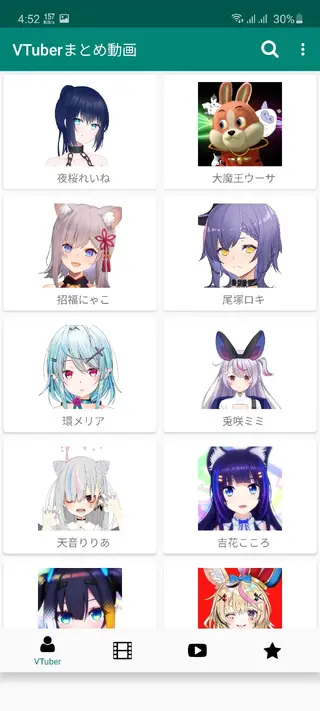
The app lists registered VTubers with their avatars and channel images, making it easy to recognize your favorite characters. From each entry you can open preview clips, check basic details, and move to the full video or live stream through the app.
The interface is simple and image driven, designed mainly for Japanese users. Even if you do not understand Japanese well, the layout is straightforward enough that most users can navigate by icons and thumbnails.
Why download VTuber for Android
VTuber helps you keep track of virtual YouTubers without jumping between different apps and pages. Instead of manually searching channel by channel, you can scroll through a combined list of VTubers, clips, and live shows.
The app is useful if you want to know when a favorite VTuber is planning to stream, or if you like to discover short highlight clips before deciding what to watch in full. The built-in notification feature for favorites also helps you react quickly when new content appears.
Because the VTuber APK file is available directly on our website, Android users who do not see it on Google Play in their region can still download and install the same application on compatible devices. You can also try Animeku.TV and Gogoanime.TV as some other alternate form of entertainment.
How VTuber app is useful for fans
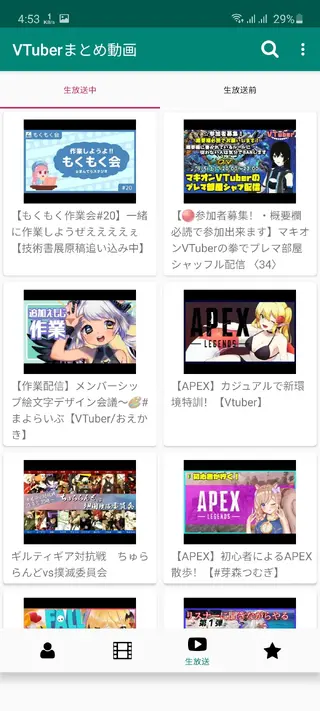
For VTuber fans, missing a live show or special collaboration can be frustrating. VTuber app reduces this risk by showing schedules and basic information about ongoing or upcoming live streams. You can check dates and times and plan your viewing around key events.
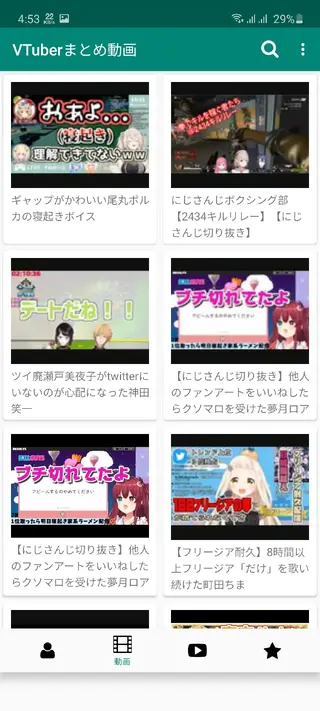
The app also offers short clips and promotional videos. These previews help you quickly scan new content, decide what looks interesting, and then open the full video if it matches your taste. It is a practical way to discover highlights without spending time on long searches.
Marking VTubers as favorites further personalizes the experience. Once you build your own list, the app focuses updates and notifications around those channels so you can follow them more closely.
How to download and install VTuber APK
You can get the VTuber APK file directly from our website and install it manually on your Android device. Make sure your phone runs Android 7.0 or higher before you start.
Follow these steps to download and install:
Scroll to the download section on this page.
Tap the download button to get the VTuber APK file from our website.
Wait for the APK to finish downloading on your device.
Open your device settings and enable installation from unknown sources, if it is not already allowed.
Locate the downloaded APK in your downloads folder and tap it.
Confirm the installation prompts and wait until the process completes.
Launch VTuber from your app drawer and set up your favorites.
After installation, you can use the app to follow VTuber clips and live streams directly from your Android phone or tablet.
Features
Central hub for virtual YouTubers
Browse a combined list of registered VTubers with their avatars and channel images in one place.
Latest videos and clips
View recent uploads and short promotional clips to preview content before opening full videos.
Live stream information
Check basic details about ongoing and scheduled live streams, including timing and dates.
Favorites and alerts
Mark selected VTubers as favorites and receive notifications when those channels update.
Daily information updates
Get frequently refreshed information so you can see new clips and stream plans as they appear.
Simple visual interface
Navigate through a clean, image-focused layout that is easy to understand on mobile screens.
Japanese language support
Use the app primarily in Japanese, matching most VTuber channels and descriptions.
VTuber camera and tracking tools
Use built-in VTuber camera features with face and hand tracking support on capable devices.
Screenshots
VTuber camera and tracking capabilities
Besides aggregating VTuber content, the app also mentions camera and tracking features that appeal to creators and advanced fans. On supported devices, VTuber offers a VTuber camera with face tracking and limited hand tracking, which can help control virtual avatars more naturally during recording or streaming.
The app references support for ARCore-based face tracking on newer versions, which can improve responsiveness and stability when mapping facial expressions to a virtual character. These tools are oriented toward users who want to experiment with simple VTuber-style performance using their Android device.
Language and region considerations
Most text inside the VTuber app, including menus and descriptions, is in Japanese. This matches the origin of many VTubers and the main audience the app targets. If you already follow Japanese VTubers, you will likely feel comfortable with the layout.
Users who do not read Japanese can still rely on channel icons, thumbnails, and basic navigation, but some details about streams and descriptions may be harder to understand. In that case, combining the app with basic translation tools on another device can help.
Tips for getting started with VTuber
When you first open VTuber, spend a few minutes browsing the VTuber list and identifying channels you already know. Mark them as favorites so the app can prioritize updates and notifications for those creators.
Check the clips section regularly to discover new VTubers through short previews. If a clip looks interesting, open the full video and consider adding that channel to your favorites so you do not miss future streams or collaborations.
FAQs
Pros
- Collects information about many VTubers in one app
- Shows live stream dates and times to reduce missed shows
- Offers short clips to preview videos quickly
- Supports favorites and notifications for selected VTubers
- Simple, image-based interface suited to mobile screens
- APK can be downloaded directly from our website
Cons
- Interface and content are mainly in Japanese
- Requires an active internet connection for updates
- May contain in-app advertising during use
- No clear information about in-app purchases or premium options
- Focuses on VTubers only, not general anime content
Conclusion
VTuber is a focused Android app for following virtual YouTubers through clips, schedules, and simple notifications. If you enjoy VTuber content and want a mobile hub to track streams and highlights, you can download the latest VTuber APK directly from our website and start exploring channels on any compatible Android device.




Comments
No approved comments yet.