

Wave Money
Wave Money is a popular digital wallet app for users in Myanmar that helps you send and receive money, pay bills, and manage everyday payments directly from your Android phone.
With a verified mobile number, you can create a Wave Pay account, top up your balance, and make cashless payments at supported merchants and services in just a few taps.
On our website, you can download the Wave Money APK latest version for Android and install it manually if you prefer using the APK file instead of the Play Store.
Rate this app
App details
- App name
- Wave Money
- Category
- Finance
- Version
- v2.6.1
- Size
- 69.76 MB
- Requirements
- 5.0 and Above
- Package name
- mm.com.wavemoney.wavepay
- Publisher
- Digital Purchases
- Price
- Free
- Mod
- No
- Downloads
- 5,182,518
- Rating
- 4.3 / 5
- Rating count
- 298,161
- Play Store
- Yes
- Requires root
- No
- Offline support
- No
- Contains ads
- No
- In-app purchases
- Yes
- Updated
- May 14, 2026
- Age rating
- Rated for 3+
Table of contents
What is Wave Money Android App?
Wave Money is a finance and mobile wallet application designed mainly for people living in Myanmar. It allows users to send and receive money, pay utility bills, recharge mobile credit, shop online, and make everyday payments without carrying cash.
After installing the app, you register with your mobile number and complete a basic verification process. Once your Wave Pay account is active, you can add money through supported channels and start using it to pay friends, family, shops, and service providers that accept Wave Money.
The interface is simple and localized for Myanmar users, with clear menus for transfers, bill payments, airtime top-ups, and other services. The app focuses on secure transactions with PIN protection and transaction notifications so you can keep track of every payment from your smartphone.
So, if you are not a citizen of Myanmar, then don’t waste your time on this Wave Money App. We have more options for you guys, and you can explore PayMaya and K PLUS. But if you are a citizen of the country, then you can stay with us to get all information about the app.
Why Download Wave Money APK from Our Site?
Downloading the Wave Money APK from our website gives you direct access to the official installation file, which you can keep and reinstall whenever you need. This is helpful if you manage multiple devices or prefer to install apps manually instead of relying only on the Play Store.
With the APK file stored on your device, you can set up Wave Money quickly after a reset, share it with family members in the same household, or install it on Android phones and tablets that support manual APK installation.
Our download page focuses on providing the current available version information, along with clear details like package name, version, and Android requirements so you know exactly what you are installing.
How Wave Money Is Useful for Users in Myanmar?
Wave Money is particularly useful in Myanmar where cash handling and bank access can be inconvenient. With this app, many everyday payments move to your phone, reducing the need to carry cash and visit physical branches.
Users can quickly transfer money to friends and family, settle electricity and other utility bills, buy mobile top-up, and pay for services that support Wave Money. This makes it easier to manage monthly expenses from one place.
The app also supports online payments such as shopping, travel ticket purchases, and game top-ups, which helps younger and more digital-focused users manage entertainment and travel spending in a structured way.
How to Download and Install Wave Money APK?
You can get the Wave Money APK file directly from our website and install it on any compatible Android device that meets the minimum requirements.
Follow these steps to download and install:
Scroll to the download area on this page.
Tap the APK download button to start downloading the current available version.
Wait until the APK file finishes downloading to your device.
On your Android phone, open Settings and enable installation from unknown sources if required.
Locate the downloaded APK file in your Downloads folder and tap it.
Confirm the installation prompts and wait for the app to install.
Open Wave Money, register with your mobile number, and complete verification to start using your wallet.
Features
Digital wallet for Myanmar users
Provides a mobile wallet service mainly targeted at residents of Myanmar for everyday payments and transfers.
Fast money transfers
Send and receive money between Wave Money users within seconds, with notifications for both sender and receiver.
Bill and utility payments
Pay supported bills such as utilities and services directly from the app without visiting a payment office.
Mobile recharge and top-ups
Recharge mobile airtime and data packages for yourself or others using your wallet balance.
Online shopping and services
Use the wallet to pay at supported online merchants and services that accept Wave Money payments.
Travel and ticket payments
Purchase certain domestic and international travel tickets where partners support Wave Money as a payment method.
Game top-up support
Top up supported online games and gaming wallets quickly from your Wave Money balance.
Simple registration with phone number
Create an account using your mobile number and complete verification to start using Wave Pay features.
Screenshots

Account Setup and Verification
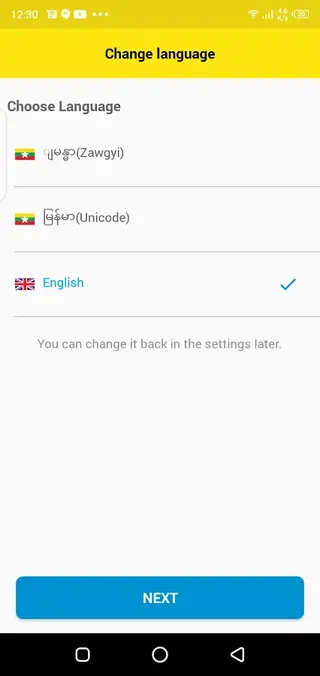
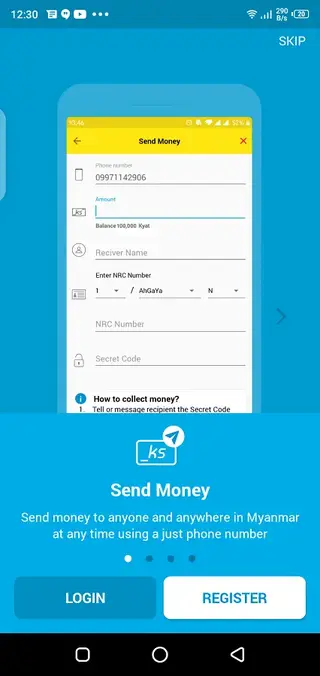
To start using Wave Money, install the app and register with your mobile number. You will receive a verification code by SMS that you must enter in the app. After that, you create a secure PIN that protects your wallet and authorizes payments.
Depending on current regulations and service level, you may need to provide additional information for identity verification to access higher transaction limits or more services.
Security and Privacy Practices
Wave Money uses PIN-based access and transaction confirmation to help protect your wallet from unauthorized use. Each payment or transfer typically requires PIN entry, and you can review recent activity from the transaction history screen.
For better security, users should keep their PIN confidential, avoid sharing one device account among many people, and regularly review their transaction history for any unfamiliar activity.
Supported Payments and Services
The app supports a range of payment categories that may include person-to-person transfers, utility and service bills, mobile phone recharges, online shopping payments, travel bookings, and game top-ups. Exact options can vary over time as Wave Money adds or changes partners.
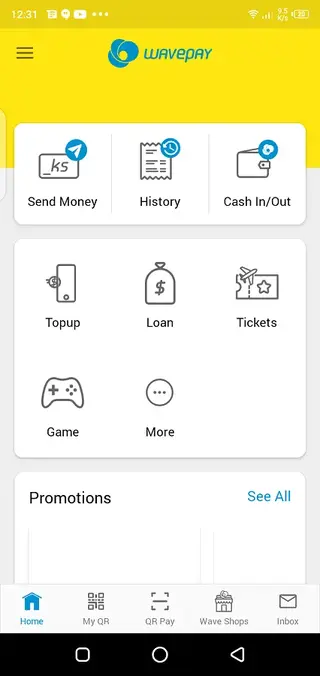
Within the app, each category is accessible from the home screen menu so users can quickly choose the type of payment and follow the guided steps for a successful transaction.
FAQs
Pros
- Easy-to-use digital wallet tailored for users in Myanmar
- Fast transfers and payments for everyday transactions
- Supports bill payments, phone top-ups, and online services in one app
- Clear transaction history and notifications for better tracking
- Available on the Google Play Store and as an APK download from our website
Cons
- Service availability is mainly limited to Myanmar
- Requires stable internet connection for most features
- Account setup and full use depend on valid local phone number and supported partners
Conclusion
Wave Money provides a straightforward digital wallet solution for people in Myanmar who want to move daily payments onto their phones. If your device meets the requirements and you need a local mobile wallet, you can download the Wave Money APK from our website, install it, and start managing transfers and payments in one place.




Comments
No approved comments yet.