

X8 Speeder
X8 Speeder is a game acceleration tool for Android that lets you adjust the speed of selected games and apps. It focuses mainly on popular offline titles where timing and repetitive grinding slow down progress.
As you know there are other applications, which offer these services. So, you have a question why are we suggesting this application offering features similar to the Game Guardian Mod Revo and X8 Sandbox? There are many reasons for this question, which we will share in the paragraphs below.
With simple controls, you can speed up or slow down supported games without needing root access. The APK file is available directly on our website so you can download and start using it on compatible Android phones and tablets.
This tool targets players who want to clear stages faster, test strategies quickly, or reduce waiting time in certain games. Used responsibly, it can make single‑player sessions smoother and more efficient.
Rate this app
App details
- App name
- X8 Speeder
- Category
- Tools
- Version
- v3.3.6.8-gp
- Size
- 13.52 MB
- Requirements
- 4.2 and Above
- Package name
- com.x8zs.ds2
- Publisher
- X8 Developer
- Price
- Free
- Mod
- No
- Downloads
- 65,847
- Rating
- 4.5 / 5
- Rating count
- 21,998
- Play Store
- No
- Requires root
- No
- Offline support
- Yes
- Contains ads
- No
- In-app purchases
- No
- Updated
- May 7, 2026
- Age rating
- Rated for 12+
Table of contents
What is X8 Speeder for Android
X8 Speeder is a third‑party Android utility that modifies the running speed of supported games and apps. Instead of changing graphics or adding cheats directly, it focuses on time and speed control so you can run gameplay faster or slower than usual.
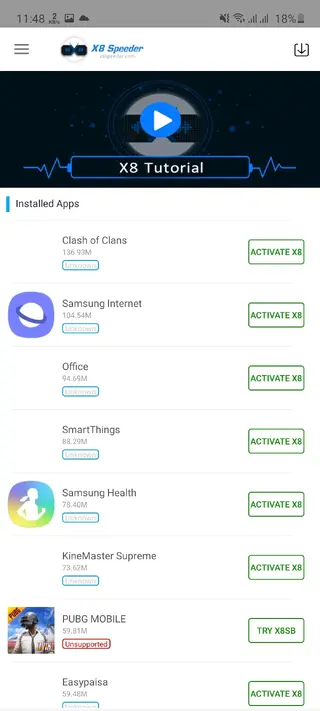
The app scans your device for compatible games and lets you inject a speed control panel into selected titles. Once enabled, you can adjust the speed while you play, which is especially useful in offline games that rely on grinding, cooldown timers, or long animations.
X8 Speeder works without root on many devices running Android 4.2 and above. Because it is not available on Google Play, you install the APK manually, and you can download the official installation file straight from our website.
Why download X8 Speeder APK from our site
Players download X8 Speeder because they want more control over how fast a game runs. Instead of spending long periods repeating the same level or waiting for in‑game timers, you can increase the speed and finish sections faster.
By getting the X8 Speeder APK from our website, you can:
Access the stated version name and package that many users look for.
Install the tool on devices that do not support similar apps on official stores.
Use a single installer rather than mixing different unofficial builds.
Keep in mind that using speed tools can conflict with game terms of service, especially in online or competitive titles. It is safer to focus on offline, single‑player games and to use the app only for personal experimentation or faster casual play.
How X8 Speeder can be useful
X8 Speeder can be useful for Android gamers who spend a lot of time on repetitive offline content. By speeding up gameplay, you can reduce grinding time in farming stages, card draws, or endless runs.
Content creators and testers also use speed tools to capture footage more efficiently or to check game behavior at different speeds. Slowing down play can help you study animations, timing windows, or tricky mechanics that are hard to observe at full speed.
However, it is important to remember that many developers do not support or allow external tools that modify gameplay. To avoid account issues, users generally keep X8 Speeder for offline titles where server‑side checks are minimal and no competitive integrity is involved.
How to download and install X8 Speeder APK
You can download the official X8 Speeder APK file directly from our website. Follow these steps to get it running on your Android device:
Scroll to the download area on this page and tap the X8 Speeder APK download button.
Confirm the download in your browser and wait until the APK file finishes downloading.
On your device, open Settings and go to the security or privacy section.
Enable installation from unknown sources or allow your browser or file manager to install unknown apps.
Open your downloads folder or file manager and tap the X8 Speeder APK file.
Review the installation prompt and tap Install.
Once installation completes, launch X8 Speeder and select the games you want to configure.
After setup, open a supported game through X8 Speeder so the speed control overlay can be added properly.
Features
Speed control for supported games
Adjust the speed of selected Android games to run faster or slower during gameplay.
Works without root on many devices
Designed to operate on most Android 4.2 and above devices without requiring root access.
Focus on offline gameplay
Best suited for offline and single‑player games where you want to shorten grind or waiting times.
Simple floating control panel
Adds a small in‑game panel so you can change speed on the fly while playing.
Game scanning and injection
Scans installed apps to find compatible games and then injects the speed control environment when enabled.
Free to install and use
The core functionality is available without subscription fees or in‑app purchases.
Custom speed levels
Offers multiple speed levels so you can choose moderate or extreme acceleration based on device stability.
No registration required
You can start using the app without creating an account or logging in.
Screenshots
Is X8 Speeder legal to use
X8 Speeder operates in a gray area. Installing the app on your device is generally not illegal in most regions, but using it to modify how a game behaves can conflict with the game developer’s terms of service. This is especially true in online multiplayer titles, where any form of unfair advantage is usually forbidden.
To reduce risk, many users limit X8 Speeder to offline games and personal experiments. Always review the terms of service of each game you play and decide carefully whether you want to connect a modified environment to your account.
Tips for safer and smoother use
If you decide to use X8 Speeder, a few practical habits can make the experience smoother:
Start with low or moderate speed settings to test stability.
Use the tool mainly in offline, single‑player games where account risk is lower.
Avoid logging into social or ranked modes while the speed modification is active.
Close background apps to reduce the chance of freezes when you increase game speed.
Backup important game data when possible, especially for titles that store progress locally.
These habits will not remove all risk, but they can help minimize crashes and unexpected behavior when experimenting with game speed.
Device compatibility and performance
X8 Speeder targets Android 4.2 and higher, but real‑world performance depends on your hardware and the specific game you run. Older or low‑end devices may struggle at high speed levels, causing frame drops or sudden exits.
For the best experience, keep your device’s operating system updated, maintain enough free storage, and avoid running heavy background apps while using X8 Speeder. If a game repeatedly crashes with speed control enabled, consider lowering the speed level or removing that title from the tool.
FAQs
Pros
- Lets users adjust game speed to reduce grind in supported titles
- Works on many non‑rooted Android devices
- Simple interface makes it accessible for beginners
- Useful for offline, single‑player gameplay and testing
- APK is available directly for download from our website
Cons
- Not available on Google Play Store
- May violate terms of service of some games, especially online ones
- Compatibility varies and not all games work with the tool
- Potential stability issues or crashes at very high speed settings
- Third‑party tools like this always carry some risk if misused
Conclusion
X8 Speeder is a niche tool aimed at Android gamers who want more control over gameplay speed, mainly in offline titles. If you understand the risks, focus on single‑player use, and install the APK carefully, it can make grinding, farming, and testing much faster. You can download the current Android version directly from our website whenever you need to reinstall or update it.




Comments
No approved comments yet.