

Y Musik
Y Musik is a lightweight Android app that lets you play YouTube audio in the background and with the screen off. It focuses on music playback while keeping data and battery usage low.
With this app you can listen to songs, podcasts, and lectures from YouTube while using other apps or when your phone is locked. It also adds convenient download options for offline listening on your device.
There are some limitations available in the Google Product YouTube. It is a well-known platform to share and watch videos. There are millions of videos available for users to watch and enjoy for free. So, we are here with this app similar to ReVanced Extended and YouTube Blue, through which you can have a better experience of using it.
You can download the official Y Musik APK directly from our website in its latest available version and install it on compatible Android phones and tablets.
Rate this app
App details
- App name
- Y Musik
- Category
- Entertainment
- Version
- v3.9.15
- Size
- 8.36 MB
- Requirements
- 4.1 and Above
- Package name
- com.kapp.youtube.final
- Publisher
- KAPP
- Price
- Free
- Mod
- No
- Downloads
- 88,109
- Rating
- 4.7 / 5
- Rating count
- 34,225
- Play Store
- No
- Requires root
- No
- Offline support
- Yes
- Contains ads
- No
- In-app purchases
- No
- Updated
- Jun 1, 2026
- Age rating
- Rated for 7+
Table of contents
What is Y Musik APK
Y Musik APK is an Android media player built around YouTube audio. It allows you to stream the audio track of YouTube videos with the screen off, in the background, or while using other apps. The app focuses on music and podcast listening rather than full video playback.
Y Musik does not include its own YouTube engine, so it relies on YouTube libraries already present on your device. You need to have the official YouTube app or compatible libraries installed first, then Y Musik connects to that content and removes several playback limitations.
The app is small in size, easy to install, and designed to run smoothly even on lower-end devices. It offers a familiar music player experience, complete with playlists, artist and album views, and a built-in audio player interface on your screen.
Why download Y Musik for Android
Many users listen to music and talks on YouTube but get interrupted whenever they lock the screen or switch apps. Y Musik solves this problem by keeping the audio playing in the background, so you can multitask or save battery with the display turned off.
The app also adds convenient download options. You can save audio or video files from YouTube to your device and listen offline whenever you do not have a stable connection. This combination of background playback and offline access makes Y Musik appealing to heavy YouTube listeners.
You can download the official Y Musik APK directly from our website and install it manually, which is useful for devices where the app is not available through standard app stores.
How Y Musik is useful
Y Musik is useful for anyone who uses YouTube mainly as a music or podcast source. By turning videos into background-friendly audio, it reduces screen-on time and can help save battery and data. You can keep listening while chatting, browsing, or checking email.
The offline download feature lets you prepare playlists for commuting, travel, or areas with weak coverage. You can store files in your device storage and play them any time without needing to stream again.
On top of that, Y Musik organizes your content with artist and album views, intelligent playlists, and a cohesive music library interface. This makes it more convenient to manage long-term listening than relying only on the standard YouTube app.
How to download and install Y Musik APK
You can download the latest available Y Musik APK file directly from our website and install it manually on your Android device. Follow these steps to complete the process:
Scroll to the download area on this page and tap the Y Musik APK download button.
Wait for the APK file to finish downloading to your device.
Open your phone settings and enable app installs from unknown sources if it is not already allowed.
Locate the downloaded APK file in your Downloads folder or file manager.
Tap the file, review the permissions, and confirm Install.
Once installation is complete, open Y Musik and connect it with your existing YouTube content.
After the first setup, you can start playing audio in the background, downloading media, and organizing your library inside the app.
Features
Background and screen-off playback
Continue listening to YouTube audio when the screen is off or while using other apps.
YouTube-based audio player
Access audio from YouTube videos and focus on music and spoken content instead of full video.
Download videos and audio
Save media from YouTube to your device for offline playback whenever you want.
Multiple quality options
Choose from different video or audio quality levels before downloading content.
Built-in converter
Convert YouTube video streams into audio-focused formats directly inside the app.
Low data usage on slow networks
Optimized to stream audio smoothly even on weaker or unstable connections.
Cohesive music library
Browse tracks by artist, album, and playlists to keep your library organized.
Trending and recommended content
Discover popular music and videos based on YouTube trends.
Screenshots


Background playback and multitasking
One of the main advantages of Y Musik is its background playback capability. Instead of keeping the YouTube app open with the screen on, you can lock your phone or switch to other apps while the audio continues to play. This is especially helpful for long playlists, podcasts, and lectures.
The app provides a built-in player notification and controls, so you can pause, resume, or skip tracks without reopening the main interface. This multitasking-friendly design makes everyday listening smoother and more efficient.
Offline downloads and storage management
Y Musik lets you download media from YouTube and store it directly in your device memory. You can choose between different quality levels and formats to balance sound quality with storage space. Once downloaded, files remain available in your library for offline listening.
This is useful for commuting, flights, and remote areas where streaming is unreliable. Because the app is lightweight, it works well even on devices with limited space, especially when you selectively choose lower-bitrate audio for large playlists.
Library organization and playback controls
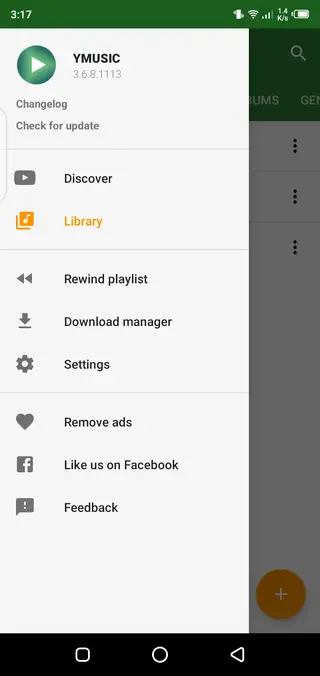
Beyond simple streaming, Y Musik offers tools for organizing your audio collection. It retrieves artist images where possible, builds intelligent playlists based on artist and album information, and presents your content in a cohesive music library layout.
The built-in player supports familiar controls and integrates with the device screen and notification area. Combined with home screen widgets on some versions, it gives you quick access to your favorite tracks without needing to open the full app each time.
FAQs
Pros
- Plays YouTube audio with the screen off and in the background
- Allows downloading media from YouTube for offline playback
- Lightweight app that works on older Android versions
- Multiple quality options and built-in converter for downloads
- Organized library with artist, album, and playlist views
Cons
- Requires YouTube libraries and cannot work fully on its own
- Not available on the official Google Play Store in many regions
- Interface and stability may vary depending on Android version
- Downloading YouTube content may not align with YouTube terms of service
Conclusion
Y Musik is a compact YouTube-focused audio player that unlocks background playback and offline downloads on Android. For users who rely on YouTube for music and talks, it offers a practical way to listen with the screen off, save data, and organize content more like a traditional music player. The official APK is available on our website so you can install it directly on supported devices.




Comments
No approved comments yet.