

2nr
2nr is a communication app that lets you add extra virtual phone numbers to your Android device without buying new SIM cards or phones. You can receive calls and SMS on these numbers directly in the app.
These disposable or long-term virtual numbers help you protect your primary phone number when you sign up for online services, sell items, or talk to new contacts. You manage everything inside one clean interface, in just a few taps.
You can download the official 2nr APK latest version directly from our website and install it on compatible Android phones and tablets to start using additional numbers instantly.
Rate this app
App details
- App name
- 2nr
- Category
- Communication
- Version
- v2.1.18
- Size
- 12.57 MB
- Requirements
- 5.0 and Up
- Package name
- pl.rs.sip.softphone
- Publisher
- MobileLabs Sp. z o.o.
- Price
- Free
- Mod
- No
- Downloads
- 100,010
- Rating
- 4.7 / 5
- Rating count
- 25,000
- Play Store
- Yes
- Requires root
- No
- Offline support
- No
- Contains ads
- Yes
- In-app purchases
- Yes
- Updated
- May 18, 2026
- Age rating
- Rated for 3+
Table of contents
What is 2nr App
2nr is a virtual number application for Android that adds extra mobile numbers to a single device. Instead of inserting multiple SIM cards or carrying more than one phone, you generate additional numbers inside the app and use them for calls and text messages.
The service is popular in Poland and focuses on Polish numbers, with the main interface available in the Polish language. Even if you do not speak Polish, the layout is simple enough that most users can navigate it after a short time.
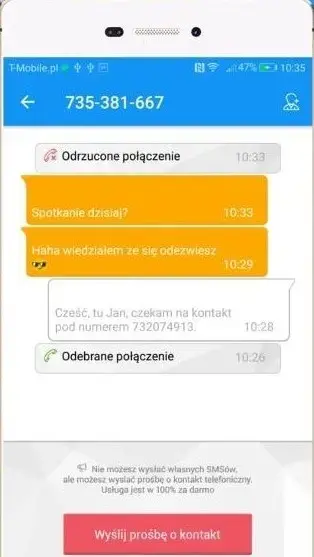
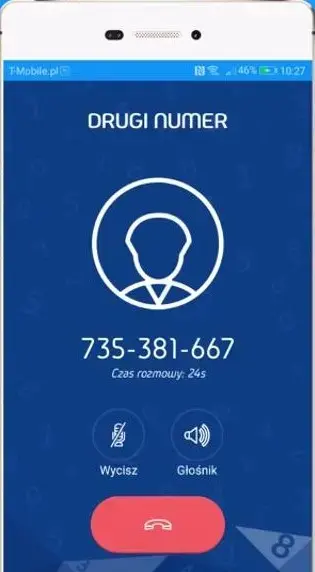
Once you create an account, you can choose and activate numbers, send and receive SMS and MMS, and handle incoming and outgoing calls over an internet connection. The app works as a second line on your phone, so you can keep your main number private while staying reachable.
In fact, there are a lot more similar applications available, which offer quite amazing features for the users. Therefore, if you would like to know more amazing applications, then you may want to check out Pokedailer and WhatsApp Monitor 4. Both of these applications are quite amazing.
Why download the 2nr APK from our website
Installing the 2nr APK from our website gives you quick access to the latest available Android version without waiting for staged updates. You can store the installer file locally, reinstall it whenever needed, and use it on multiple compatible devices you own.
Because 2nr is strongly focused on virtual numbers, many users prefer a direct APK download so they can set it up on devices that may not have easy access to app stores. By getting the file from our website, you can move it to your phone, tablet, or even an Android emulator and keep full control over installation.
If you like to test new apps, use dual-number solutions, or separate your work and personal communications, downloading 2nr in APK format gives you flexibility. You simply download the file from our website, install it once, and then manage all your extra numbers within the app.
How 2nr can be useful for everyday privacy
Sharing your primary phone number everywhere can quickly lead to spam calls, promotional SMS, and privacy risks. 2nr solves this by giving you additional numbers you can share instead. If one number starts receiving unwanted messages, you can stop using it without affecting your real SIM.
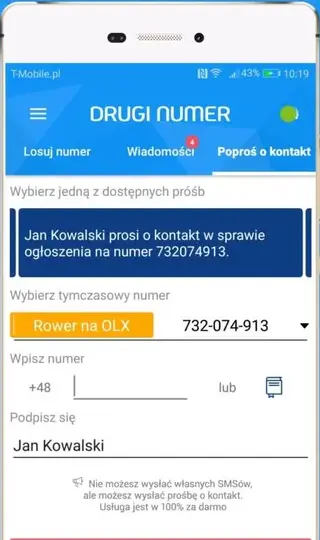
The app is useful for registering on websites, creating social accounts, verifying services, or placing classified ads. You keep your personal number hidden while still receiving all important codes and messages. It also helps people who want separate numbers for work, clients, and private life without signing extra contracts.
Because everything runs inside a single application, you do not need extra hardware or complicated setup. You simply select a number, use it for calls and messages as needed, and remove it later if it is no longer useful.
How to download and install 2nr APK
You can download the official 2nr APK file directly from our website and then install it manually on your Android device. The process is simple and only takes a few minutes.
Follow these steps to get started:
Scroll to the download area on this page and tap the 2nr APK download button.
Wait until the APK file finishes downloading to your device.
Open your phone’s downloads folder or notification panel and tap the downloaded APK.
If asked, enable installation from unknown sources in your Android security settings.
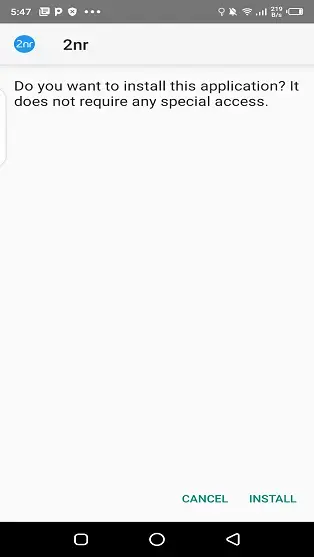
Confirm the installation prompt and wait for the setup to complete.
Once installed, open 2nr, complete the initial setup, and start creating your virtual numbers.
After installation, you can keep the APK file as a backup or delete it to free up space, since the app will remain installed on your device.
Features
Multiple virtual numbers on one device
Create and manage additional phone numbers on a single Android smartphone or tablet without buying new SIM cards.
Up to three extra numbers
Get up to three active numbers in the app, giving you separate lines for work, personal use, and temporary online activities.
SMS and MMS support
Send and receive standard SMS messages and multimedia messages using your virtual numbers inside the 2nr interface.
Voice calling capability
Make and receive calls through your virtual numbers so people can contact you without knowing your real SIM number.
Polish-language interface
The app is primarily designed in Polish, matching its main market, while still being simple enough for other users to explore.
Temporary and disposable numbers
Use numbers for short-term tasks like verifications or listings and stop using them later to reduce spam and exposure.
Dual-SIM style experience
Enjoy a dual- or multi-number experience even on phones that support only one physical SIM card.
Missed call notifications
Get notifications for missed calls so you can quickly see who tried to contact your virtual numbers.
Screenshots
System requirements and compatibility
2nr is built for Android smartphones and tablets running a relatively recent version of the operating system. For a smooth experience, you should use a device that meets or exceeds the minimum Android version mentioned in the app details and has enough free storage for call logs, messages, and media.
Because calls and messages rely on data connectivity, using 2nr on a stable Wi-Fi or mobile data connection will provide better call quality and faster message delivery. Older or very low-end devices may still run the app, but performance and responsiveness can vary.
Privacy and responsible use
Virtual numbers can significantly improve privacy, but they do not give complete anonymity or immunity from the law. Your activity may still be subject to local regulations and carrier rules, and misuse can lead to account restrictions or legal issues.
Use 2nr to separate your private and public contact details, to reduce spam, and to manage work communication more cleanly. Avoid using the app for harassment, fraud, or any activity that violates terms of service or regional laws.
FAQs
Pros
- Lets you add multiple virtual numbers to a single phone
- Helps protect your main phone number and privacy online
- Supports SMS, MMS, and voice calls on virtual numbers
- Useful for separating work, personal, and temporary contacts
- No extra physical SIM cards or devices required
Cons
- Primary interface is in Polish which may confuse some users
- Requires a stable internet connection for reliable use
- May include ads and optional paid features
- Virtual numbers may be limited to specific regions or prefixes
Conclusion
2nr is a practical solution if you need extra phone numbers on one Android device for privacy, work, or temporary use. Download the APK from our website, install it, and manage multiple lines without buying new SIM cards or phones.




Comments
No approved comments yet.