

AKVIP
AKVIP is a lightweight VPN app for Android that helps you encrypt your connection and browse with a hidden IP address. It is designed for users who want a simple way to add an extra layer of privacy on mobile.
With multiple virtual servers and a one-tap connection interface, AKVIP makes it easy to route your traffic through different locations. You can quickly switch servers to find a stable and responsive connection for everyday browsing.
As you know surfing on the web is one of the most common ways to connect with the world. But there are also risks to users’ data. Therefore, Virtual Privacy tools such as Swing Lite VPN and Speed Booster Proxy are popular. Learn about the new Proxy tool specially developed for Android.
You can download the official AKVIP APK directly from our website and install it on compatible Android phones and tablets without needing root access.
Rate this app
App details
- App name
- AKVIP
- Category
- Tools
- Version
- v1.1
- Size
- 5.42 MB
- Requirements
- 5.0 and Above
- Package name
- app.dev.akvip.vpn
- Publisher
- Aoyo Technology
- Price
- Free
- Mod
- No
- Downloads
- 83,992
- Rating
- 4.7 / 5
- Rating count
- 31,023
- Play Store
- No
- Requires root
- No
- Offline support
- No
- Contains ads
- No
- In-app purchases
- No
- Updated
- May 15, 2026
- Age rating
- Rated for 12+
Table of contents
What is AKVIP APK?
AKVIP APK is an Android virtual private network application that helps you create an encrypted tunnel between your device and remote servers. By routing your traffic through these servers, the app hides your original IP address and assigns a virtual one, which can provide more privacy while you browse.
The app focuses on straightforward VPN use rather than complex configuration. After installation, you can pick a server location, tap connect, and allow the VPN permission in Android. Once connected, all traffic from your device passes through the selected server until you disconnect.
AKVIP targets users who want to access blocked sites or services that are restricted by region, such as some websites, news platforms, or apps that do not work in specific countries. It aims to deliver this functionality with a minimal interface and relatively small APK size.
Why download AKVIP for Android?
Many users look for a VPN app that stays simple, does not ask for complicated setup, and focuses on basic privacy needs. AKVIP tries to meet that expectation with quick connection options and a clean layout.
If you regularly face geo-restrictions, public Wi-Fi networks, or content that only opens from certain regions, AKVIP can be useful. Switching to another server can help you reach services that your local network or region blocks.
You can download the latest AKVIP APK version directly from our website, keep it stored locally, and reinstall it whenever you change or reset your Android device.
How is AKVIP useful?
Using a VPN can be helpful in several everyday situations, and AKVIP focuses on those common use cases:
Extra privacy on shared networks: When you connect to public Wi-Fi in cafes, hotels, or airports, encrypting your traffic adds another layer of protection against basic network snooping.
Access to restricted content: Some websites and apps limit access based on country or region. By connecting through a different server, you may be able to reach content that is unavailable on your regular network.
Simple one-tap operation: AKVIP does not overload the user with settings. This makes it easier for less technical users to start using a VPN service.
While no VPN can guarantee complete anonymity or security, using an app such as AKVIP can be one practical step in improving your everyday browsing privacy.
How to download and install AKVIP APK
You can get the official AKVIP APK file directly from our website and install it manually on your Android phone or tablet. Follow these steps to complete the process:
Scroll to the download area on this page and tap the AKVIP APK download button.
Wait for the APK file to finish downloading to your device.
Open your phone settings and enable the option that allows installing apps from your browser or file manager, if it is not already enabled.
Locate the downloaded AKVIP APK in your downloads folder and tap it to start installation.
Review the permissions and tap Install to add the app to your device.
After installation, open AKVIP, grant the VPN connection permission when prompted, choose a server, and tap Connect.
Once installed, you can reconnect to the VPN at any time directly from the app without repeating the APK installation steps.
Features
Simple VPN interface
The app provides a straightforward layout with basic connect and disconnect controls, making it accessible for new users.
Multiple server locations
AKVIP offers a list of remote servers so you can choose different regions for routing your traffic.
IP address masking
When connected, your real IP address is hidden and replaced with a virtual IP from the selected server.
Bypass basic geo-restrictions
Routing traffic through other regions can help you open websites and apps that may be blocked in your location.
Fast connection setup
The app aims to establish VPN tunnels quickly so you can move from disconnected to protected browsing in a few seconds.
No root required
AKVIP works on standard Android devices without needing root access or system modifications.
Lightweight APK
The installation file is relatively small compared with many full-scale VPN clients, which can help save storage space.
Screenshots



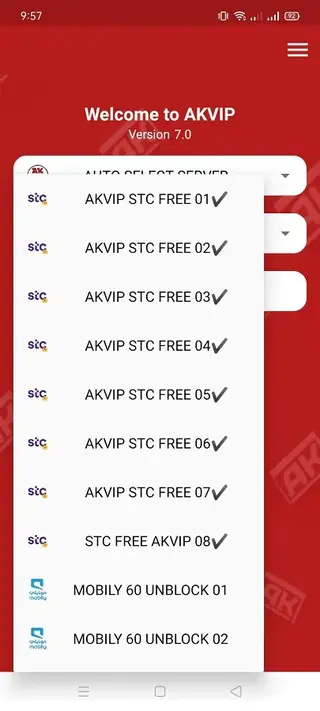

App compatibility and system requirements
AKVIP is designed for Android phones and tablets running modern versions of the operating system. The original release targets Android 5.0 and above, which covers most active devices.
Because it uses the standard Android VPN API, the app integrates with the system-level VPN settings. You can usually see the active VPN status in your notification bar while connected.
Security and privacy considerations
Using a VPN app can improve privacy on open networks, but it does not replace secure browsing habits. AKVIP encrypts your traffic between the device and its servers, yet the service provider can still technically see connection metadata.
For sensitive activities, you should combine VPN usage with strong passwords, two-factor authentication, and secure HTTPS websites. Treat AKVIP as one part of a broader personal security approach rather than a complete solution.
Tips for better performance with AKVIP
VPN performance depends on server load, distance, and your base internet speed. You can try a few simple steps to get more stable results with AKVIP:
Test several servers and choose the one that gives you the lowest latency and fastest loading times.
Reconnect if speeds drop significantly, as switching to a new session can sometimes restore performance.
Close background apps that use a lot of bandwidth while the VPN is active.
Use a stable Wi-Fi or mobile data connection before turning on the VPN to avoid frequent disconnects.
FAQs
Pros
- Straightforward and beginner-friendly VPN interface
- Offers multiple remote servers for routing traffic
- Helps mask your IP address while browsing
- Can assist in bypassing some geo-restricted websites and apps
- Does not require root access to work on Android
- Lightweight app size suitable for low-storage devices
Cons
- Not available on Google Play Store at the time of writing
- Limited public information about long-term support and updates
- Server list and performance may vary over time
- No clear details about advanced features such as kill switch or split tunneling
Conclusion
AKVIP is a compact Android VPN app aimed at users who want quick, simple access to encrypted browsing and basic geo-unblocking. If you prefer a minimal interface and easy one-tap connection, you can download the official AKVIP APK directly from our website and test how it fits your everyday browsing habits.




Comments
No approved comments yet.