

Game Booster VIP GFX Lag Fix
Game Booster VIP GFX Lag Fix is an Android optimization tool designed to make mobile games run smoother on a wide range of devices, including many low-end phones. It focuses on graphics tweaking and system cleanup to help reduce stutter and lag.
With customizable GFX settings, FPS controls, and a built-in booster, the app gives gamers more control over performance than stock game settings usually allow. You can fine-tune visuals, free up RAM, and keep distractions to a minimum while you play.
You can download the latest Game Booster VIP GFX Lag Fix APK directly from our website and start optimizing your favorite games in just a few taps.
https://apkoll.com/game-booster-vip-gfx-lag-fix-apk/
Rate this app
App details
- App name
- Game Booster VIP GFX Lag Fix
- Category
- Tools
- Version
- v80
- Size
- 3.22
- Requirements
- 4.1 and Up
- Package name
- com.booster.gfxpro
- Publisher
- GFXPRO
- Price
- Free
- Mod
- No
- Downloads
- 100,001
- Rating
- 4.7 / 5
- Rating count
- 30,000
- Play Store
- No
- Requires root
- No
- Offline support
- Yes
- Contains ads
- No
- In-app purchases
- No
- Updated
- May 18, 2026
- Age rating
- Rated for 3+
Table of contents
What is Game Booster VIP GFX Lag Fix?
Game Booster VIP GFX Lag Fix is a gaming utility app for Android that helps optimize performance and graphics for many popular mobile games. It lets you adjust core GFX parameters such as resolution, FPS, and overall graphics quality, so you can balance visuals and smooth gameplay according to your device capabilities.
The app is especially helpful for users with mid-range or older phones who struggle with frame drops and lag in demanding titles. By cleaning memory, reducing background load, and applying optimized GFX profiles, it aims to provide a more stable and responsive gaming experience.
Game Booster VIP GFX Lag Fix works as a companion tool instead of a standalone game. You add your installed games to the app, configure preferred settings, and then launch them through the booster interface to apply the chosen optimizations.
Headshot GFX Tool and GFX TOOL BGMI are also popular apps, through which you can get similar services. So, if you want to get more tools on your device, then you can try these.
Why download Game Booster VIP GFX Lag Fix APK?
Many modern Android games are built for powerful hardware, which often leaves budget and older devices struggling with overheating, slow loading, and inconsistent FPS. Game Booster VIP GFX Lag Fix gives you more control over these performance bottlenecks.
By downloading the APK from our website, you can quickly install the latest available version and access tools that help free RAM, close unnecessary background apps, and adjust graphics features such as HDR and frame rate caps. These tweaks can improve responsiveness and reduce lag in games that normally feel heavy.
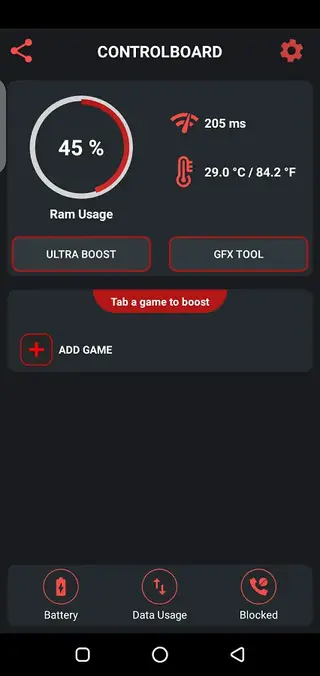
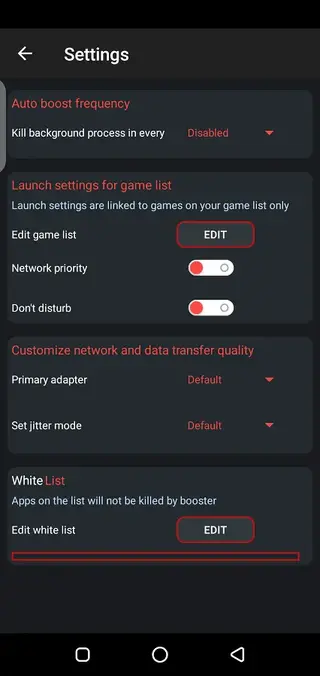
The app also adds practical extras for gamers, including a live ping meter, call blocking while you play, and at-a-glance data and battery usage information, so you can stay focused on the match instead of dealing with interruptions.
How is Game Booster VIP GFX Lag Fix useful?
Game Booster VIP GFX Lag Fix is useful because it brings several performance and quality-of-life options into one simple dashboard. Instead of juggling system settings, in-game menus, and manual task killing, you can rely on one-touch tools to prepare your phone for gaming.
For low-end and mid-range devices, the ability to lower resolution, cap or raise FPS where supported, and simplify graphics can make previously choppy games noticeably more playable. Clearing cache directories and freeing memory before each session can also help reduce random slowdowns.
On top of raw performance, features such as call blocking, live ping monitoring, and battery and data usage indicators help you manage distractions and resources while gaming. The app aims to make each session smoother and more consistent, without requiring deep technical knowledge from the user.
How to download and install Game Booster VIP GFX Lag Fix
You can download the official Game Booster VIP GFX Lag Fix APK file directly from our website. Follow these steps to get it installed on your Android device:
Scroll to the download area on this page and tap the APK download button.
Wait for the APK file to finish downloading to your device.
On Android, open Settings and enable installation from unknown sources if it is not already allowed.
Open your file manager and tap the downloaded APK file.
Confirm the installation prompts and wait until the process completes.
Launch Game Booster VIP GFX Lag Fix, add your favorite games, and configure your preferred optimization settings.
After the first setup, you can simply open the app and start your games from within the booster to apply your saved configurations.
Features
Custom GFX control
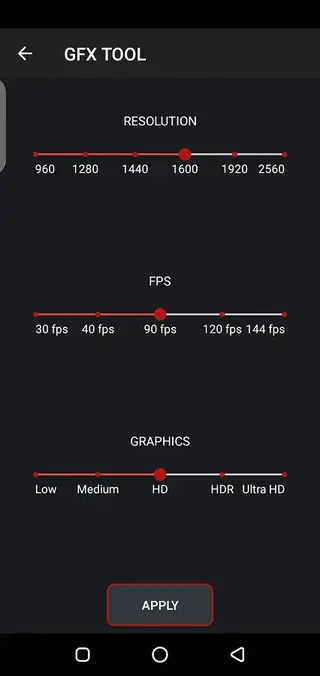
Adjust resolution, FPS, and graphics presets for supported games to find the right balance between quality and performance.
Ultra booster mode
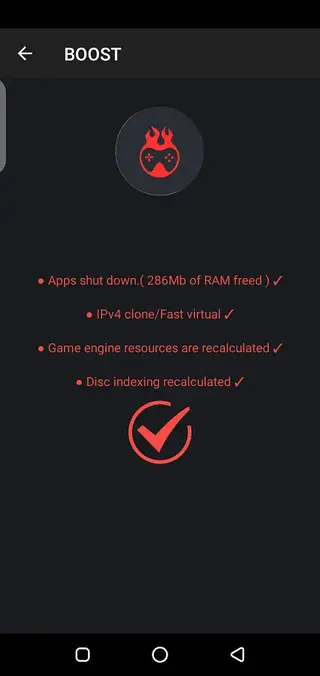
Close unnecessary background apps and services in one tap to free RAM and CPU resources before starting a game.
Live ping meter
View real-time network latency so you can quickly see if internet conditions might affect online matches.
Call blocking while gaming
Temporarily block incoming calls to avoid interruptions during intense online battles or ranked matches.
System and battery info
Check data consumption, battery status, and related system information while playing to manage longer sessions.
Game library support
Add any installed Android game into the booster interface and launch it with your preferred optimization profile.
HDR and graphics tweaking
Enable or control HDR-style graphics options where supported and fine-tune visual details for smoother gameplay.
Config file creation
Create and apply configuration files that store your chosen graphics and performance settings for quick reuse.
Screenshots
Best practices for using GFX settings safely
While Game Booster VIP GFX Lag Fix gives you advanced controls, using them carefully is important. Start with moderate changes rather than extreme values, especially for resolution and FPS. Test your game for a few minutes after each adjustment and watch for overheating, frame drops, or crashes.
If a game behaves unpredictably after a change, revert to default or lower-impact settings. Avoid setting FPS or graphics options that are not supported by your device or the game itself, as this can sometimes lead to instability.
Supported game types and typical use cases
The app is built with popular competitive and graphics-intensive titles in mind, including battle royale shooters, MOBAs, and open-world action games. Players often use it to reduce input lag, smooth out frame pacing, and keep network conditions visible with the ping meter.
Casual players can also benefit by using the booster only mode, which clears memory before opening lighter games and reduces the chance of background apps interrupting gameplay.
Tips to improve gaming performance further
For the best results with Game Booster VIP GFX Lag Fix, combine its tools with simple device habits. Keep your device charged, avoid playing while the phone is very hot, and close unused apps manually if needed. Turning off non-essential sync services and lowering screen brightness can also help with temperature and battery life.
Updating your games and system software regularly can improve compatibility with optimization tools. If a particular game starts misbehaving after an update, revisit your GFX settings and choose more conservative values.
FAQs
Pros
- Offers detailed control over resolution, FPS, and graphics for many games
- Includes one-tap booster to clear RAM and close background apps
- Provides extras like live ping meter and call blocking for focused gaming
- Simple, user-friendly interface suitable for beginners
- Can help older and mid-range devices run heavy games more smoothly
Cons
- Effectiveness depends heavily on device hardware and specific game updates
- Improper settings may cause instability, crashes, or visual glitches in some titles
- Not available through the Google Play Store, so updates must be installed manually
- Interface and options may feel overwhelming to users who do not understand GFX settings
Conclusion
Game Booster VIP GFX Lag Fix is a practical Android tool for players who want more control over game performance and graphics, especially on older or mid-range devices. By downloading the APK from our website, you can quickly set up tailored optimization profiles, clear background processes, and reduce common sources of lag, all from a straightforward dashboard.




Comments
No approved comments yet.