

SUPER SENSI
SUPER SENSI is an Android sensitivity tool designed for popular shooter and MOBA titles like Garena Free Fire, PUBG Mobile, and Call of Duty Mobile. It helps players fine-tune controls, response speed, and device performance for smoother matches.
With customizable sensitivity sliders, DPI tweaks, and optimization options for RAM, cache, and battery, the app focuses on giving mobile gamers more control over how their game feels. You can adjust values to match your playstyle instead of relying only on in-game presets.
You can download the original SUPER SENSI APK directly from our website and install it on your Android phone or tablet to start testing new settings and improving your overall aim response.
Rate this app
App details
- App name
- SUPER SENSI
- Category
- Tools
- Version
- v1.0
- Size
- 4.72 MB
- Requirements
- 4.2 and Above
- Package name
- com.devl.supersensi
- Publisher
- Golden Days Digital Advertising
- Price
- Free
- Mod
- No
- Downloads
- 45,216
- Rating
- 4.4 / 5
- Rating count
- 17,521
- Play Store
- No
- Requires root
- No
- Offline support
- Yes
- Contains ads
- Yes
- In-app purchases
- No
- Updated
- May 7, 2026
- Age rating
- Rated for 7+
Table of contents
What is SUPER SENSI App
SUPER SENSI is a free Android utility app created for mobile action and MOBA gamers who want more control over their in-game sensitivity and device performance. Instead of using only the default game settings, this tool lets you experiment with advanced options that can make aiming, camera movement, and overall control feel more responsive.
The app focuses mainly on popular competitive titles such as Garena Free Fire, PUBG Mobile, and Call of Duty Mobile. Within a simple interface, you can apply presets or manually adjust sensitivity-related values to match your playstyle, whether you prefer fast flicks, steady tracking, or more precise long-range aim.
SUPER SENSI also adds utility functions like RAM and cache clearing, a booster mode, and screen resolution tweaks (DPI changes). These options aim to reduce lag, free resources, and help your device handle demanding matches more consistently.
Key tools provided in the app include:
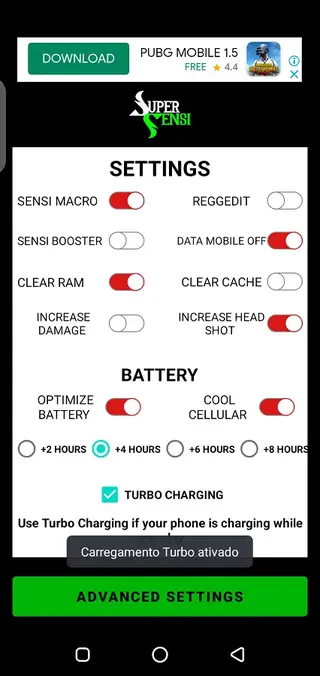
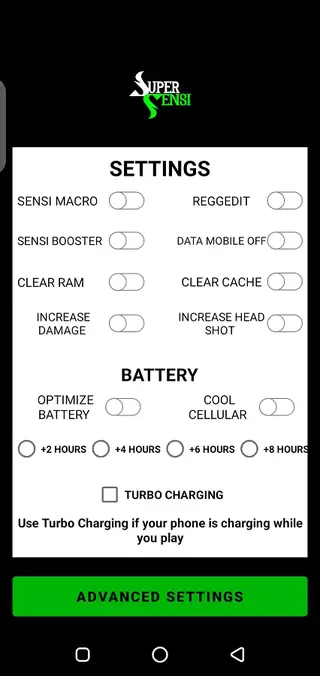
SENSI-MACRO and SENSI-BOOSTER style options for more responsive control feel
REGEDIT-style tweaks to adjust game-related parameters
CLEAR RAM and CLEAR CACHE shortcuts to free system resources
Options labeled to INCREASE DAMAGE and INCREASE HEADSHOT behavior within supported games
Battery-oriented helpers such as a TURBO charging mode for gaming while plugged in
All of these options are presented in a straightforward dashboard, so even casual players can try changes without complex configuration steps.
Why download SUPER SENSI for Android
Players download SUPER SENSI because it offers a quick way to experiment with sensitivity and performance tweaks without digging through multiple game menus every time. If you feel that your aim is either too slow or too fast, or your device stutters during intense fights, this tool gives you extra levers to adjust.
Instead of using a different helper application for each game, SUPER SENSI focuses on several well-known titles in one place. That makes it easier to switch between games and keep a consistent control feel across them.
Many users also like the one-tap optimization functions that clear RAM or cache before launching a match. These simple actions can sometimes help reduce background load and let the game use more available memory.
You can download the SUPER SENSI APK directly from our website, install it on your Android device, and start trying different combinations of sensitivity, DPI, and booster settings until you find a configuration that feels right.
If you are not satisfied with the available features, then we have more similar apps for you. So, you guys can try Sensi E.B.G.R and FFSensity, both of which are quite popular Sensitivity tools, which offer similar services for the users.
How SUPER SENSI can be useful
SUPER SENSI can be useful for mobile gamers who struggle with inconsistent aim, uncomfortable sensitivity curves, or performance dips during gameplay. By centralizing control tweaks and optimization shortcuts, it helps you tune your device environment before entering ranked or competitive matches.
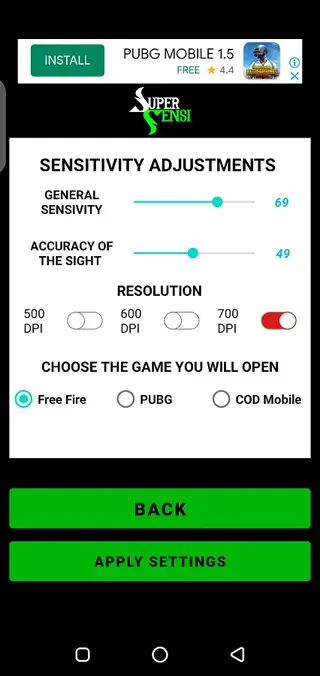
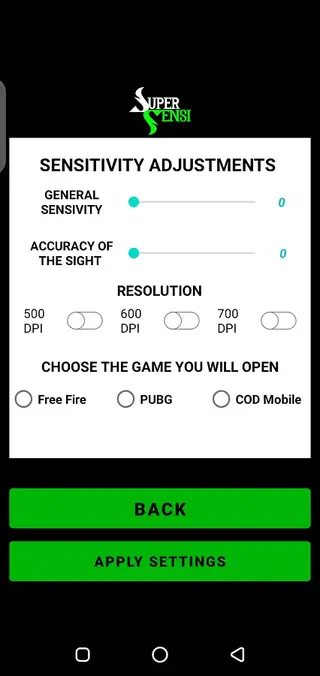
The sensitivity meters make it easier to understand how small changes affect your crosshair movement and camera control. You can raise or lower values and immediately test how they feel in supported titles, then return to the tool to refine your setup.
The app also includes:
General sensitivity controls for overall look and camera speed
Accuracy of sight options for scoped or aimed-down-sight movement
DPI and resolution adjustments that can influence how precise your touch input feels
Device cleaning tools that may help reduce lag by freeing memory and cached data
Because all options are grouped into a simple layout, you do not need advanced technical knowledge to try them. You can start with modest changes, test them in-game, and only keep what genuinely improves your comfort and consistency.
How to download and install SUPER SENSI APK
You can get the official SUPER SENSI APK file directly from our website. Follow these steps to download and install it on your Android phone or tablet:
Scroll to the download section on this page and tap the SUPER SENSI APK download button.
Wait for your browser to finish downloading the APK file to your device.
Open your phone settings and enable installation from unknown sources for your browser or file manager, if it is not already allowed.
Locate the downloaded APK in your Downloads folder using a file manager app.
Tap the APK file, review the installation prompt, and press Install.
After the installation completes, launch SUPER SENSI from your app drawer and start configuring your preferred sensitivity and booster settings.
When a new version becomes available on our website, you can download the updated APK the same way and install it over the existing version.
Features
Multi-game sensitivity support
Provides sensitivity and optimization tools targeted at games like Garena Free Fire, PUBG Mobile, and Call of Duty Mobile.
Advanced sensitivity controls
Offers sliders and meters for general sensitivity and sight accuracy so players can fine-tune camera and aim speed.
Performance booster options
Includes SENSI-BOOSTER style options plus CLEAR RAM and CLEAR CACHE shortcuts to free device resources before playing.
DPI and resolution tweaks
Lets users modify DPI-related values and resolution behavior to change how precise touch input feels on screen.
Battery and turbo charge helper
Adds a TURBO charging mode concept so users can keep playing while charging with settings aimed at stable performance.
Simple user interface
Uses a clean, user-friendly layout that is easy to navigate even for beginners who are new to sensitivity tools.
Free to download and use
The app is offered as a free Android tool, and the APK file can be downloaded directly from our website.
Quick optimization workflow
Allows players to apply changes, clear memory, and then jump into matches within just a few taps.
Screenshots

Supported games and compatibility
SUPER SENSI focuses primarily on competitive mobile games where precise aiming and smooth camera control matter. The tool is commonly used alongside:
Garena Free Fire
PUBG Mobile
Call of Duty Mobile
The app targets Android devices running version 4.2 and above, which covers many older and newer phones. Performance and effectiveness can vary depending on your chipset, RAM capacity, screen resolution, and the specific game version you are using.
Because mobile titles receive frequent balance and engine updates, you may need to revisit your SUPER SENSI configuration from time to time to maintain a comfortable feel.
Tips for adjusting sensitivity safely
When you start using SUPER SENSI, it is better to make changes gradually instead of applying extreme values immediately. This approach helps you understand what each slider or option actually does in practice.
Begin with small adjustments to general sensitivity and sight accuracy.
Test these changes in a training room or casual match before playing ranked modes.
Take notes or screenshots of setups that feel good so you can restore them later.
Use RAM and cache cleaning tools before long gaming sessions to keep your device more responsive.
By refining your configuration step by step, you can build a personal profile that supports your playstyle rather than fighting against it.
FAQs
Pros
- Dedicated sensitivity tool for popular shooter and MOBA games
- Combines multiple tweaks such as sensitivity, DPI, RAM, and cache in one app
- Simple interface that is easy to understand for new users
- Free to download directly from our website
- Offers quick optimization steps before launching a match
Cons
- Not available on the official Google Play Store at the time of writing
- Actual results can vary depending on device model and game updates
- Contains advertising, which may interrupt the experience for some users
- Settings require testing and adjustment time to find the ideal configuration
Conclusion
SUPER SENSI is a focused Android tool for players who want more control over sensitivity and basic performance optimization in games like Free Fire, PUBG Mobile, and Call of Duty Mobile. If you are willing to test and refine your settings, you can download the APK from our website and use it to build a more comfortable and consistent control setup for your favorite titles.




Comments
No approved comments yet.