

X Icon Changer Pro
X Icon Changer Pro is a personalization tool that lets you replace default app icons and labels with custom designs, images, and icon packs on your Android home screen.
With a clean interface and ready-made icon collections, you can quickly restyle your launcher, hide sensitive apps behind decoy icons, or match your home screen to any theme.
So, how can you prevent it? The answer to this question is right on the page. You don’t need any kind of high-protection system or any kind of locker. You just need this application, through which you can make everyone fool using this app. Shimeji and Fake Game Collection also provide similar personalization services.
You can download the latest X Icon Changer Pro APK directly from our website and start customizing icons and app names in just a few simple steps.
Rate this app
App details
- App name
- X Icon Changer Pro
- Category
- Personalization
- Version
- v4.5.2
- Size
- 69.03 MB
- Requirements
- 5.0 and Up
- Package name
- io.hexman.xiconchanger
- Publisher
- Unknown
- Price
- Free
- Mod
- No
- Downloads
- 58,000
- Rating
- 4.7 / 5
- Rating count
- 25,000
- Play Store
- Yes
- Requires root
- No
- Offline support
- Yes
- Contains ads
- Yes
- In-app purchases
- Yes
- Updated
- May 9, 2026
- Age rating
- Rated for 12+
Table of contents
What is X Icon Changer Pro APK
X Icon Changer Pro is an Android personalization application that allows you to change the appearance of your app icons and the display names shown on the home screen. Instead of being limited to the icons that come with each app, you can apply custom designs from built-in icon packs or use your own photos.
The app scans your installed applications and shows them in a simple grid. You pick any app, choose a new icon style, optionally edit the label, and then add the customized shortcut to your home screen. Many users also use it as a light privacy layer by disguising private apps as harmless tools or games.
Along with static icons, X Icon Changer Pro supports various styles, categories, and downloadable packs from its internal store. It works with most popular Android launchers without requiring root access.
Why download X Icon Changer Pro for Android
Most launchers offer only basic icon options. X Icon Changer Pro focuses entirely on icon customization and makes the process more flexible and fun. You can mix different icon packs, use personal photos, or create decoy icons for extra privacy.
If you care about how your home screen looks, this tool gives you precise visual control without complex setup. You can experiment with different themes for work, gaming, or minimalist layouts and switch them whenever you like.
Another reason to download the APK from our website is convenience. You get the current Android package directly, install it on your device, and start changing icons within minutes, even if it is not available or visible in your local Play Store region.
How X Icon Changer Pro is useful
X Icon Changer Pro is useful in two main ways: visual customization and light privacy.
Visual customization: You can redesign your home screen with consistent icon sets, pastel themes, neon styles, or photo-based icons, helping your device feel personal and organized.
Light privacy and app disguise: By changing both the icon and the label, you can make a sensitive app look like a generic tool or game. This does not replace strong security, but it helps reduce casual snooping when you share your phone.
The app is also practical for users who like aesthetic setups for screenshots, social media themes, or productivity layouts, because it lets you fine-tune icons without changing your entire launcher.
How to download and install X Icon Changer Pro APK
You can get the X Icon Changer Pro APK directly from our website. Follow these steps to download and install it on your Android device:
Scroll to the download section on this page.
Tap the download button for the latest X Icon Changer Pro APK.
Wait until the APK file finishes downloading to your device.
Open your device settings and enable installation from unknown sources if needed.
Locate the downloaded APK in your downloads folder and tap to start installation.
Follow the on screen prompts to complete the setup and then open the app to begin customizing icons.
Once installed, you can return to this page anytime to download the updated APK when a newer version becomes available.
Features
Change icons of installed apps
Replace default icons of almost any installed application with custom designs or shortcuts on your home screen.
Rename app shortcuts
Edit the display name that appears under the icon to better organize, categorize, or disguise your apps.
Built in icon collections
Access a library of ready made icons across categories such as camera, social apps, tools, contacts, and games.
Use personal photos as icons
Turn any image from your gallery into an app shortcut icon by cropping and adjusting it inside the editor.
Icon categories and filters
Browse icons by category so you can quickly find designs that match cameras, browsers, games, or utility apps.
Downloadable icon packs
Explore the in app store to download additional icon packs and expand your customization options.
Launcher compatibility
Works with most mainstream Android launchers without requiring root access to the device.
Simple and guided workflow
The interface walks you through selecting an app, choosing an icon, renaming it, and placing the shortcut on the home screen.
Screenshots
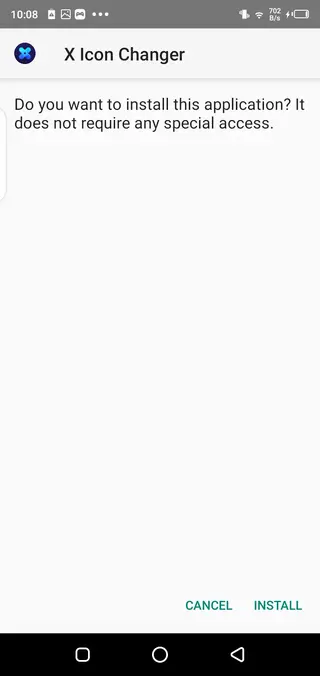
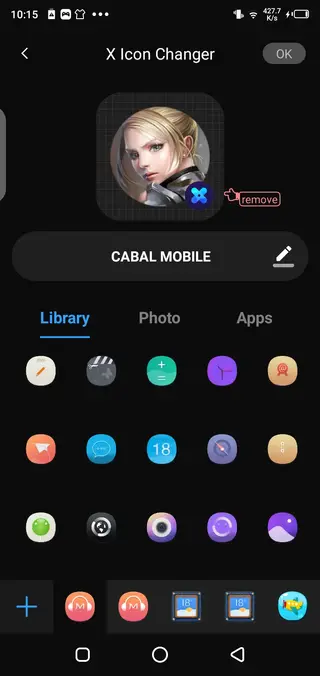
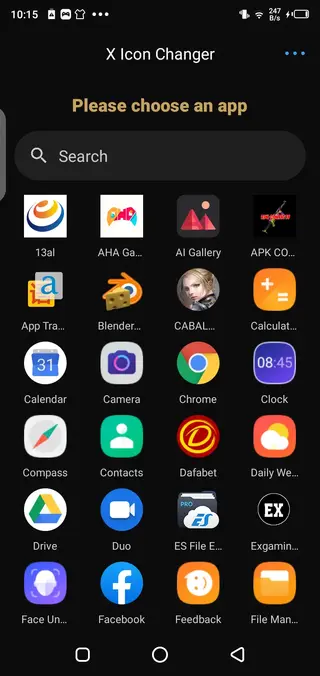
Getting started with your first custom icon
After installing X Icon Changer Pro, you can create your first custom icon in a few taps. Open the app and allow it to display your installed applications. Select the app you want to customize, browse the suggested icons, or open the gallery option to pick a photo. Adjust the crop, confirm your choice, and set a new label if you like. The app then adds a shortcut to your home screen using the new icon.
You can repeat this process for as many apps as you want. For a consistent look, try applying icons from the same pack or color palette across all your main apps.
Tips for better privacy with icon changes
While X Icon Changer Pro is not a security app, it can help you reduce casual attention on certain apps. For example, you can:
Rename a private messaging app to a neutral name like Notes or Tools.
Change the icon of a financial app to something generic that does not reveal its purpose.
Group disguised apps in a folder with a harmless label.
Remember that this approach only obscures apps visually. For real protection, you should still use screen lock, app lock, and security features provided by your device or trusted security software.
Customization ideas for themed home screens
If you enjoy aesthetic home screen setups, X Icon Changer Pro can help you match icons to wallpapers and widgets. You might create:
A minimalist monochrome theme using simple outline icons.
A pastel themed layout with soft colored icons and a light background.
A gaming focused screen where all icons resemble game badges or controllers.
By combining icon changes with a suitable wallpaper and widget style, you can build a cohesive look that makes your device feel more personal and easier to navigate.
FAQs
Pros
- Lets you fully customize app icons and labels on the home screen
- Includes built in icon packs and downloadable icon collections
- Allows using personal photos as icons for a unique look
- Does not require root access and works with many launchers
- Useful for light privacy by disguising sensitive apps
Cons
- Creating and applying many custom icons can be time consuming
- Some advanced icon packs or styles may require in app purchases
- Home screen shortcuts may need to be recreated after launcher changes or updates
Conclusion
X Icon Changer Pro gives Android users a straightforward way to redesign app icons and labels without changing their launcher or rooting the device. If you want more visual control over your home screen or a simple way to disguise certain apps, the APK available on our website offers an accessible and flexible solution.




Comments
No approved comments yet.