

CPU X
Get CPU X to understand everything about your Android device. The system monitoring app offers detailed information related to hardware and software available on the device. It brings important technical details into one place, making it easier to inspect a device without relying on multiple diagnostic tools.
Rate this app
App details
- App name
- CPU X
- Category
- Tools
- Version
- v4.1.6
- Size
- 27.45 MB
- Requirements
- 8.0 and Above
- Package name
- com.abs.cpu_z_advance
- Publisher
- Absut
- Price
- Free
- Mod
- No
- Downloads
- 71,951
- Rating
- 4.8 / 5
- Rating count
- 19,471
- Play Store
- Yes
- Requires root
- No
- Offline support
- Yes
- Contains ads
- No
- In-app purchases
- No
- Updated
- Aug 17, 2026
- Age rating
- Rated for 3+
Table of contents
What is CPU X APK?
CPU X App is an Android tool specially developed to get device information and diagnostic services. It analyzes available system and hardware data from the Smartphone or tablet, then organizes all the information to make it easier to understand. The app allows users to inspect their device without going through hard-level diagnoses.
The application isn’t limited to examining the device on which it is installed. It also provides a database for exploring the specifications of other Android smartphones and iPhones. This help users to research and compare devices based on specifications, prices, and other. Apart from this, learn about long-term users' complete reviews of different devices too.
The app offers high-end services for Android users to learn about their device. So, if you want to get more similar tools, then try Sam Helper or Technocare. Both of these tools offer advanced-level services to improve user-experience.
Why Download CPU X Android?
Download this amazing application to get a clear and realistic picture of what your device actually can do. It is particularly useful when checking a new or used phone, investigating hardware, and for all information. With the complete information, evaluating the device and learning about any problem will be fast and easy for any Android user.
How is CPU X App Useful?
There are multiple useful services of this application. The best feature is to verify that the hardware on the device is behaving as expected. Users can also get information related to overheating, unusual battery behavior, network performance, sensor operations, and other hardware specifications. Additionally, users don’t need any tech support for comparing any new phone or learning about the specs.
How to Download and Install CPU X Apk?
There are multiple applications available with a similar name. Therefore, users mostly have problems locating the actual application among all these services. So, we are here with the APK file that is tested on multiple devices. Get the latest updated APK file from this page.
Follow these steps to download and install the APK file:
Go to the download section available at the top of this page.
Tap on the Download APK button and wait for the process to complete.
Access the Android Settings and navigate to the Security panel.
Checkmark Install from Unknown Sources if it is unchecked.
Open the Android File Manager and access the Downloads Folder.
Find the downloaded APK file and tap on it.
Select the Install option and wait for the process to complete.
Open the App, start diagnose, and get all information.
Features
Device and CPU Information
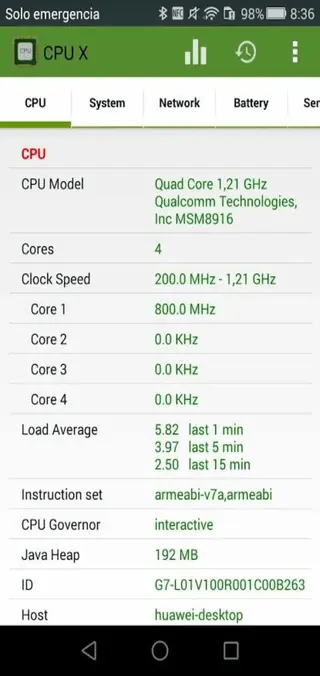
Get detailed information about the processor and other core hardware. Users can get details such as model, architecture, cores, clock speeds, manufacture, and supported hardware information.
Memory and Storage Details
The app offers complete details related to the device’s RAM and storage. These reading can help users understand the memory and storage remaining available.
Battery Monitoring
Find live battery information such as battery level, temperature, voltage, charge state, and charging/discharging. Current readings can vary between Android devices.
Sensors and Hardware Tests
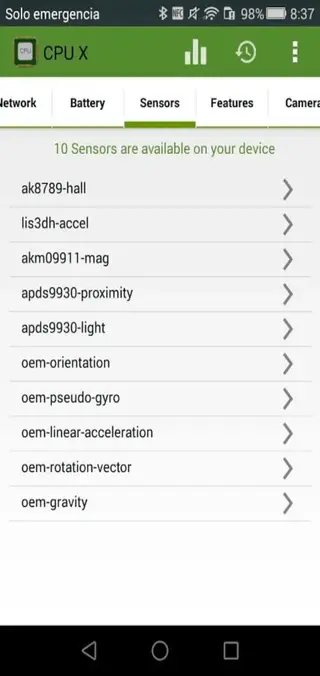
Users can inspect the sensor detection in the device. This is useful when checking whether components are being recognized or investigating a suspected hardware problem.
Camera Information
The app reveals technical information related to the cameras installed on an Android device. It offers detailed information related to the cameras available based on the hardware.
Network and Internet Monitoring
Get advanced-level tools to monitor internet performance. Users can check relevant connection details and observe network speed. This will help users to understand network problems easily.
Smartphone Specifications and Comparison
Compare any smartphone based on the performance and specifications here. The app allows a diverse collection of smartphones, including Android and IOS for comparison to check the specifications and prices.
Built-in Tools and Utilities
The app even offers multiple built-in tools for additional services. So, get compass, ruler, bubble level, and home-screen widget. These extra utility tools allow additional services apart from providing information.
Screenshots
How to Check Whether an Android Phone Has Fake Specifications?
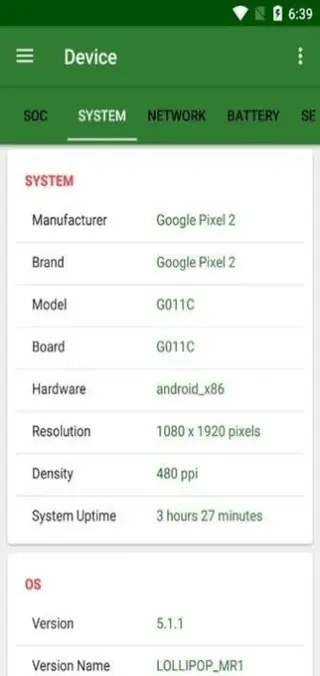
This application is ideal for checking Android specifications. Open the app and check hardware information. The app collects all the data from the device hardware. So, check details such as Processor, CPU architecture, core configuration, RAM, storage, Android version, screen information, and available sensors. Users will get complete information related to the available specifications based on the hardware.
How to Check a Phone’s Hardware before Buying it Used?
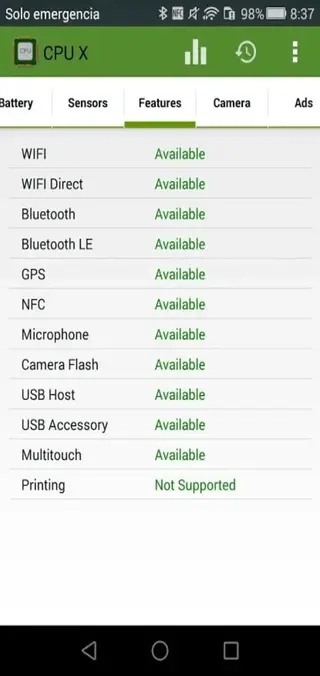
Before buying a used Android phone, install this application to check the hardware specifications. Inspect the Battery readings, cameras, sensors, storage, and network-related hardware information. Check for any differences compared to the official device. This will give you information related to any change component or damage part.
FAQs
Pros
- Provides detailed Android hardware information.
- Easy-to-read interface.
- Useful for checking used smartphones.
- Easy to find mismatched device specifications.
- Real-time system readings supported.
- Hardware testing options.
- Basic Android troubleshooting.
- Multiple Android testing options.
- Supports Android Phones and Tablets.
- Built-in Utility Tools.
Cons
- Battery current reading isn’t always accurate.
- Technical information may be confusing.
- Hardware can be different from the information.
- All errors cannot be diagnosed.
Conclusion
CPU X APK Download to understand all about your Android device in depth. It allows everyone to understand complete, detailed information related to Android easily. Troubleshooting, researching devices, checking devices, and more functions can be performed with this app. So, get the application and start exploring all available services.




Comments
No approved comments yet.