

Game Plugins
Game Plugins is an official Samsung tool that lets you add powerful plugins on supported Galaxy devices to analyze, tweak, and enhance mobile gaming performance.
With dedicated modules for frame rate, battery usage, temperature, and game-specific optimization, it helps you find a better balance between smooth graphics and stable performance.
You can download the original Game Plugins APK directly from our website and install it on compatible Samsung phones and tablets running Android 8.1 or higher.
As you know there are multiple Android devices available in the market. You can use different devices, which offer different services for the users. SUPER SENSI and Regedit Mobile are commonly used on Android devices to get a booster experience. However, the new tool is specially developed for Samsung devices.
Rate this app
App details
- App name
- Game Plugins
- Category
- Tools
- Version
- v5.1.07
- Size
- 7.43 MB
- Requirements
- 8.1 and Above
- Package name
- com.samsung.android.game.gamelab
- Publisher
- Samsung Electronics Co. Ltd.
- Price
- Free
- Mod
- No
- Downloads
- 915,423
- Rating
- 4.4 / 5
- Rating count
- 6,318
- Play Store
- No
- Requires root
- No
- Offline support
- Yes
- Contains ads
- No
- In-app purchases
- No
- Updated
- May 22, 2026
- Age rating
- Rated for 3+
Table of contents
What is Game Plugins?
Game Plugins is an Android optimization tool developed by Samsung Electronics for Galaxy smartphones and tablets. It works alongside Game Launcher and Game Booster to provide extra control and insight into how games run on your device.
Instead of being a single booster, it acts as a hub where you can install and manage different plugins. These plugins measure frame rate, power consumption, and temperature, and allow you to change how your device allocates performance to games.
The app is designed for Samsung devices only. On supported models, it integrates with system-level game services, so you can apply settings per title and track the real impact of your changes while you play.
Why download Game Plugins APK from our website?
Installing Game Plugins from our website gives you quick access to the official APK file without any extra steps. You can keep a backup of the installer, share it across your own Samsung devices, and update manually whenever you need.
Because Game Plugins is focused on Galaxy phones and tablets, many users prefer sideloading the APK to ensure they are running a version that matches their firmware and region. Downloading the file directly from our website lets you install it even if it is not listed in your local store or preinstalled on your device.
Once installed, you can explore the available plugins, monitor performance, and fine-tune your favorite games without relying on third-party tweak tools.
How Game Plugins is useful for mobile gamers?
Game Plugins is especially useful for players who want more control over how games behave on Samsung devices. Instead of guessing which graphics or performance settings work best, you can rely on real data from plugins like frame rate monitoring and power usage analysis.
By adjusting game optimization profiles, you can choose smoother gameplay, longer battery life, or a balanced mode depending on the title. This is helpful for competitive shooters, racing games, and heavy 3D titles where stable frame rates matter.
Because the tool is made by Samsung, it works closely with Game Booster and system-level game services, so changes are applied in a consistent way across supported games.
How to download and install Game Plugins APK?
You can get the official Game Plugins APK directly from our website and install it on a compatible Samsung device. Follow these steps to complete the process safely.
Step 1: Download the APK from our website
Scroll to the download section on this page.
Tap the Game Plugins APK download button.
Wait for the file to finish downloading on your Android device.
Step 2: Allow APK installation
Open your phone settings.
Go to the security or apps section and enable installation from unknown apps for your browser or file manager.
Step 3: Install Game Plugins
Open your file manager and locate the downloaded Game Plugins APK.
Tap the file and confirm the installation prompt.
Wait until the installation completes, then open Game Plugins from your app drawer.
After installation, connect it with Game Launcher or Game Booster if prompted, then start adding and configuring the plugins you need.
Features
Official Samsung optimization tool
Game Plugins is developed by Samsung Electronics and integrates with Galaxy game services such as Game Launcher and Game Booster.
Plugin-based architecture
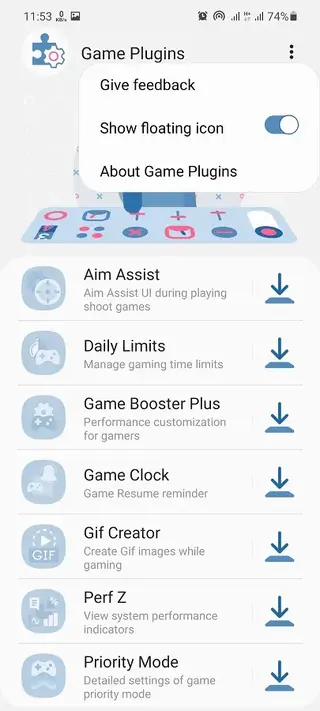
The app acts as a hub where you can install and manage separate plugins for performance tuning, analysis, and experimentation.
Performance monitoring
Track frame rate, performance stability, and device behavior while gaming to see how each title runs on your phone or tablet.
Battery and temperature insights
Review power consumption and temperature trends so you can decide when to prioritize efficiency over maximum performance.
Game optimization control
Adjust how aggressively the system optimizes games to balance visual quality, responsiveness, and power usage.
Per-game configuration
Apply different profiles for individual games so each title can have its own mix of performance and battery preferences.
Simple user interface
The layout is clean and easy to navigate, making it accessible even for users who are new to performance tuning.
No ads
The app does not display advertising, so you can tweak and monitor games without distractions.
Screenshots


Device compatibility and requirements
Game Plugins targets Samsung Galaxy smartphones and tablets running Android 8.1 or higher. Support can vary depending on your model and software version, because the app depends on Samsung game services such as Game Launcher, Game Booster, and Game Optimizing Service.
For the best experience, make sure your device firmware and system apps are up to date. If your phone already has Game Launcher enabled, Game Plugins can usually connect to it automatically after installation.
Using Game Plugins with Game Launcher and Game Booster
Once Game Plugins is installed, open it and review the available modules. On many devices it works alongside Game Launcher and Game Booster:
Game Launcher groups your games in one place and provides basic performance options.
Game Booster optimizes resources while you play and offers tools such as blocking alerts.
Game Plugins adds extra, experimental features and deeper analytics through separate plugins.
By combining these tools, you can monitor how each game behaves and decide whether to prioritize high frame rates, longer battery life, or a balanced profile.
Tips to get better results with Game Plugins
To make the most of Game Plugins, start with small changes and monitor the results. Enable a performance or analytics plugin for one game, play for a few minutes, and check frame rate and temperature. If the device heats up too quickly, step down performance or choose a balanced mode.
For competitive online titles, focus on stable frame rates over maximum graphics. For casual games, you can prioritize battery savings. Testing different profiles and checking plugin data will help you find settings that match how you play.
FAQs
Pros
- Official Samsung app that integrates with Galaxy game services
- Provides data-driven insights into performance, battery, and temperature
- Lets you adjust game optimization profiles for different titles
- Supports per-game customization instead of one global setting
- Simple interface with no advertising and no root requirement
Cons
- Works only on supported Samsung Galaxy devices
- Features may depend on firmware version and device model
- Requires some trial and error to find ideal performance settings
Conclusion
Game Plugins is a practical companion for Samsung gamers who want deeper control over performance and battery behavior. If you use a compatible Galaxy device, downloading the APK from our website gives you an easy way to install or update the app and start fine-tuning how your favorite games run.




Comments
No approved comments yet.