

Regedit Mobile
Regedit Mobile is an Android sensitivity and optimization tool created for Garena Free Fire players who want smoother aim, faster response, and better overall gameplay on mobile devices.
The app lets you fine-tune sensitivity values, boost game performance, and clean background processes so Free Fire can run more smoothly, especially on mid-range or low-end phones.
There are different ways to improve gaming skills for Android devices. Getting a high-end device is one of the best ways, but it is not possible for everyone. Sensitivity tools such as Sensi E.B.G.R and FFSensity are quite popular. However, the new tool is specially developed for the FF game. Get all information related to the tool here.
You can download the latest Regedit Mobile APK directly from our website and start adjusting your Free Fire controls and device settings in just a few taps.
Rate this app
App details
- App name
- Regedit Mobile
- Category
- Tools
- Version
- v13.0
- Size
- 36.17 MB
- Requirements
- 5.0 and Up
- Package name
- com.my.reggeditmobileff
- Publisher
- J&J Developer
- Price
- Free
- Mod
- No
- Downloads
- 64,017
- Rating
- 4.0 / 5
- Rating count
- 23,000
- Play Store
- Yes
- Requires root
- No
- Offline support
- Yes
- Contains ads
- No
- In-app purchases
- No
- Updated
- May 13, 2026
- Age rating
- Rated for 3+
Table of contents
What is Regedit Mobile?
Regedit Mobile is an Android utility app designed mainly for Garena Free Fire players who want more control over sensitivity and performance than the in-game options allow. It gives you a dedicated panel where you can tweak aim and camera sensitivity, choose presets for different devices, and apply game booster options before launching Free Fire.
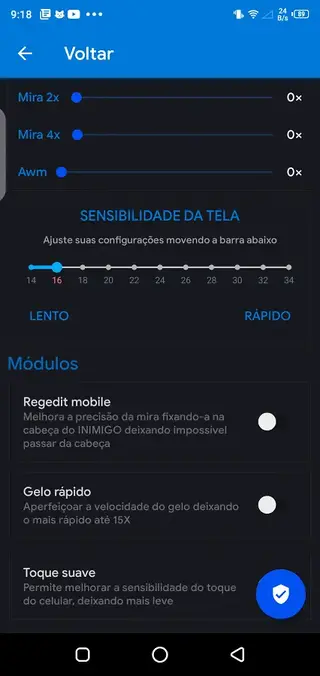
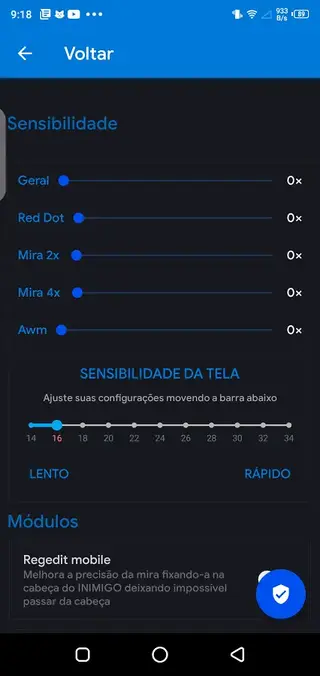
Instead of relying only on Free Fire’s default settings, Regedit Mobile lets you raise or lower sensitivity values in a more granular way. You can adjust general sensitivity, scope sensitivity, and weapon handling so your crosshair movement feels faster or more stable according to your play style.
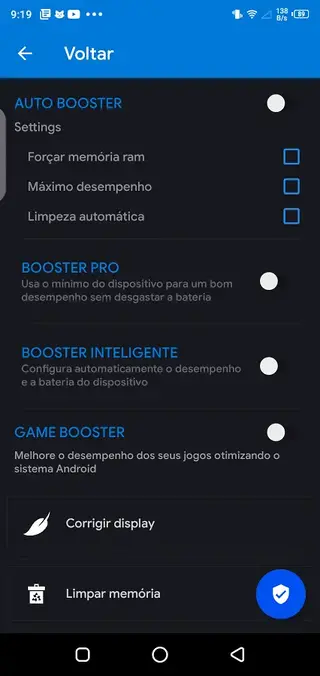
The tool also includes a basic game booster. It helps close unnecessary background apps, clear temporary cache, and focus system resources on your game session. This can reduce lag and micro-stutters on devices that struggle to keep Free Fire running smoothly.
The interface is simple and built around quick toggles and sliders. Although the app language is Portuguese, most options follow a clear structure, so regular Free Fire players can understand and apply settings with a little trial and error.
Why download Regedit Mobile APK from our website
Downloading Regedit Mobile APK from our website gives you direct access to the latest available version with the sensitivity and booster options described here. You do not need to search multiple sources or guess which build matches your device.
Once installed, you can instantly apply ready-made sensitivity configurations for Free Fire or customize values manually. This is especially helpful if you play on a low-end or older Android phone and notice input delay, jittery crosshair movement, or frame drops during intense fights.
Our download section provides the current APK file information so you can install it on compatible Android versions and start tuning your gameplay without extra steps.
How Regedit Mobile can be useful for Free Fire players
For many Free Fire players, the in-game sensitivity sliders do not always feel precise enough. Regedit Mobile adds another layer of control, which can help you find a more comfortable balance between fast flicks and accurate tracking.
By combining sensitivity tuning with a game booster, the app aims to make your device feel more responsive. Clearing background apps and cache before launching Free Fire can reduce random slowdowns, while custom sensitivity can make close-range fights and long-range sprays feel more consistent.
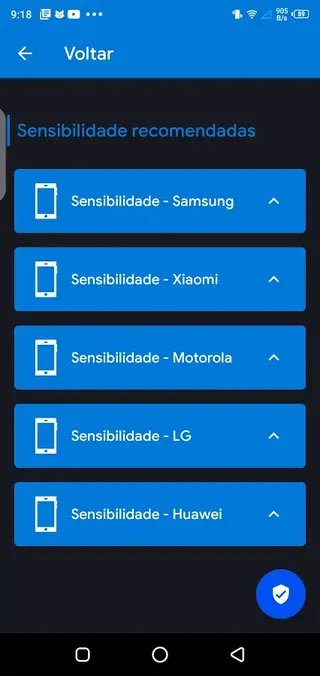
Because the app offers device-based presets, you can quickly test different configurations and keep the one that feels best without manually changing every value each time. This is useful if you share a device with other players or like to switch between different play styles.
How to download and install Regedit Mobile APK
You can download the official Regedit Mobile APK file directly from our website. Follow these steps to get it on your Android device:
Scroll to the download section on this page.
Tap the APK download button to start transferring the file to your phone.
Wait until the download finishes in your browser or notification panel.
Open your device settings and enable installation from unknown sources if it is not already allowed.
Locate the downloaded APK file in your Downloads folder and tap it.
Confirm the installation prompts and wait until the app is installed.
Launch Regedit Mobile, adjust your sensitivity and booster settings, then open Free Fire and test the changes.
Whenever a newer version becomes available, you can return to this page and download the updated APK from our website using the same steps.
Features
Advanced Free Fire sensitivity control
Adjust different sensitivity values beyond the default in-game sliders, including overall aim and scoped sensitivity.
Game booster mode
Close background apps and clean temporary data before gaming to help reduce lag and improve stability.
Device-based presets
Pick sensitivity profiles tailored to popular Android devices to get a quick starting point for tuning.
Auto booster option
Enable an automatic booster that runs optimization steps without manual configuration each time.
Simple user interface
Use a clean, straightforward layout with clear buttons and sliders focused on sensitivity and boosting.
Portuguese language support
The app interface is in Portuguese, which fits many Free Fire players from Brazil and other regions.
Free to use
Access sensitivity tools and booster features without subscription fees or in-app purchases.
No ads reported in app
According to the original description, the app does not display ads during use.
Screenshots
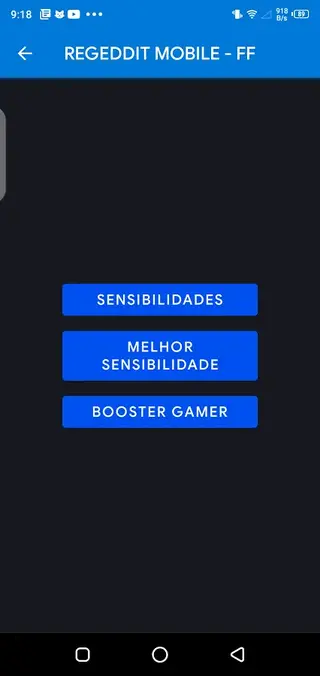
Sensitivity options available in Regedit Mobile
Regedit Mobile offers several sensitivity controls that let you tune how your camera and crosshair respond to touch. While exact labels can vary with versions, the app commonly includes:
General camera sensitivity for overall look around speed.
Red dot and scope sensitivity for mid-range fights.
High zoom scope sensitivity for sniping and long-range tracking.
Specialized tweaks aimed at helping with recoil control and drag shots.
The best approach is to change one or two sliders at a time, test them in Free Fire training or casual matches, and note which combinations feel more accurate and consistent.
Using the game booster before launching Free Fire
The game booster part of Regedit Mobile is meant to prepare your device for a match by freeing up memory and closing non-essential tasks. While it does not change your hardware, it can help Free Fire run with fewer interruptions.
For better results:
Run the booster shortly before starting Free Fire.
Avoid opening many other apps once boosting is done.
Combine booster use with basic device hygiene, such as keeping enough free storage space.
This routine can make gameplay feel more stable, especially on devices with limited RAM.
Tips for getting the best results with Regedit Mobile
To get meaningful benefits from Regedit Mobile, treat it as part of an overall optimization routine rather than a one-tap miracle tool. Consider the following tips:
Start with recommended or default profiles, then fine-tune slowly.
Test sensitivity changes in training mode before ranked matches.
Adjust separately for close-range and long-range play styles.
Keep your Android system updated and avoid running heavy apps in the background.
By combining these good practices with Regedit Mobile’s settings, you can build a more stable and comfortable setup for regular Free Fire sessions.
FAQs
Pros
- Gives more detailed sensitivity control for Garena Free Fire than default settings
- Includes a built-in game booster to close background apps and reduce lag
- Offers device-based presets to quickly test suitable sensitivity values
- Interface is simple and focused, so settings are fast to apply
- Free to download and use with no in-app purchases mentioned
- Original description states that the app does not show ads
Cons
- Interface is only available in Portuguese, which may be hard for some users
- Designed around Free Fire so it is not broadly useful for other games
- Effectiveness can vary depending on device hardware and system state
- Requires manual tweaking and testing to find the best sensitivity setup
Conclusion
Regedit Mobile is a focused helper app for Garena Free Fire players who want tighter sensitivity control and a basic game booster in one place. If you are trying to smooth out aim and reduce small performance issues on your Android phone, you can download the latest Regedit Mobile APK directly from our website and experiment with different presets until you find settings that fit your play style.




Comments
No approved comments yet.