
Hypic
Hypic is an AI-powered photo editor for Android that focuses on portraits, social media posts, and product visuals. It combines retouching tools, filters, and templates in one simple app.
With Hypic APK you can quickly remove blemishes, smooth skin, change backgrounds, and apply creative layouts without advanced design skills. Most edits take just a few taps.
You can download the official Hypic APK latest version directly from our website and start editing photos on your phone or tablet right away.
Rate this app
App details
- App name
- Hypic
- Category
- Photography
- Version
- v8.6.0
- Size
- 329.62 MB
- Requirements
- 4.3 and Above
- Package name
- com.xt.retouchoversea
- Publisher
- Bytedance Pte. Ltd
- Price
- Free
- Mod
- No
- Downloads
- 63,922
- Rating
- 4.7 / 5
- Rating count
- 20,947
- Play Store
- Yes
- Requires root
- No
- Offline support
- Yes
- Contains ads
- Yes
- In-app purchases
- Yes
- Updated
- May 29, 2026
- Age rating
- Rated for 3+
Table of contents
What is Hypic APK
Hypic APK is a photography and design app for Android that offers advanced portrait editing, collage creation, and ready-made templates for social media and business content. It focuses on AI-assisted tools that handle complex adjustments automatically, so you can improve photos even if you are not a professional editor.
The app provides dedicated face retouching options, background editing, filters, and product display layouts. You can import photos from your gallery, apply one-tap AI enhancements, and export high-quality images for Instagram, TikTok, stories, ads, and profile pictures.
Hypic App is the first available Android Picture editor tool with exclusive AI services. This App allows users to get the most high-end editing services. Therefore, making multiple changes in the image content is possible. Additionally, this Apk provides built-in template services and much more. So, no need to waste time on creating a special template with this App. Get more templates with StoryChic & Soloop.
On our website you can download the official Hypic APK file for the latest available version and install it manually on compatible Android devices.
Why download Hypic for Android
Hypic is useful if you want polished photos without learning complex desktop software. Its AI tools automatically detect faces, skin, edges, and objects, which makes retouching and background cleanup much faster than doing everything by hand.
The app also includes a large library of templates for posters, promotions, festive designs, and aesthetic collages. This helps creators, influencers, and small businesses produce consistent, professional-looking visuals in minutes.
By downloading Hypic APK directly from our website, you get quick access to the current Android build and can reinstall it whenever you need without going through any additional store pages.
How Hypic can be useful for you
Hypic is especially helpful for:
Portraits and selfies: Smooth skin, adjust facial features, correct tone, and apply makeup-style effects with AI-powered tools.
Social media posts: Use pre-designed layouts, filters, and text styles to create posts and stories that fit modern visual trends.
Online shops and small brands: Design product display cards, sale banners, and promotional creatives using category-based templates.
Batch and collage work: Combine multiple images, align them in grids, and apply consistent filters to maintain a unified look across your feed.
Because the core editor works on-device, you can continue editing most images even when your internet connection is weak or unavailable, then share your designs once you are online again.
How to download and install Hypic APK
You can get the Hypic APK file directly from our website without going through extra steps. Follow these instructions on your Android phone or tablet:
Scroll to the download section on this page.
Tap the APK download button for the latest Hypic version.
Wait until the APK file finishes downloading to your device.
Open your file manager and tap the downloaded Hypic APK.
If prompted, allow installation from unknown sources in Android settings.
Confirm the installation and wait until it completes.
Launch Hypic from your app drawer and start editing your photos.
Whenever a newer build becomes available, you can return to our website and download the updated Hypic APK the same way.
Features
AI portrait retouching
Automatically enhance faces with tools for shape adjustment, smoothing, concealer, skin tone correction, and makeup effects.
Dedicated AI portrait filters
Apply portrait-focused looks such as Classic, Baby Face, Natural, Fancy, Salt and more with a single tap.
Rich photo filters collection
Choose from many color and style filters including Light Skin, Harajuku, Camellia, Flipped, La La Land, First Love and others.
Collage maker with custom layouts
Create collages from multiple photos using preset grids or fully customized layouts to control spacing and ratios.
Template-based design
Access templates for events, product display, business posts, food and beverage, beauty, image grids, and sales promotions.
AI filters and adjustments
Use AI-enhanced filters along with manual controls for brightness, contrast, saturation and other basic adjustments.
Background edit and text tools
Change or clean up backgrounds, add overlays, and place styled text to turn simple photos into complete designs.
Cleanup and cutout tools
Remove unwanted objects and cut out subjects to place them on new backgrounds or templates.
Screenshots

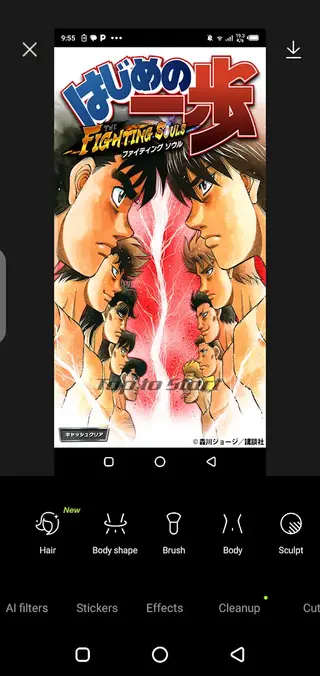
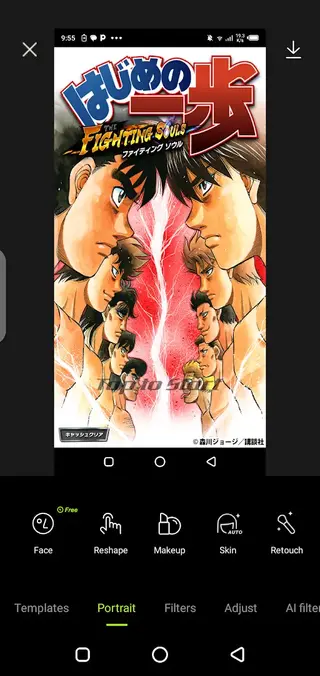
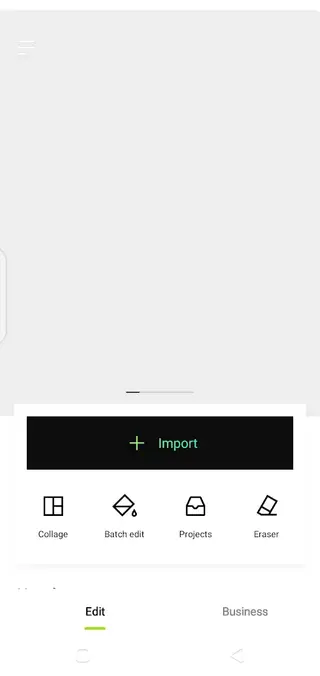

AI portraits and face enhancements
The portrait section of Hypic focuses on improving faces with minimal effort. The app automatically detects facial regions and lets you fine-tune them through intuitive sliders and presets.
You can refine face shape, soften skin texture, adjust jawline and nose, brighten under-eye areas, and apply virtual makeup. AI assistance helps keep edits within a natural range so your photos look improved but still realistic.
Photo filters and visual style control
Hypic includes a broad range of filters that change the mood and overall tone of your pictures. From soft beauty presets to colorful street styles, each filter can be adjusted in intensity to match the original photo.
The opacity control lets you dial in subtle changes instead of harsh, obvious effects. Combined with basic adjustments like exposure and contrast, you can create a consistent style across your photo gallery.
Collages and grid layouts
If you like sharing multiple moments at once, Hypic’s collage builder lets you place several photos into one frame. You can choose layout ratios, adjust borders, and rearrange images with drag-and-drop controls.
Custom layouts give you freedom to change grid size and spacing, which is especially useful when designing story covers, mood boards, or photo recaps for social platforms.
FAQs
Pros
- AI-powered tools make portrait and face editing fast and simple
- Large variety of templates for social media, business, and promotions
- Includes collage maker, filters, and background tools in one app
- Works on many older Android devices starting from version 4.3
- Can perform most basic edits without a constant internet connection
Cons
- Contains in-app ads that may interrupt editing sessions
- Some premium templates and effects require in-app purchases
- Large install size can consume significant device storage
- Advanced AI processing can be slow on low-end devices
Conclusion
Hypic APK brings AI portrait editing, creative filters, collages, and ready-made templates into a single Android app. If you want to improve selfies, design social media posts, or prepare quick product visuals on your phone, downloading the official Hypic APK from our website is a practical way to get a capable all-in-one photo editor.




Comments
No approved comments yet.