

Indycall
Indycall is a calling app that lets you place voice calls to Indian numbers over the internet without using regular mobile minutes. It works with most major Indian telecom operators and only needs a stable data or Wi-Fi connection.
With a familiar dialer interface, temporary Indycall numbers, and options to earn bonus minutes by viewing ads or completing offers, the app helps you reduce your calling costs inside India. You can download the official Indycall APK directly from our website and start calling in a few simple steps.
The app includes both free and premium options, so you can try the service at no cost and upgrade later if you need an ad-free experience or more minutes.
But the main problem is the charging rate. The charges are high, which is difficult for users to manage. So, we are here with this app just like Verified Calls App and NG WhatsApp shared before. It is going to provide the best communication features. Do you want to know all about it? If yes, then let’s explore it together.
Rate this app
App details
- App name
- Indycall
- Category
- Communication
- Version
- v1.17.4
- Size
- 81.76 MB
- Requirements
- 5.0 and Above
- Package name
- lv.indycall.client
- Publisher
- Indycall
- Price
- Free
- Mod
- No
- Downloads
- 71,847
- Rating
- 4.7 / 5
- Rating count
- 26,391
- Play Store
- Yes
- Requires root
- No
- Offline support
- No
- Contains ads
- Yes
- In-app purchases
- Yes
- Updated
- Jun 1, 2026
- Age rating
- Rated for 3+
Table of contents
What is Indycall APK
Indycall APK is the Android installation file of the Indycall voice calling app. It enables users to make internet-based calls to Indian phone numbers, including mobile and landline numbers, without using standard carrier call minutes.
The app relies on your data or Wi-Fi connection instead of traditional voice balance. Once you install the APK and register with your email and basic details, Indycall assigns you a temporary Indycall number and lets you start calling from its built-in dialer.
The interface is similar to a regular phone app, with three main areas: a dial pad for manual numbers, a contacts tab synced with your phonebook, and a call history section. This layout makes it easy for new users to adapt without learning a new workflow.
Indycall primarily focuses on calls to India and supports popular telecom networks such as Jio, Airtel and others. According to public information, the app may also support other destinations, but availability and tariffs can vary, so users should always check the latest details inside the app.
Why download Indycall for Android
People download Indycall to cut down their phone bills while still being able to call Indian numbers whenever they need. The app routes calls over the internet and gives you free or low-cost minutes instead of charging per traditional mobile minute.
Another reason to try Indycall is how easy it is to get started. You only need an Android phone, an internet connection and a quick in-app registration. The dialer looks like your default phone app, so there is almost no learning curve.
Indycall also includes a built-in system to earn extra minutes. By viewing ads, completing simple advertiser tasks or switching to premium options, you can extend your call time and reduce out-of-pocket costs even further.
How Indycall is useful
Indycall is useful for anyone who often calls Indian numbers and wants to rely more on data than on expensive voice plans. Students, remote workers, small business owners and families can all benefit from its flexible calling model.
The app keeps communication simple by offering one place for dialing, accessing saved contacts and reviewing your call history. Because it works over data, it can be especially handy when your voice balance is low but you still have access to Wi-Fi or mobile internet.
For budget-conscious users, the ability to earn Indyminutes by watching ads or completing offers can make a noticeable difference over time. You can keep in touch longer without constantly recharging your SIM for calls.
How to download and install Indycall APK
You can get the official Indycall APK file directly from our website and install it manually on your Android device. Follow these steps to complete the process smoothly.
Scroll to the download section on this page and tap the Indycall APK download button.
Confirm the download in your browser and wait for the APK file to finish downloading.
On your Android device, open Settings and enable app installs from unknown sources for your browser or file manager if needed.
Open your file manager, locate the downloaded Indycall APK file and tap it.
Review the permissions shown on screen, then tap Install to begin the installation.
Once installation completes, open Indycall from your app drawer, complete the registration steps and start making calls.
If you update to a newer version later, simply download the latest APK from our site and install it over the existing app.
Features
Internet based calling to Indian numbers
Place voice calls over data or Wi-Fi to Indian mobile and landline numbers instead of using regular carrier minutes.
Simple dialer style interface
Use a clean dial pad with tabs for dialer, contacts and call history, similar to your default phone app.
Temporary Indycall number
Get a temporary Indycall number assigned to your account for making outgoing calls from within the app.
Works with major Indian networks
Designed to work with popular Indian telecom operators such as Jio and Airtel while using your data connection.
Earn free minutes from ads
View advertisements or complete promotional tasks to earn additional Indyminutes for calls.
Call from phonebook contacts
Syncs with your device contacts so you can initiate calls directly from your existing phonebook entries.
Detailed call history
Track outgoing, incoming and missed calls in a dedicated history tab with timestamps and durations.
No special hardware or root
Runs on standard Android phones without the need for root access or custom modifications.
Screenshots
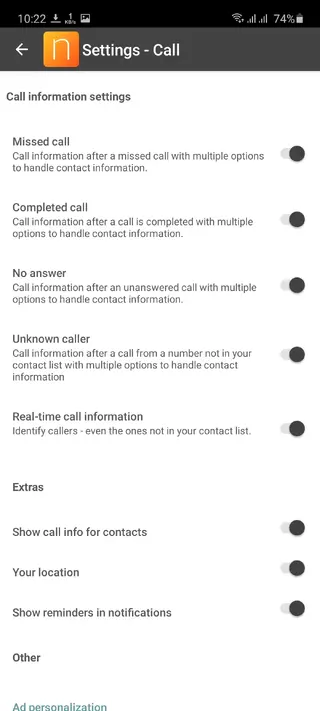
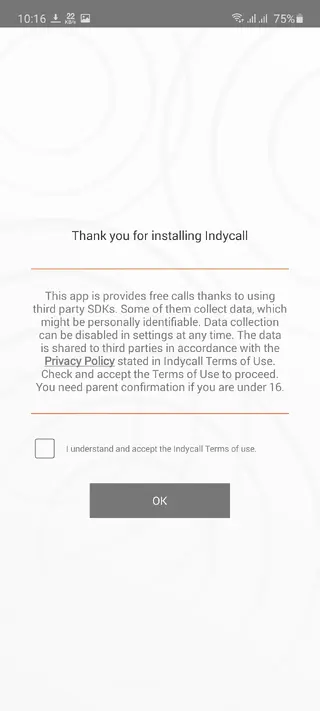
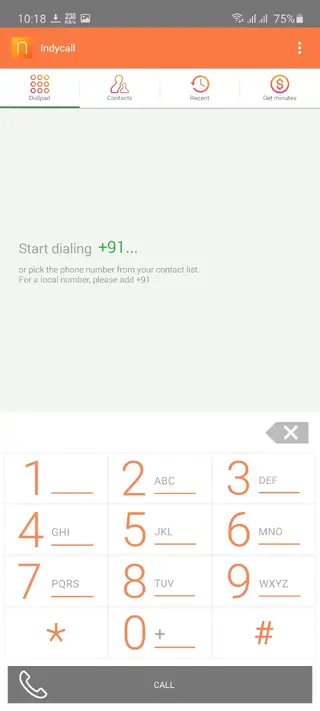
Account setup and registration
After installing Indycall APK, you complete a short registration to activate your account. Typically this involves verifying your details and linking an email address. Once registered, the app assigns a temporary Indycall number that appears as your caller ID when supported.
The registration flow is designed to be quick, so most users can start calling within a few minutes of installing the app.
Call quality and performance tips
Because Indycall uses data instead of standard voice channels, call clarity depends heavily on your network connection. For best results, use a stable Wi-Fi connection or strong 4G or 5G signal.
Avoid heavy downloads or streaming during calls to prevent audio drops.
Stay within good coverage areas to reduce latency and echo.
Keep the app updated to the latest version from our website for ongoing performance improvements.
FAQs
Pros
- Reduces reliance on standard voice minutes for calls to India
- Familiar dialer interface with contacts and call history tabs
- Ability to earn extra call minutes by watching ads or completing tasks
- No root access required and simple setup process
- Supports major Indian telecom operators while using data connection
Cons
- Requires a stable internet connection for good call quality
- Contains advertising in the free version
- Availability of free minutes and offers may change over time
- Call coverage and rates for destinations outside India can vary
Conclusion
Indycall offers a straightforward way to place internet calls to Indian numbers from your Android device while keeping costs under control. If you often call India and prefer using data instead of standard minutes, downloading the official Indycall APK from our website provides a simple and flexible option to stay connected.




Comments
No approved comments yet.