
Open Browser Android TV
Open Browser Android TV is a smart browsing app designed for big screens. It combines a TV-friendly interface with fast web access so you can explore sites, videos, news, and more directly on your Android TV or compatible device.
If you want to get more similar apps, then we got some best options for you all. You guys can try 9UHD Max and Syncler. Both of these are quite popular entertainment apps, which offer similar services for the users.
The app focuses on simple navigation with the remote, quick page loading, and easy access to entertainment content such as online videos, IPTV portals, and streaming sites. It aims to turn your TV into a more flexible media hub without complicated setup.
You can download the official Open Browser Android TV APK directly from our website and install it on supported Android phones, tablets, TV boxes, and Android TV devices.
Rate this app
App details
- App name
- Open Browser Android TV
- Category
- Entertainment
- Version
- v2.2.1.343
- Size
- 20.37 MB
- Requirements
- 7.0 and Up
- Package name
- com.seraphic.openinet.pre
- Publisher
- MetaX
- Price
- Free
- Mod
- No
- Downloads
- 100,008
- Rating
- 4.6 / 5
- Rating count
- 47,000
- Play Store
- Yes
- Requires root
- No
- Offline support
- No
- Contains ads
- Yes
- In-app purchases
- No
- Updated
- May 15, 2026
- Age rating
- Rated for 3+
Table of contents
What is Open Browser Android TV App
Open Browser Android TV is a web browser optimized for Android TV and large-screen Android devices. Developed by MetaX, it delivers a leanback-style interface that works smoothly with remote controls, gamepads, and air mice, so you can browse the internet on your TV without relying on a mouse and keyboard.
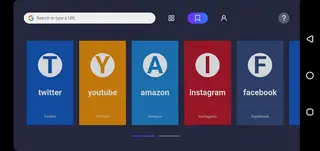
Unlike many mobile-first browsers, this app is built around TV use. Menus, tabs, and content tiles are large and easy to read from a distance. You can open your favorite entertainment sites, IPTV web players, social platforms, and search engines while staying in a TV-friendly layout.
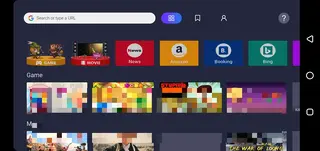
The browser also offers sections dedicated to entertainment, casual games, and news, making it simple to jump into content instead of typing long URLs every time. It keeps the experience light, responsive, and focused on what matters most on a TV screen.
Why Download Open Browser Android TV APK
Installing Open Browser Android TV APK gives you more control over how you browse and watch content on your TV. Instead of being limited to a few preinstalled apps, you can open websites, web players, and online tools directly in the browser.
The APK download from our website lets you install the latest available version even if it is not visible or up to date in your device’s app store. This is especially helpful for Android TV boxes and projectors that ship with a limited app catalog.
With a clean layout, remote-friendly navigation, and quick access to entertainment, games, and news, Open Browser Android TV can act as a central gateway for most of your online activity on a big screen.
How Open Browser Android TV Is Useful
Open Browser Android TV is useful for anyone who wants to turn a TV or TV box into a more open and flexible smart device. Instead of switching between multiple apps, you can handle web searches, video streaming, and news reading inside one interface.
The entertainment section helps you discover online video and IPTV web content more quickly, while the games section offers simple online games you can play without installing extra apps. The news area aggregates stories so you can stay informed from the couch.
Because it is optimized for remote navigation, you spend less time struggling with on-screen keyboards and more time watching or reading. For users with limited storage, the ability to stream games and media through the browser rather than installing many apps is also a practical advantage.
How to Download and Install Open Browser Android TV APK
You can download the official Open Browser Android TV APK directly from our website and then install it on your Android TV, TV box, phone, or tablet.
Follow these steps:
Scroll to the download section on this page and tap the download button for the latest version of Open Browser Android TV APK.
Wait for the APK file to finish downloading to your device.
On your Android device, open Settings and enable installation from unknown sources for your browser or file manager if needed.
Open your file manager, locate the downloaded APK, and tap it to start the installation.
Confirm the prompts on screen and wait for the installation to complete.
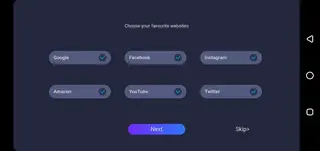
Launch Open Browser Android TV from your app drawer or TV home screen and configure your basic preferences.
Once installed, you can start browsing the web, watching online content, and exploring the built-in entertainment, games, and news sections directly from your TV.
Features
TV-optimized browsing interface
The interface is designed for Android TV and big screens, with large tiles and easy navigation using a remote control or gamepad.
Entertainment focused home screen
A dedicated entertainment area helps you reach video platforms, IPTV portals, and online streaming content quickly.
Built-in games section
Access casual online games directly in the browser so you can play without downloading and installing separate APKs.
News and information hub
A news section gathers recent stories so you can follow local and international updates from your TV.
Fast page loading
The browser is optimized for quick loading and smooth scrolling, which is important on low to mid-range TV boxes.
Simple navigation controls
Menus and buttons are mapped for D-pad remotes, making it easy to move, select, and go back without a mouse.
Support for multiple languages
The app supports different interface and content languages, making it accessible to a wider range of users.
Free to use
Open Browser Android TV is available as a free download and does not require a subscription to use its core features.
Screenshots
Compatibility and System Requirements
Open Browser Android TV targets Android 7.0 and above, which covers most modern Android TV models, TV boxes, and many phones or tablets. For the best experience, it is recommended to run the app on a device with stable Wi-Fi and enough processing power to stream HD video smoothly.
The app is optimized for landscape orientation and leanback-style launchers. It works particularly well on certified Android TV devices, HDMI sticks, and media boxes with standard D-pad remotes.
Tips for Better Big Screen Browsing
To get more from Open Browser Android TV, start by adding your favorite streaming sites and news portals to quick access or bookmarks. This reduces the need to type long URLs with the remote.
Using a wireless keyboard or air mouse can speed up text input, but the interface remains fully usable with a simple TV remote. Adjust display zoom and text size if your TV is far from the seating position so that menus and headlines stay easy to read.
FAQs
Pros
- TV-optimized interface that works well with remote controls
- Combines browsing, entertainment, games, and news in one app
- Free to download and use from our website
- Lightweight and suitable for many Android TV boxes and devices
- Helps reduce the need for multiple separate streaming and game apps
Cons
- Requires an active internet connection for most features
- May include in-app advertising while browsing
- Not as feature-rich as leading mobile browsers on phones
- Performance can depend on the power of your TV box or device
Conclusion
Open Browser Android TV is a practical choice if you want a simple, TV-friendly browser that focuses on entertainment and everyday web use. Download the APK from our website, install it on your Android TV or TV box, and you can quickly turn your big screen into a more capable online media center.




Comments
No approved comments yet.