

Platinum Songbook
Platinum Songbook is the official digital songbook and remote control app for supported Platinum Karaoke players. It lets you browse the full song catalog, view lyrics and codes, then send songs straight to your karaoke machine from your Android phone or tablet.
With fast search by title, artist, volume, or monthly updates, the app removes the need for printed songbooks and manual input. You can quickly queue songs, manage favorites, and explore categories for every mood and occasion.
You can download the original Platinum Songbook APK file directly from our website, install it on your Android device, and start controlling compatible Platinum Karaoke players in just a few steps.
Rate this app
App details
- App name
- Platinum Songbook
- Category
- Entertainment
- Version
- v3.1.25
- Size
- 8.28 MB
- Requirements
- 5.0 and Up
- Package name
- com.platinumkaraoke.digitalsongbook
- Publisher
- Vismay International Corp
- Price
- Free
- Mod
- No
- Downloads
- 51,000
- Rating
- 4.8 / 5
- Rating count
- 25,000
- Play Store
- No
- Requires root
- No
- Offline support
- No
- Contains ads
- No
- In-app purchases
- No
- Updated
- May 30, 2026
- Age rating
- Rated for 3+
Table of contents
What is Platinum Songbook APK
Platinum Songbook APK is an Android entertainment app developed by Vismay International Corp for users of Platinum Karaoke players. It works as a digital songbook and controller, allowing you to search the Platinum catalog, see song details, and select tracks for playback on your karaoke machine.
The app replaces thick printed songbooks with a convenient mobile interface. You can browse sections like NEW, Training, Regional, Gospel, Kids, and more, then send your chosen songs to compatible models such as Major HD series, Reyna, Hermosa, N20 Nano Plus, KS series, P-Series, and other supported players.
Platinum Songbook Android is the best available Android App providing the best digital Songbook services. This is a complete application that provides active services related to Songbook. Therefore, accessing this mobile application will be entertaining and productive for the users. Instrument apps such as Music Sampler and Keylimba are also popular. However, learn about the new app here.
Instead of typing song numbers manually on the device, you pick songs on your phone and let the app handle the rest. This makes karaoke sessions smoother for families, bars, and KTV setups that rely on Platinum hardware.
Why download Platinum Songbook for Android
Installing Platinum Songbook on your Android device makes managing karaoke sessions much easier than using printed lists or paper songbooks. You get an always up-to-date catalog, quick search tools, and direct control over the queue.
The app is especially useful if you regularly host karaoke nights at home or run a venue with Platinum Karaoke players. Everyone can browse on their own phone, choose songs by category or artist, and add them to the playlist without crowding around the machine.
Our website provides the Platinum Songbook APK file so you can download the app directly, keep a local installer, and update manually whenever you need.
How Platinum Songbook helps karaoke users
Platinum Songbook focuses on convenience and organization for karaoke fans. It centralizes the entire Platinum catalog in one place, so you do not have to flip through pages or remember long codes.
The powerful search lets you quickly locate songs by keyword, title, artist, or even monthly updates. Category filters help you discover tracks for children, training, regional songs, or gospel music, depending on your audience.
Because the app integrates with many Platinum Karaoke players, you can treat your phone as a wireless songbook and controller. That combination saves time, reduces paper clutter, and keeps karaoke sessions running smoothly.
How to download and install Platinum Songbook APK
You can get the official Platinum Songbook APK file directly from our website and install it on any compatible Android device.
Follow these steps to download and install:
Scroll to the download section on this page.
Tap the APK download button for Platinum Songbook.
Wait for the APK file to finish downloading on your device.
Open your device settings and enable app installs from unknown sources, if it is not already allowed.
Locate the downloaded APK file in your Downloads folder or file manager.
Tap the file and confirm Install when prompted.
After installation, open Platinum Songbook and select your Platinum Karaoke player model to start using the app.
Features
Digital songbook for Platinum Karaoke
Browse the official Platinum karaoke catalog on your Android device instead of using printed songbooks.
Support for multiple Platinum players
Connect and work with various Platinum Karaoke models including Major HD, Reyna, Hermosa, N20 Nano Plus, KS series, P-Series and more.
Organized song categories
Explore curated categories such as New, Training, Regional, Gospel, Kids and others for faster song discovery.
Advanced search options
Find songs by keyword, title, artist or monthly updates to quickly locate the track you want to sing.
Song queuing and selection
Select songs in the app and send them to the connected Platinum Karaoke player to build your playlist.
Favorites and quick access
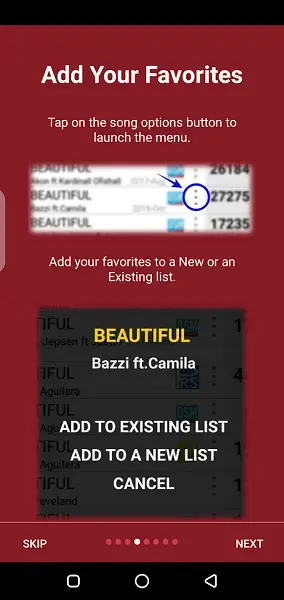
Save frequently used songs for faster access during parties or regular karaoke sessions.
Simple interface
Use an easy, clean interface designed for both casual and frequent karaoke users.
Fast connectivity to players
Connect to supported Platinum Karaoke units over the local network for quick control and song selection.
Screenshots
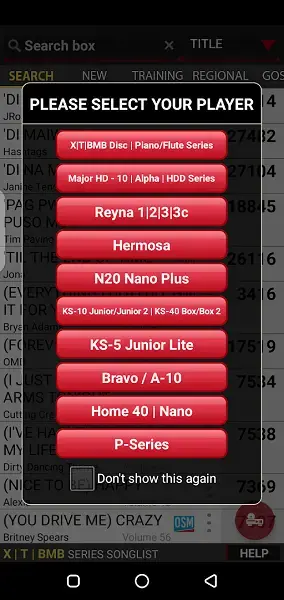
Supported Platinum Karaoke players
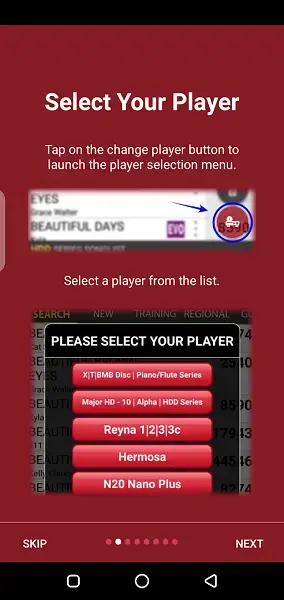
The app is designed to recognize and work with a wide range of Platinum Karaoke hardware. When you first launch Platinum Songbook, you select the player model you are using so the app can connect and adapt its controls.
Supported families and models include X, T, VMV Disc and Piano or Flute series, Major HD and Alpha HDD series, Reyna models, Hermosa, N20 Nano Plus, KS-10 Junior and KS-40 Box variants, KS-5 Junior Lite, Bravo or A-10, Home 40, Nano and P-Series units, among others. Once selected, the app remembers your choice so you do not have to pick it every time.
Song categories and browsing
Platinum Songbook organizes its catalog in multiple categories to make navigation simple. New releases, training tracks, regional songs, gospel selections, and kids songs each have their own sections, so you can quickly find music for specific audiences.
You can browse by category, tap into individual songs to see details, and then add them to the queue for your connected player. This structure is helpful for party hosts and venue staff who need to respond quickly to different song requests.
Search and discovery tools
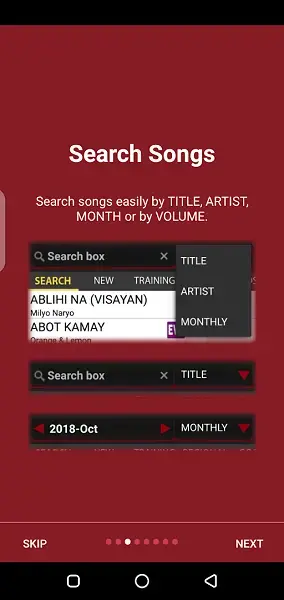
The app includes a powerful search feature tailored for large song libraries. Instead of scrolling through long lists, you can type a keyword, song title, artist name, or browse songs based on monthly updates.
This approach is particularly useful when guests know only part of a title or just the singer. The search system narrows results in real time, so you can select the right track and send it to your Platinum Karaoke player with minimal delay.
FAQs
Pros
- Official digital songbook for Platinum Karaoke hardware
- Supports many popular Platinum Karaoke player models
- Fast search by title, artist, keyword, and monthly updates
- Well organized song categories for easier browsing
- Removes the need for bulky printed songbooks
- Simple interface that most users can learn quickly
Cons
- Requires compatible Platinum Karaoke hardware to be useful
- Needs an internet or local network connection for full functionality
- Not all features work if your player model is unsupported
Conclusion
Platinum Songbook is a practical companion app for anyone using Platinum Karaoke players, turning your Android device into a digital songbook and controller. Download the APK from our website, connect it to your compatible player, and manage song selection more comfortably during any karaoke session.




Comments
No approved comments yet.